
What is a Crypto Wallet
To get started with crypto and web3, you need a "crypto wallet." So what is a crypto wallet, and how does it help you explore decentralized finance?
A crypto wallet (also called a "DeFi wallet") is a software application you can install on your browser or mobile device, or it can exist as a physical device. Keep in mind that a crypto wallet doesn't hold your cryptocurrencies itself. It's a gateway that lets you access your cryptocurrencies, which are stored on the blockchain.
Here's how it works: your wallet has a public key and a private key. A public key is like a bank account number, something you can share with anyone to receive crypto. A private key is like your ATM PIN or bank account password, something you need to keep safe and use to access your crypto. Protecting your private key helps prevent unauthorised access to your wallet; it does not protect against changes in the value of your crypto or other risks associated with holding cryptoassets.
A crypto wallet stores and helps you manage your private key. It also gives you an interface to send, receive and manage your digital assets.
Not all crypto wallets work the same way. Some store your private key for you, and others let you hold it yourself. So how do you pick the right one for you?
Prices, figures and examples on this page (including EAL ratings and any USD values) are for illustrative purposes only and may not reflect current live data.
Identity Verification Required
KYC checks are usually completed within minutes. UK customers must complete additional mandatory steps, including a 24-hour cooling-off period, before making their first transaction. The process is not immediate, and access depends on successful completion of each required step.
Choosing a Crypto Wallet
When you're starting out with cryptocurrencies, one of the first decisions you'll make is choosing a wallet. Different wallets offer different features for managing and accessing your digital assets.
You'll come across two main options: custodial wallets and non-custodial wallets. Let's look at both.
Custodial Wallets
A custodial crypto wallet is one where the provider stores your private key on their servers. That means the provider is responsible for storing your key, and you're relying on their systems and controls to protect the private key from unauthorised access.
There may be laws and regulations that place obligations on providers around how they handle client funds, but the provider still has the technical ability to access those assets. When choosing a custodial wallet provider, you can look at independent customer feedback, for example Paybis reviews on Trustpilot. We've also written a separate article on the risks associated with custodial wallets, and how we address them.
The upside of custodial wallets is convenience. You don't need to store your private keys yourself, which makes them easier to get started with.
This is often a good starting point if you're new to decentralized finance, before you explore private key management and other wallet options. All centralized cryptocurrency exchanges offer a custodial service.
Non-Custodial Wallets
With non-custodial wallets, you hold your own private keys and control your funds directly. That means no one can access or move your crypto assets without your private key, unless that key has been compromised.
Most non-custodial wallets give you 12 or 24 words known as a "seed phrase." Entered in the right order, these words reveal your private key or let your wallet access your assets on the blockchain.
Non-custodial wallets come in two forms: hardware wallets (also called cold wallets) and software wallets (also called hot wallets). With a hardware wallet, your private key sits on a physical device that can be disconnected from the internet. Software wallets are installed on your computer or mobile device and usually stay connected to the internet.
Hardware wallets keep the private key offline, which is generally considered to reduce exposure to online threats such as hacking and malware, compared with wallets that stay connected to the internet.
Choosing an Online Crypto Wallet
The right online crypto wallet depends on your needs. Think about platform security features, convenience, ease of use, fees and customer support before choosing one.
With non-custodial wallets, you're unlikely to have access to customer support, and it's entirely up to you to keep your private keys safe. This can also be less convenient, since you may need to carry a physical device to access your funds, or re-enter your seed phrase when logging in from a different device.
Advantages of the Paybis Wallet
By trusting your crypto to a custodian like Paybis, you're also accepting a certain level of risk. Please read our article on the risks associated with storing crypto in a custodial wallet.
Paybis Wallet is a crypto wallet with the following features to help you manage your digital assets:
Easy Access
The Paybis Wallet lets you manage your crypto assets while on the move.
You can access your wallet and its assets using your email, similar to how you'd sign in to any other digital cash wallet. There's no need to remember or carry a private key or seed phrase.
When you're not using it, log out of your Paybis account and the device will no longer have access to your funds.
Manage Multiple Assets
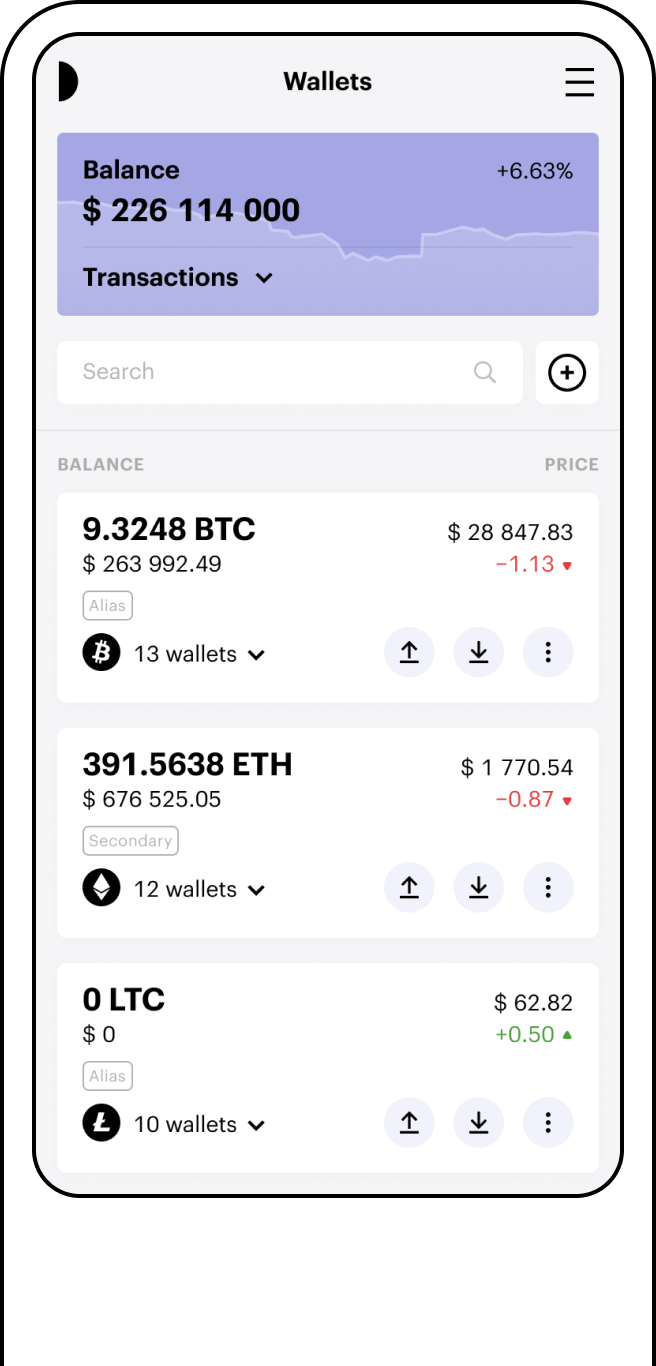
With the Paybis Wallet, you can manage multiple cryptocurrencies in a single wallet, instead of needing a separate wallet or account for each one. You can send funds, receive payments, or store your crypto assets all from one place.
Buy Option
In the Paybis Wallet, you can top up your crypto assets by selecting "Buy" next to the cryptocurrency you want. You'll be guided through the steps to complete the transaction, including how much to buy and which payment method to use. Any purchase remains subject to eligibility, verification, payment approval, service availability and transaction limits.
Paybis Wallet supports payment options such as credit/debit cards or bank transfers, depending on availability.
By following the steps, you can add more cryptocurrencies to your wallet to manage your portfolio. UK customers must complete additional mandatory steps, including a 24-hour cooling-off period, before making their first transaction. See "Identity Verification Required" above.
Real-Time Prices
With the Paybis Wallet, you can view the prices of the cryptocurrencies in your wallet, shown in USD. This lets you check current prices to help you decide about buying, selling, or managing your portfolio. Prices shown are for illustrative purposes and may not reflect the live market rate at the time of your transaction.
You can also view the total value of your portfolio in USD under "Balance."
On-Chain Wallets
The Paybis Wallet stores your funds on a dedicated address, rather than pooling them with other users' funds.
Because your funds are held on a dedicated address, you can view your balance independently using a blockchain explorer for the cryptocurrency you hold. Please note that access to your funds may be affected by network conditions or other operational factors, and isn't guaranteed to be available at all times.
MPC Model
The Paybis Wallet uses Multi-Party Computation (MPC), a cryptographic technique that splits your private key across multiple parties (computation parties), so no single party holds the complete key.
By splitting the private key this way, the Paybis Wallet is designed so that if one computation party is compromised, an attacker can't reconstruct the full private key on its own.
Convenience
Custodial wallets remove the need to store and manage your own private keys, which some users find more convenient than non-custodial wallets. This convenience comes with the risks described in our custodial wallet risk article.
Paybis lets you buy, sell, and store cryptocurrencies within a single wallet.
Available on Web and Mobile App
The Paybis Wallet is available on both the web platform and mobile app, so you can choose how you access it.
The web platform gives you an interface for managing your wallet, including buying, selling and viewing your balances. The mobile app (available on Android and iOS) lets you access your wallet from your device.
How to Set Up a Crypto Wallet: Paybis Wallet
Paybis Wallet is a free crypto wallet with a range of features to explore.
Setting up a traditional wallet can involve unfamiliar terms like "seed phrase," "mnemonic phrase," and "private keys."
At Paybis, wallet creation happens through your account sign-in, so you don't need to manage a seed phrase or private key directly for your Paybis Wallet.
To create a crypto wallet on Paybis:
- Go to the "Crypto wallet" tab and click "Create wallet."
- Log in to your Paybis account, or sign up if it's your first time.
- Click "Add wallet" and choose from the available cryptocurrencies.
You've now created your crypto wallet. You can use this to store crypto you buy on Paybis, as well as crypto sent from external platforms. To add a different currency, click "Add wallet" again and choose another currency.
UK customers must complete additional mandatory steps, including a 24-hour cooling-off period, before making their first transaction. See "Identity Verification Required" above.
Paybis Wallet is available on iOS and Android.
How Is Crypto Wallet Security Measured?
There are different ways to assess how securely a cryptocurrency wallet stores your private key. This is about how your wallet protects your key from unauthorized access. References to wallet security concern technical and account-protection features only; they do not reduce the investment risks of holding cryptocurrency, which remains a high-risk activity regardless of wallet type.
One method uses the Evaluation Assurance Level (EAL), an international standard (ranging from EAL 1 to EAL 7) for assessing the security of IT products and systems.
Hardware wallets store your private key offline, which is generally considered to reduce exposure to online threats such as hacking and malware, compared with wallets that stay connected to the internet. Hardware wallets often include extra security features too, including PIN codes, encryption, and backup and recovery options.
Top Crypto Wallet Use Cases
Checking Balances in USD
The Paybis Wallet lets you check the balance of your holdings in both crypto and fiat currency, so you can track changes over time. Figures shown are for illustrative purposes only.
Sending Cryptocurrency
With Paybis, you can send crypto by entering the recipient's public wallet address. Sending is subject to standard blockchain confirmation. UK customers must complete the required verification steps, including a 24-hour cooling-off period, before making their first transaction. See "Identity Verification Required" above.
Receive Multiple Cryptos
The Paybis wallet lets you receive multiple cryptocurrencies in one place, instead of managing separate wallets for different coins.
FAQ
How do I create a crypto wallet?
Download the extension or app, note down the mnemonic seed phrase, and set a password or PIN so you don't need to enter a private key each time. Or log in to Paybis and create a wallet you can access with your email.
What is a crypto hardware wallet?
A crypto hardware wallet is a physical device that stores your private key offline (air-gapped). It can be less convenient for daily transactions. Many hardware wallets include safety features, such as erasing the private key if someone tries to tamper with the device.
Can I start my wallet anonymously?
Non-custodial wallets don't require personal information to set up. That said, transactions on the blockchain are public and traceable. The Paybis wallet is a custodial wallet, so it isn't possible to create an anonymous wallet at Paybis.
How do I choose a crypto wallet?
It depends on your needs. If minimizing online exposure of your private key matters most to you, a hardware wallet keeps your key offline. If you'd rather not manage private keys yourself, a custodial wallet may suit you better.
How many crypto wallets should I have?
If you're just starting out, using one wallet with a small amount of funds can help you get familiar with how they work. As you get more comfortable, you might choose to use multiple wallets for different purposes.
What should I consider when storing my crypto?
Using a non-custodial (cold) wallet is one method some users choose, since the private key is kept offline. Even then, security depends on the precautions you take to keep your private key safe. This doesn't remove the risks associated with investing in cryptocurrency.
