Is It Safe to Buy Crypto with PayPal? Security & Fraud Protection
Key Takeaways:PayPal secures your account against hackers but offers zero Buyer Protection on crypto purchases. If a scammer tricks you into sending Bitcoin, you won’t get it back. PayPal also holds your private keys, embeds spreads into exchange rates without itemizing them separately, and restricts transfers to external wallets. We break down what PayPal actually protects, the most common scams targeting crypto buyers, and how to buy Bitcoin with PayPal or buy USDT with PayPal with transparent fees and 24/7 live support that responds in 15 seconds. You can also use the Bitcoin cash calculator to see exact totals before you commit.
Buying BTC on PayPal feels safe because you’ve used it for years to shop online. But PayPal’s Buyer Protection, the feature that refunds you when a seller disappears, doesn’t cover cryptocurrency. That single gap changes everything for first-time buyers.
This guide covers exactly what PayPal protects and what it doesn’t, as well as the most common scams targeting PayPal crypto users.
How PayPal Protects Your Crypto Purchases (And What It Doesn’t Cover)
PayPal runs robust cybersecurity on its platform. Two-factor authentication, device monitoring, and encryption all protect your account login.
But account security and transaction protection are different things. The gap between them is where most crypto buyers get hurt.
PayPal states clearly in its own terms that Buyer Protection does not cover crypto. The Purchase Protection Program excludes “Financial products or investments of any kind,” and crypto falls under that category. PayPal’s UK cryptocurrency terms confirm: “PayPal’s Buyer and Seller Protection will not apply to activity in your Cryptocurrencies Hub.”
If a scammer convinces you to send crypto and never delivers, PayPal can’t help you get it back. For a deeper look at how to protect yourself before this happens, read our guide on how to spot and avoid crypto scams.
These two protections cover completely different situations.
- Unauthorized activity applies when a hacker accesses your PayPal account and makes purchases without your knowledge. PayPal does protect you here. According to PayPal’s cryptocurrency terms, PayPal will reimburse unauthorized transfers out of your Cryptocurrencies Hub “up to a maximum lifetime cap of an equivalent of $50,000.00 U.S. dollars.”
- Buyer Protection applies when you willingly pay a seller who then scams you. That protection is completely absent for crypto. PayPal makes the distinction explicit: “If you believe that a transaction made through your PayPal account was not authorized by you, this type of claim is different from the Purchase Protection program.”
The scenario most beginner buyers fear most (a scammer taking your money and disappearing) is precisely the scenario PayPal won’t cover for crypto.
Why Crypto Transactions Are Final
When you send Bitcoin, thousands of computers confirm it simultaneously. Once they confirm the transaction, no one can reverse or delete it, not PayPal, not a bank, not anyone.
PayPal confirms this directly in its cryptocurrency terms: “There isn’t a way to cancel or reverse cryptocurrency transactions.” This isn’t a policy choice. The blockchain itself works this way.
For a plain-English breakdown of why transaction finality makes choosing the right platform so important, check out this YouTube guide.
The Hidden Risks of Buying Crypto on PayPal
Beyond the Buyer Protection gap, three structural issues affect every PayPal crypto user: custodial control, non-itemized fees, and limited asset selection.
PayPal also states in its own terms that crypto assets carry no FDIC or SIPC insurance and no protection against cyber theft or theft by other means. If PayPal’s crypto holdings were compromised, your balance has no government-backed safety net, unlike the FDIC insurance protecting cash deposits up to $250,000. If you’re weighing whether crypto exchanges are genuinely secure, our breakdown of the safest crypto exchanges and their security features is worth reading before you commit to any platform.
PayPal Holds Your Private Keys (Custodial Risk)
When you buy Bitcoin on PayPal, you don’t get the private key, the password-like code that proves you own the crypto. PayPal holds that key for you.
Research on PayPal’s custodial model confirms: “PayPal operates a custodial cryptocurrency service, meaning users do not directly own the private keys to their digital assets.” PayPal confirms this in its own terms: “You are given rights to the cryptocurrency you buy on PayPal but will not be provided with a private key.”
This creates a specific risk. If PayPal freezes your account for compliance reasons, you lose access to your crypto until the freeze lifts. PayPal’s terms state PayPal may limit “your ability to buy, sell, convert, or transfer Crypto Assets” and may seize assets if it believes a transaction involves fraud or money laundering. PayPal makes that determination unilaterally.
Here’s how this plays out in practice. When you transfer Bitcoin to another PayPal user, no Bitcoin moves on the blockchain. PayPal updates its internal database, like a bank moving a balance between accounts. Only when you transfer to an external wallet does the transaction hit the blockchain, and PayPal’s external transfer capability remains restricted to select wallets. Once you do move funds on-chain, our guide on how to send Bitcoin to another wallet walks you through the process step by step.
High Fees and Limited Crypto Selection
PayPal publishes a fee schedule for crypto transactions: 2.20% for purchases of $1.00-$74.99, 2.00% for $75.00-$200.00, 1.80% for $200.01-$1,000.00, and 1.50% for $1,000.01 and above.
But PayPal also charges a spread on top of these transaction fees. According to PayPal’s cryptocurrency terms, “PayPal will charge a spread (or margin) between the market price we receive from our Service Provider and the price of the Crypto Assets displayed to you.” The exact spread percentage per transaction isn’t separately disclosed. As Bitget’s analysis notes, PayPal’s fee structure embeds costs within exchange rate spreads that vary based on market conditions.
We work differently at Paybis. Before you confirm any transaction, you see three numbers: Service Fee (1.49% after your first purchase, 0% on the first card transaction), Processing Fee (4.5-8.5% for card transactions over $50, depending on currency), and Network Fee (varies by Bitcoin network demand). The Paybis fee calculator shows the exact crypto amount you receive before you click confirm. What you see is what you pay.
Common PayPal Crypto Scams (And How to Avoid Them)
Scammers specifically target PayPal’s crypto users because they know Buyer Protection won’t apply. Watch the Paybis crypto security issues video for a walkthrough of the top five threats in plain English.
Fake Invoices and Overpayment Scams
The fake invoice scam is sophisticated because it uses PayPal’s own infrastructure against you.
Here’s how it works, according to research on PayPal Bitcoin scams:
- You receive an email that looks exactly like an official PayPal notification, claiming you’ve authorized a $499.99 Bitcoin purchase. The email may genuinely originate from PayPal’s systems because scammers can use PayPal’s invoice tool to insert a fake phone number and fake transaction claim. PayPal covers this risk in its invoice and money request scams guide.
- You call the number listed and reach a fake “PayPal support agent” who walks you through “canceling” the charge by providing banking details, buying gift cards, or sending Bitcoin.
- How to avoid it: Never call phone numbers from emails. Log directly into paypal.com to check your actual transaction history. If no transaction appears there, the email is fake. Report suspicious invoices through your PayPal account settings, not email links.
Impersonation and Phishing Attacks
Security research from Axis Intelligence documents how scammers route phishing emails through legitimate third-party platforms so messages pass spam filters. The document prompts you to “sign” by entering your PayPal credentials, which the attacker then captures. Red flags to watch:
- Sender address: “service@paypa1.com” (number 1 instead of letter l) is not PayPal.
- Urgent language: Demands to act within 24 hours are pressure tactics.
- Gift card or crypto requests: No legitimate company asks you to pay this way to resolve any issue.
- Unexpected verification pages: Close any page asking for your password before you can view a document.
If you click a suspicious link, change your PayPal password immediately before doing anything else. Forward suspicious emails to phishing@paypal.com.
PayPal vs. Dedicated Crypto Exchanges: Which Is Safer?
Convenience and security aren’t the same thing. PayPal is convenient because you already have an account, but that convenience comes with real trade-offs: no Buyer Protection, custodial control, non-itemized spreads, and a narrower asset selection.
Dedicated crypto platforms solve specific problems PayPal never designed for: transparent pricing, on-chain settlement you control, and support teams trained specifically for crypto issues. If you’re still researching which platform best fits your needs, our comparison of the best Bitcoin trading platforms covers the key criteria side by side.
Comparing PayPal, Coinbase, and Paybis
The table below compares the three platforms across the criteria that matter most to first-time buyers, based on independent reviews from FXEmpire, Coin Bureau’s Paybis analysis, and 99Bitcoins’ 2025 assessment.
| Feature | PayPal | Coinbase | Paybis |
|---|---|---|---|
| Buyer Protection | No (excluded for crypto) | Reportedly none for crypto | No (irreversible transactions) |
| Fee Transparency | Transaction fee disclosed, spread not itemized | Reportedly partial disclosure | Fees shown before confirmation |
| Processing Speed | Reportedly instant (internal) | Card: instant; Bank: 3–5 days | 10–20 min review, wallet delivery 5–15 min |
| Support Response Time | Reportedly bot-first, variable | Reportedly ticket-based, hours to days | 24/7 live chat, ~15 sec average |
| Asset Control | PayPal holds your keys | Reportedly custodial by default | Can send to external wallet |
| Crypto Selection | 7+ coins | 250+ coins | 90+ coins |
| Countries Supported | Varies by region | Limited in some markets | 180+ countries |
Coinbase processes debit card purchases instantly, but bank transfers take 3-5 business days to clear before you can withdraw crypto. When something goes wrong on Coinbase, the primary path is a support ticket, which means hours or days without a response. We connect you to a live agent in an average of 1-2 minutes.
“I’ve been using Paybis for over a year now. I’m brand new this crypto stuff, but this company has been straightforward, easy to use, and reliable. If you’re a newbie like me, it’s easy to use. Not a lot of analytical stuff going on just straight crypto payments. I highly recommend!” – MOOSE on Trustpilot
“paybis helped me turn my paysafe balance I found into crypto and I was then able to turn that crypto into cash in about half an hour from start to finish …I was stoked as I really needed the money … I will definitely be using Paybis in the future and would recommend it to anyone” – Jason Halton on Trustpilot
How to Buy Crypto Safely and Instantly with Paybis
We built Paybis for buyers who want to purchase $100-$1,000 of Bitcoin or Ethereum today without learning trading interfaces or waiting days for bank transfers. The full process from signup to crypto in your wallet takes under 15 minutes.
We’ve operated since 2014 with no security breaches, hold FinCEN (Financial Crimes Enforcement Network, US financial regulator) registration (US entity 31000272911973, PL entity 31000277275964), FINTRAC (Financial Transactions and Reports Analysis Centre, Canadian financial regulator) registration in Canada (PL entity C100000816, CA entity C100000646), and Revenue Chamber in Katowice VASP (Virtual Asset Service Provider, Polish crypto regulator) registration (RDWW-805). We’re also PCI DSS Level 1 (Payment Card Industry Security Standard) compliant. Paybis has earned 30,180+ Trustpilot reviews with a rating of 4 or “Great” as of March 2026.
Step 1: Create Your Account and Verify Your ID
Go to paybis.com and create an account with your email address. Upload a photo of your government-issued ID and take a selfie. Automated image recognition processes the check in real time, and most users complete verification in under 2 minutes.
Identity verification is required by FinCEN and FINTRAC regulations for all legitimate crypto platforms. Watch the Paybis KYC verification walkthrough to see exactly what the ID upload looks like before you start.
Step 2: Choose Your Crypto and See Exact Fees Upfront
Enter the amount you want to spend in the Paybis calculator. You’ll see the exact crypto amount you receive, broken down into three line items, before you confirm:
- Service Fee: 1.49% (your first card transaction has 0% service fee)
- Processing Fee: 4.5-8.5% for card transactions over $50, depending on currency
- Network Fee: Varies by blockchain demand, displayed in real time
For a $500 Bitcoin purchase with a credit card after your first transaction:
- Service Fee: $7.45
- Processing Fee: $22.50-$42.50
- Network Fee: approximately $0.70
- Total charged to your card: approximately $530.65-$550.65
That number appears before you enter your card details. No spread is buried in the exchange rate. No surprise at the confirmation screen. If you want to figure out how much Bitcoin your dollars translate to before you even sign up, the Bitcoin cash calculator gives you an instant estimate.
Step 3: Pay Securely and Receive Crypto Instantly
We support 20+ payment methods, including Visa, Mastercard, bank transfers, and PayPal across 180+ countries.
Once you confirm, most transactions are typically reviewed within 10 to 20 minutes. Crypto arrives in your wallet typically within 5-15 minutes, depending on which blockchain you’re using. You can send the crypto to any external wallet address you control after purchase. If you’re new to moving funds after purchase, our guide on how to send Bitcoin to another wallet covers every step in plain English.
The Buy Bitcoin with PayPal video and buy and sell walkthrough show the complete flow from start to finish.
Our 24/7 live chat connects you to a real agent in an average of 15 seconds. If we flag a transaction for compliance reasons, all decisions are made internally by our security department and cannot be disclosed or explained, even through support. We return any charged funds to your payment method if we reject the transaction. Is Paybis Safe to Use video covers our security model in detail.
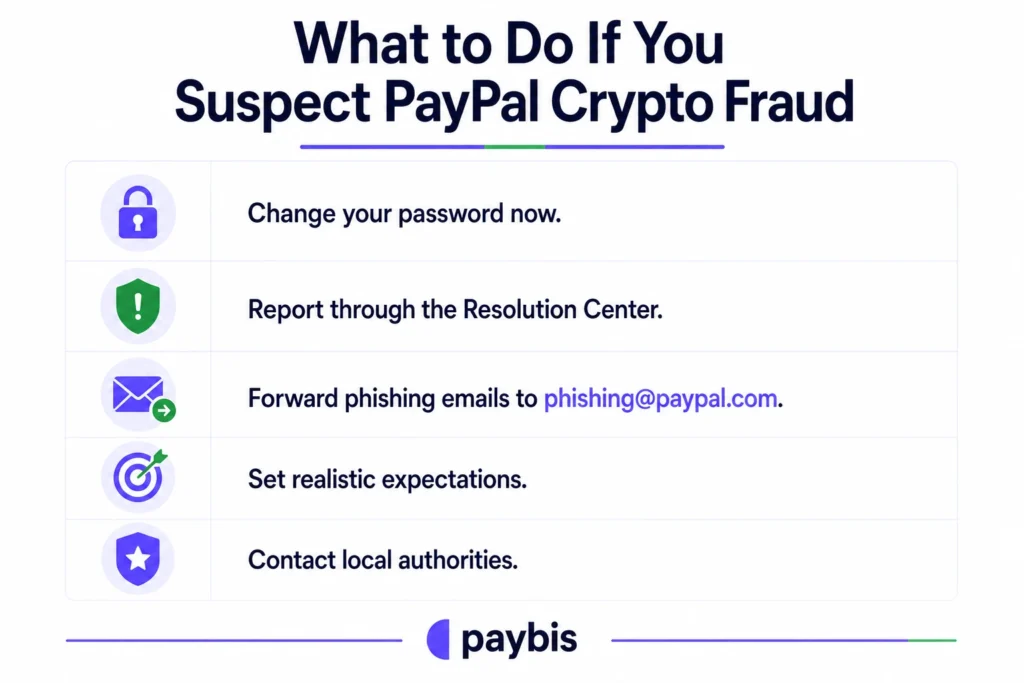
What to Do If You Suspect PayPal Crypto Fraud
If someone accessed your PayPal account without permission and made unauthorized crypto transactions, act immediately:
- Change your password now. Do this before anything else. PayPal advises: “If you think your account has been compromised, change your password and update your security questions right away.”
- Report through the Resolution Center. Go to PayPal’s Resolution Center, click “Report a Problem,” select the transaction, and choose “I want to report unauthorized activity.” PayPal will respond within 10 days.
- Forward phishing emails to phishing@paypal.com. Use PayPal’s security page to report suspicious links or sites directly.
- Set realistic expectations. If you willingly sent crypto to a scammer, recovery is unlikely. Blockchain transactions can’t be reversed. Report it anyway to help PayPal identify patterns and protect other users.
- Contact local authorities. If the amount is significant, file a report with your local financial crimes unit to create an official record.
PayPal’s $50,000 unauthorized activity protection covers only situations where someone else accessed your account without permission. It doesn’t cover authorized transfers you made, even if a scammer deceived you.
Ready to buy crypto with complete transparency? Create your Paybis account at paybis.com, complete the 2-minute identity verification, and see your exact total cost before you pay. Your first card transaction carries 0% service fee.
Key Terminology
- Custodial wallet: A wallet where a third party (like PayPal) holds your private keys on your behalf. You access your crypto through their platform, but the platform controls the underlying assets.
- Spread: The difference between the market price of a cryptocurrency and the price you pay on a platform. A spread builds into the exchange rate rather than appearing as a separate line item.
- Blockchain finality: The property of a confirmed blockchain transaction that makes it permanent and irreversible. Once a transaction has enough network confirmations, no bank or platform can cancel it.
- Phishing: A scam where attackers impersonate a trusted company (like PayPal) to trick you into entering your login credentials on a fake site, giving the attacker access to your account.
- Private key: A unique cryptographic code that proves ownership of a cryptocurrency wallet. If you hold the private key, you own the crypto. If a platform holds it for you (custodial), you hold a contractual claim to the crypto, but the platform controls access.
FAQ
Does PayPal refund scammed crypto?
No. PayPal explicitly states that Buyer Protection doesn’t apply to cryptocurrency, and blockchain transactions can’t be reversed once confirmed. If you authorized the transaction, PayPal has no mechanism to recover the funds.
Can I lose my crypto if PayPal gets hacked?
Crypto held on PayPal carries no FDIC or SIPC insurance. PayPal offers up to $50,000 lifetime coverage for unauthorized account access, but this applies only if someone else accessed your account without permission, not for market losses or transfers you authorized yourself.
What happens if the crypto price drops after I buy on PayPal?
Market losses are your risk. No platform refunds price declines, and no platform can guarantee price stability after purchase.
What's the PayPal crypto fee structure?
PayPal charges a disclosed transaction fee (1.50%-2.20% depending on purchase size) plus a separate spread. According to PayPal’s own terms, “PayPal will charge a spread (or margin) between the market price we receive from our Service Provider and the price of the Crypto Assets displayed to you.” The exact spread percentage is not itemized per transaction.
What's the PayPal crypto fee structure?
PayPal charges a disclosed transaction fee (1.50%-2.20% depending on purchase size) plus a separate spread. According to PayPal’s own terms, “PayPal will charge a spread (or margin) between the market price we receive from our Service Provider and the price of the Crypto Assets displayed to you.” The exact spread percentage is not itemized per transaction.
Can I transfer Bitcoin from PayPal to an external wallet?
PayPal introduced limited external transfer capabilities, but restricts this functionality to select wallets. You can’t import an existing private key or access PayPal’s crypto from a self-custody wallet you control.
Is Paybis available in my country?
We operate in 180+ countries with 20+ payment methods. Check paybis.com to confirm availability and supported payment methods in your region. We currently can’t serve residents of sanctioned countries, New York State, or Louisiana due to regulatory restrictions.
Disclaimer: Don’t invest unless you’re prepared to lose all the money you invest. This is a high‑risk investment and you should not expect to be protected if something goes wrong. Take 2 mins to learn more at: https://go.payb.is/FCA-Info