Crypto Withdrawal Security: Protect Your Cash Before It Hits Your Bank
– Crypto withdrawals are irreversible once confirmed, so accuracy matters.
– Small mistakes in wallet or bank details can lead to lost funds or delays; whether you swap BTC to ETH or cash out to fiat.
– Simple security habits like avoiding public Wi-Fi and using authenticator apps help protect your account.
– Sending a small test transaction first can prevent costly withdrawal errors; especially when you buy Bitcoin with a credit card or other payment methods and plan to move funds later.
– Platforms like Paybis reduce surprises with upfront fees and 24/7 human support; you can also buy Bitcoin with Paysafe Card or buy Bitcoin Cash with Paysafe Card directly through the platform.
Crypto assets can increase or decrease in value. Paybis is a payment gateway, not an investment service. This content is for informational purposes only and does not constitute financial advice.
Crypto ownership has a dangerous final step that most guides ignore. Buying is straightforward, but cashing out is where irreversible mistakes and targeted scams concentrate. One wrong character in a wallet address means your money is gone with no fraud department to call, no reversal process, and no insurance to cover the loss. If you need a full walkthrough of the cash-out process itself, the Paybis guide on how to cash out Bitcoin is a useful companion to read alongside this one. This guide walks through every step required to protect your cash during a crypto-to-fiat conversion, from locking down your account to verifying the final bank transfer.
Why Crypto Withdrawals Are Irreversible
Understanding why crypto transfers are permanent is not a technical exercise. It is the single most important piece of context you need before cashing out.
How Crypto Transfers Become Final
The blockchain records every crypto transaction on a distributed ledger that no one can edit. Once the network validates enough confirmations, the transaction reaches finality: the point at which the network permanently locks it in place. Bitcoin typically achieves practical finality in about 60 minutes across six block confirmations, with each block taking roughly 10 minutes. Ethereum settles faster, finalizing in approximately 12 to 15 minutes under its current Proof-of-Stake system.
Crypto Payments Are Final, No Reversal
Unlike a bank transfer, crypto has no FDIC insurance and no chargeback mechanism. If you send Bitcoin to a mistyped address, the transaction confirms on-chain and the funds are gone. No exchange, regulator, or support team can recover them. The decentralized nature of blockchain removes the safety net traditional finance provides.
Common Crypto Withdrawal Mistakes
The errors that cause the most loss are also the most preventable:
- Wrong network selection: Sending USDC on Ethereum when the recipient expects it on Solana means your funds land where the recipient cannot access them.
- Address typos: A single incorrect character sends funds to a wallet that may not exist or belongs to someone else.
- Missing memo or tag fields: Some networks (like XRP and MEMO-based tokens) require a destination tag alongside the address. Omitting it can delay or permanently lose funds at centralized exchanges. For XRP specifically, understanding which XRP wallet is right for you can help you avoid these pitfalls before they arise.
- Sending to a contract address: Some wallet addresses are smart contracts that do not accept direct transfers.
Prevention is always faster than recovery. If you send crypto on the wrong network, recovery options are extremely limited and may be impossible depending on the network compatibility.
Verify Wallet Addresses Before Every Transaction
Address verification is the most critical manual step in the entire withdrawal process. It eliminates the single largest cause of permanent fund loss.
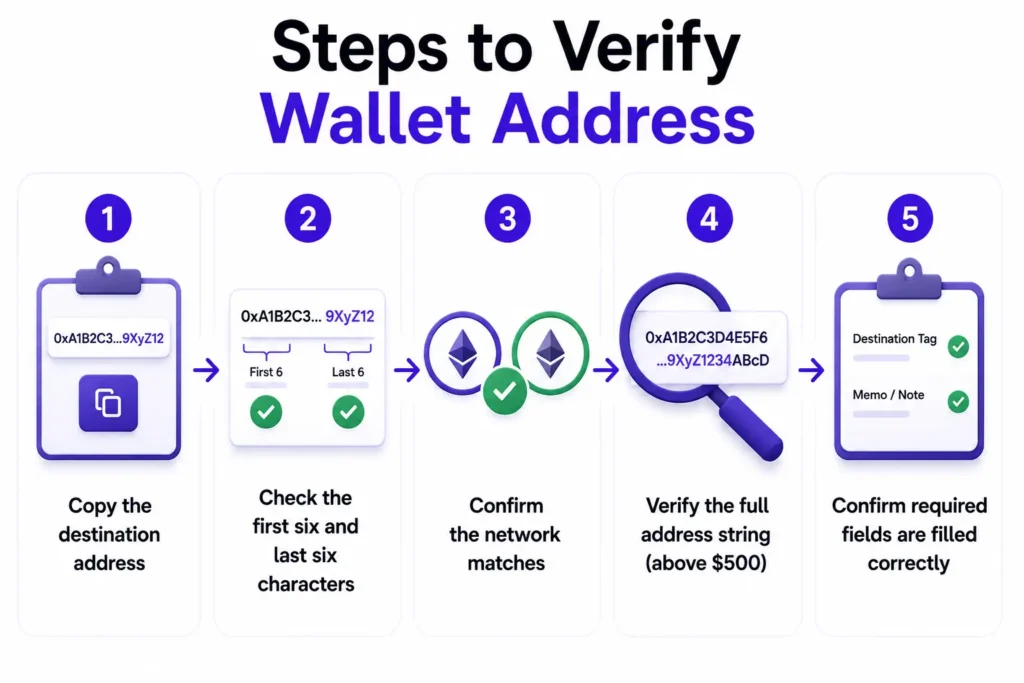
Steps to Verify Wallet Address
Before sending any amount, follow this checklist every single time:
- Copy the destination address directly from the receiving platform or wallet.
- Check the first six and last six characters of the address against what the recipient provided.
- Confirm the network matches on both ends (for example, both are using Ethereum, not one Ethereum and one Polygon).
- Verify the full address string visually if the transaction is above $500. Do not rely only on the first and last characters.
- Confirm required fields such as destination tags or memo codes are filled in correctly.
Guard Against Wallet Address Theft
Clipboard malware, known as “clipper” software, silently replaces a copied wallet address with the attacker’s address the moment you paste it. The malware monitors your clipboard for strings that look like wallet addresses and swaps them before you paste.
Address poisoning works similarly. Scammers generate a fake wallet address that closely resembles one you have used before, then send you a tiny amount to “poison” your transaction history. The next time you look up a recent address to reuse, you might accidentally select the scammer’s lookalike version instead of the real one.
To defend against both: always copy the destination address fresh from the source, paste it into a plain text document first to inspect it visually, then paste it into the transaction field. Never reuse an address from transaction history without verifying it character by character.
Store Verified Crypto Addresses
Most reputable platforms allow you to save trusted withdrawal addresses in an address book or whitelist. When you use this feature, you verify a new address once, then select it from a saved list for future transactions. This eliminates clipboard malware risk entirely for repeat transfers.
Prevent Loss: Test with Small Crypto
Before moving a large amount to any new address, send the smallest possible transaction first, typically $5 to $10 worth of crypto. Wait for full blockchain confirmation that the funds arrived at the correct destination. Only then send the full amount.
Enable Two-Factor Authentication (2FA) on All Accounts
Account security is the foundation on which everything else sits on. If your exchange account is compromised, no amount of address verification matters.
SMS 2FA Security Weaknesses
Text-message-based 2FA feels secure, but it carries a known vulnerability: SIM swapping. In a SIM swap attack, a criminal contacts your mobile carrier, impersonates you, and convinces the carrier to transfer your phone number to a SIM card the attacker controls. Every SMS verification code then goes to the attacker instead of you. The FBI’s Internet Crime Complaint Center received 982 SIM-swapping complaints in 2024, with total reported losses exceeding $26 million. SMS 2FA is better than nothing, but an authenticator app is significantly more secure.
Set Up Authenticator Apps for 2FA
Authenticator apps like Google Authenticator or Authy generate a new 6-digit code every 30 seconds, tied to your specific device rather than your phone number. A SIM swap cannot intercept these codes because they never travel over the mobile network.
Here is how to enable it:
- Download Google Authenticator or Authy on your smartphone.Log into your Paybis account and navigate to Security Settings.
- Select “Enable 2FA” and choose “Authenticator App.”Scan the QR code shown on screen with your authenticator app.
- Enter the 6-digit code the app generates to confirm setup.
- Save your backup recovery codes somewhere offline.
Store Your 2FA Account Recovery Codes
When you enable 2FA, your platform will display a set of one-time recovery codes. Write these down on paper and store them somewhere physically secure, like a locked drawer or a fireproof box. Do not save them in a cloud document or screenshot them on your phone. If you lose access to your authenticator app (for example, if your phone is lost or stolen), these codes are the only way to regain account access.
Prevent Crypto Theft via Public Wi-Fi
Your internet connection is an attack surface. Treating it carefully during financial transactions costs nothing and eliminates a significant risk.
Data Theft on Public Wi-Fi
A Man-in-the-Middle attack happens when someone intercepts the data traveling between your device and the network. On public Wi-Fi, any device on the same network can potentially capture login credentials, steal session tokens, or redirect you to a fake version of your exchange. Coffee shop Wi-Fi, hotel connections, and airport networks all create this exposure during crypto transactions.
Your Safest Choice: Home Wi-Fi or Mobile
Always use your secured home Wi-Fi or your phone’s mobile data connection for crypto withdrawals. Mobile data (4G/5G) encrypts traffic between your device and your carrier. Recent research has identified side-channel vulnerabilities in 4G and 5G that can expose call state information. The protection is meaningfully stronger than open public Wi-Fi, but it is not absolute. Home Wi-Fi with a strong, unique password provides comparable protection when your router firmware is kept current.
Beyond VPNs: More Crypto Security
A VPN encrypts your traffic even on public networks, which adds a meaningful layer of protection if you must transact away from home. Keep your phone’s operating system and exchange apps updated, since security patches close vulnerabilities that attackers actively target. Always confirm the site URL begins with “https” and the domain exactly matches the platform you use. A URL like “paybis-secure.com” or “payb1s.com” is a fake. Type the URL directly rather than clicking links from emails or messages.
Ensure Your Cash Lands in the Right Bank
Cashing out crypto to fiat involves a second set of details that need the same care as wallet addresses.
Verify Account and Routing Numbers
Before initiating a fiat payout, verify these details directly against your bank’s official app or a recent bank statement:
- Routing number (ABA number for US accounts, or Sort Code for UK accounts)
- Account number (checking or savings account)
- IBAN and SWIFT/BIC for international transfers
- Bank name and address if required by the platform
A wrong digit in a routing number typically triggers a rejection, and the bank returns the funds within three to five business days. This is far less catastrophic than a wrong crypto address, but it still causes delays and may require additional identity verification to resolve.
Correct Name for Crypto Payouts
Your bank account holder name must exactly match the name on your exchange account. Paybis verifies your identity as part of Paybis’s KYC compliance obligations under anti-money laundering regulations, and name matching between your exchange account and bank account is a platform-level deposit verification requirement to ensure funds are processed correctly.
A mismatch can trigger a compliance hold or outright rejection. If your exchange account uses your full legal name but your bank account uses a nickname or a middle name variation, update one of them before withdrawing.
Incorrect Bank Info: What’s Next?
If you enter incorrect bank details, the receiving bank rejects the transfer and returns the funds. This is not the same as an irreversible crypto error. The return typically takes three to five business days, and you can then correct your account details before retrying.
Identify and Block Crypto Phishing Attacks
Phishing is the most common entry point for account takeovers, and crypto users are a specific target because attackers know the stakes are high and transactions are irreversible. Understanding the full landscape of threats is important — the Paybis guide on how to spot and avoid crypto scams goes deeper on the tactics bad actors use beyond phishing alone.
Spotting Deceptive Crypto Emails
Phishing emails impersonating crypto platforms use urgency and fake branding to trick you into acting before you think. Watch for subject lines like “Your withdrawal is on hold” or “Verify your identity within 24 hours,” generic greetings like “Dear user,” sender emails with extra characters (support@paybis-security.com instead of support@paybis.com), and call-to-action buttons leading to wrong URLs. Always check the full sender email address, not just the display name. If in doubt, close the email and log into your account by typing the URL directly.
Stop Link-Based Crypto Scams
Never click a link in an email or SMS to log into your crypto exchange. Attackers craft pages that are pixel-perfect replicas of real platforms. The branding can mirror legitimate sites closely enough to fool most people when they are in a hurry. Type the URL directly into your browser every time. For Paybis, that is paybis.com. Bookmark it once from the real site and use only the bookmark going forward.
Avoid Phony Support Call Scams
Legitimate exchanges never call you unsolicited to ask for your password, 2FA code, or remote device access. If someone calls claiming to be from Paybis support, hang up. Real support agents access their own systems to help you. Contact Paybis directly through the official live chat at paybis.com if you receive a suspicious call.
Check Who Sent That Message
Look at the exact domain in any email you receive. A sender address padded with extra characters or using a slightly different domain is a fake. Some platforms offer anti-phishing codes, a custom phrase you set that appears in every genuine email from the platform. Enable this if your platform supports it.
Essential Checks for Safe Crypto Cash-Out
Use this pre-withdrawal checklist before every withdrawal, regardless of amount.
Secure Your Account Before Withdrawal
- Use a unique, strong password for your exchange account (a password manager like Bitwarden makes this straightforward).
- Enable authenticator-app 2FA if you have not already.
- Confirm your antivirus software is active and up to date.
- Check that no unfamiliar devices are logged into your account.
Verify Your Crypto Withdrawal Info
Before confirming any transaction, review the complete fee breakdown. Paybis displays all fees upfront, including the service fee (from 1.49%), processing fee (4.5% to 8.5% for card transactions over $50, depending on currency), and the network fee (set by the blockchain, not by Paybis, and variable based on network demand), before you click confirm.
Secure Your Phone and Wi-Fi for Withdrawals
- Update your exchange app and mobile OS before transacting.
- Switch to mobile data or home Wi-Fi.
- Use a dedicated browser with no extensions installed for financial transactions, keeping it separate from your general browsing.
- Log out of your exchange account completely when done.
Steps if Your Crypto Transfer Fails
Even with all precautions in place, transactions can fail due to network congestion or compliance holds. Here is exactly what to do.
Act Fast: Protect Your Withdrawal
If a transaction shows as failed or is unexpectedly pending, take these steps immediately:Do not attempt the same transaction again until you understand why it failed.Contact Paybis’s 24/7 live chat. Paybis’s live chat connects you to a human support agent quickly, available 24/7, 365 days a year, across 9 languages, including help navigating alternative payment options if your original method fails.If you suspect someone else has accessed your account, change your password and re-enable 2FA immediately.
Paybis users frequently report successful Bitcoin sales and card withdrawals across its Trustpilot reviews, with the platform holding a 4.1 rating from 31,502+ reviews as of May 2026.
Log Transaction IDs and Times
Every blockchain transaction generates a Transaction ID (TXID), a unique string that serves as your receipt. To check the status of any transaction:Copy the TXID from your exchange’s transaction history.Visit the appropriate blockchain explorer: Etherscan for Ethereum-based tokens, or a Bitcoin explorer for BTC.Paste the TXID into the search bar.Read the status: “Success” means confirmed on-chain, “Pending” means waiting for confirmation, and “Failed” means no funds moved (though network fees may still apply on Ethereum).
The Cost of Unrecoverable Funds
If you send crypto to a wrong address and the blockchain confirms it, you lose those funds permanently. No escalation path exists, no insurance claim applies, and no reversal is possible. It is how all public blockchains work. Prevention takes seconds. Recovery is impossible. Every step in this guide exists to make prevention automatic.
Avoid Common Crypto Cash-Out Mistakes
A few final pitfalls trip up even experienced users.
No Undo for Crypto Transfers
The irreversibility of crypto is worth restating plainly: once a transaction achieves finality, you cannot reverse it any more than you can undo a physical cash hand-off. Bitcoin requires approximately six confirmations (around 60 minutes) for full finality, while Ethereum typically finalizes in 12 to 15 minutes. During that window, some platforms allow cancellation. After it, no one can help you.
Avoid Crypto Withdrawal Delays
Delays happen for two main reasons: blockchain network congestion (high traffic means slower confirmation and higher fees) and platform compliance holds. If Paybis flags a transaction for a compliance review, you are notified directly.
If a transaction is rejected for security or compliance reasons, your funds are returned to your original payment method. Review the current Paybis refund terms for details on any applicable processing fees from payment providers. Contact 24/7 support via live chat if you need clarity on any hold.
Secure Your Crypto Withdrawal Destination
Understanding where your crypto lives after a purchase matters for security planning. It is also worth understanding whether blockchain wallets are truly safe before committing to any storage approach.
| Feature | Hot Wallet | Cold Wallet |
|---|---|---|
| Connection | Online, always connected | Offline, disconnected |
| Convenience | High, instant access | Low, requires physical device |
| Security | Moderate, vulnerable to hacks | High, not accessible remotely |
| Best for | Regular transactions | Long-term storage |
A custodial wallet (where the platform holds your private keys) is convenient but means you trust the platform’s security. A non-custodial wallet (where you control your own private keys) gives you full control but full responsibility. The Paybis guide to how custodial and non-custodial wallets differ covers this trade-off in detail, and the Paybis blog post on why crypto wallet choice matters is worth reading before deciding where to store funds long-term.
Wrong Crypto Address? What to Do
If you send to an address on the same platform, contact support immediately via live chat. Internal transfers within a platform sometimes have a recovery window. If the address was off-platform and on-chain, recovery is almost certainly not possible. This is why the test transaction step exists and why you should never skip it for new addresses.
When you’re ready to withdraw, a Paybis account lets you convert crypto to cash with transparent fees, 2-minute verification, and 24/7 human support. Already have an account? Enable authenticator-app 2FA in your security settings now.
Paybis has processed transactions for 5M+ retail users across 180+ countries, maintains a 4.1 rating across 31,502+ Trustpilot reviews (as of May 2026), and has operated since 2014 with no security breaches.
Key Terminology
- Transaction Finality: The point at which a blockchain transaction is permanently confirmed and cannot be altered or reversed. Bitcoin achieves finality after approximately six confirmations (around 60 minutes). Ethereum reaches finality in 12 to 15 minutes.
- Network Fee: The cost paid to blockchain validators or miners to process and confirm a transaction. The network itself sets this fee, not any exchange platform, and it fluctuates based on how busy the blockchain is at the time of your transaction.
- TXID (Transaction ID): A unique alphanumeric string that the blockchain assigns to every transaction, functioning as your receipt. Paste a TXID into a blockchain explorer like Etherscan to check the status, confirmation count, and destination address of any transaction.
- EVM-compatible: Networks that run the Ethereum Virtual Machine and can execute Ethereum smart contracts. If two networks are EVM-compatible (like Ethereum and Polygon), they use the same wallet address format and private keys work on both chains, which can enable fund recovery if sent to the wrong network.
- PCI DSS (Payment Card Industry Data Security Standard): A set of security standards designed to protect card information during and after financial transactions. Level 1 compliance is the highest tier, required for organizations processing over 6 million card transactions annually.
FAQ
What Happens If I Send Crypto to the Wrong Network?
If both networks run the Ethereum Virtual Machine, meaning they share the same wallet address format (for example, Ethereum and Polygon), you may recover funds using the same private key on both networks. If the networks are incompatible, you typically lose the funds permanently, and no exchange or support team can recover them.
How Long Does a Crypto Withdrawal Take?
Paybis executes platform transactions in under 1 minute. Most transactions undergo a 10 to 20 minute security and compliance review before on-chain settlement begins. Blockchain confirmation time then depends on the network: Bitcoin typically confirms in 10 to 60 minutes (one to six confirmations), while Ethereum settles in approximately 12 to 15 minutes.
What Causes a Crypto Withdrawal Delay?
Most delays result from blockchain network congestion (high traffic competing for block space) or routine platform compliance checks. Paybis notifies you directly if a transaction is flagged for security review. The 24/7 live support team responds in an average of 15 seconds.
What Fees Will I Pay to Withdraw Crypto on Paybis?
Paybis shows every fee before you confirm: the service fee starts from 1.49% (first card transaction carries a 0% service fee). The processing fee is 4.5% to 8.5% for card transactions over $50, depending on the currency, and the network fee is set by the blockchain (not by Paybis) and varies with congestion. No additional charges appear after confirmation.
Disclaimer: Don’t invest unless you’re prepared to lose all the money you invest. This is a high‑risk investment and you should not expect to be protected if something goes wrong. Take 2 mins to learn more at: https://go.payb.is/FCA-Info