Crypto Swap Errors & Troubleshooting: What to Do When Your Swap Fails
Key Takeaways:Your crypto is almost certainly safe after a failed swap. Most errors like “Insufficient Output Amount” or a stuck pending transaction are fixable in minutes. Adjust slippage tolerance, increase the gas limit, or clear your wallet cache. You can buy Bitcoin with PayPal, with a bank account, with Paysafe Card, and then swap BTC to ETH on Paybis without navigating DEX error codes. If you’re tired of troubleshooting alone at midnight with no one to call, Paybis offers 24/7 live human chat support. Average response time is approximately 15 seconds.
Your swap just failed. Your screen shows an error, and you’re not sure if your crypto has disappeared. In most cases, the blockchain rejected the transaction specifically to protect your funds from bad pricing or network timeouts. This guide shows you exactly why your swap didn’t complete, how to decode the error messages, and the step-by-step process to recover your funds or push the transaction through.
Quick Fix Finder: Match Your Error to a Solution
| Dimension | Unvetted DEX Swap | Paybis Curated Swap |
|---|---|---|
| Liquidity | Often limited, highly variable | We curate vetted assets |
| Scam Risk | Permissionless listing model | We list established cryptocurrencies |
| Support | Typically no human support | 24/7 live chat, 1–2 min response time |
| Speed | Speed depends on blockchain network | We process instantly, under 1 minute |
Why Isn’t My Crypto Swap Completing?
A failed swap is a protective mechanism, not a catastrophe. The blockchain detected a problem mid-execution and rolled back the transaction as if it never happened, returning your funds automatically.
Why Your Crypto Swap Needs More Gas
Gas measures the computational work a blockchain network like Ethereum requires to execute a transaction. Think of it like fuel in a car engine: a longer, more complex journey burns more fuel. The Ethereum Foundation explains that every transaction requires two settings: a gas limit (the maximum fuel you’re willing to put in the car) and a gas price (how much you’re willing to pay per unit of fuel). If you want to understand the broader ecosystem, our guide on what Ethereum is provides a solid foundation.
The “out of gas” error occurs when the smart contract (the automated code running the swap) uses up all the gas you allocated before finishing. The Ethereum Virtual Machine reverts all changes, but miners keep the consumed gas because they performed the computational work up to that point. Increase the gas limit in your wallet’s advanced transaction settings before resubmitting.
Gas fees are non-refundable by design. As the Ethereum Foundation confirms, gas is consumed whether a transaction succeeds or fails. The cost of a failed swap varies significantly depending on network congestion and contract complexity. This is a structural cost of using DEXs (decentralized exchanges, meaning trading platforms with no company behind them), not a policy any platform controls.
High Traffic Causes Crypto Swap Delays
During periods of high activity (major token launches, market crashes, airdrop events), gas prices spike sharply. The Etherscan Gas Tracker shows real-time gas prices on the Ethereum network. Historical high-congestion periods have pushed Gwei readings into the 30-150+ range, significantly raising the cost of each attempted transaction.
Smart Contract Glitches: Causes of Swap Failure
Two contract-level issues cause swaps to fail:
- Transfer tax tokens: Some tokens charge a fee on every transfer. If your slippage tolerance doesn’t account for this deduction, the swap fails. Tokens with built-in taxes often require higher slippage settings.
- Stale token approvals: A previous approval you granted to a DEX can conflict with new transactions. Reset token allowances (the permissions you grant a DEX to move your tokens) in your wallet’s connected apps section. The MetaMask Help Center provides step-by-step instructions for revoking and resetting approvals.
Crypto App Wallet Connection Errors
If the DEX shows a connection error or your balance doesn’t load correctly, a stale cache or failed RPC node (the server your wallet uses to communicate with the blockchain) is usually the cause. To fix it:
- Disconnect your wallet from the DEX.
- Clear your browser cache.
- Reconnect the wallet.
If the problem persists, switch to a different RPC node in your wallet settings.
The Paybis help article on swap transfers covers connection troubleshooting for Paybis wallet users specifically. Understanding how Bitcoin wallets work can also help you diagnose wallet-level issues before they affect your swaps.
Your Crypto Swap Didn’t Process? Steps to Take
Before doing anything else, understand the key distinction. A failed swap means the blockchain rejected it and reverted your funds automatically. A mis-sent transaction (sending to the wrong address) is a different and more serious problem. This section covers failed swaps only.
Identify Failed Swap Status
Go to Etherscan (for Ethereum) or BscScan (for BNB Chain) and paste your transaction hash (the unique ID found in your wallet’s history). The status will show one of four states:
- Pending: Waiting in the mempool (the waiting room for transactions) for a miner to include it.
- Success: Confirmed and complete.
- Failed: Reverted. Your tokens are back in your wallet, minus gas.
- Dropped and Replaced: A newer version of the transaction replaced it, usually with a higher fee.
Check Wallet for Missing Crypto
If your swap shows “Failed” on Etherscan but your wallet balance hasn’t updated yet, don’t panic. Wallet interfaces can take time to reflect reverted transactions. Manually refreshing the token balance or restarting the wallet app typically resolves the display lag. For users with questions about a specific transaction, the Paybis help article on delayed transactions explains what to check and when to escalate to support.
Seeing an Error? What to Do Next
Common symptoms and immediate actions:
- “Transaction reverted”: Increase slippage tolerance and retry.
- “Execution reverted: Pancake: K”: A PancakeSwap-specific error that occurs when a trade would disrupt the reserve ratio. Try reducing the swap amount or increasing slippage tolerance and retry.
- Blank transaction or no receipt: Check the block explorer and consider resubmitting.
- “Insufficient liquidity”: The trading pool may not have enough of the token you want. Try a smaller amount or a different DEX.
How to Get Your Funds Back
Per Uniswap’s documentation, if a swap fails, your wallet still holds your tokens. The transaction reverts as if it never happened. The only cost is the gas fee paid to miners. Blockchain reverts happen automatically. The delay you notice is usually the wallet display catching up with on-chain reality.
For Paybis transactions rejected for security reasons, Paybis returns funds to your original payment method, as explained in the Paybis security rejection help article.
Avoid Slippage Errors: Get More Crypto Per Swap
The “Insufficient Output Amount” error is a common swap failure on platforms like Uniswap and PancakeSwap. Slippage is the difference between the price you expected when you clicked “Swap” and the price at which the trade actually executes. As Uniswap’s documentation explains, slippage tolerance sets the margin of acceptable price change: if the price moves outside that margin before your transaction confirms, the swap fails to protect you from a worse-than-expected deal.
Understanding Slippage Tolerance
Three scenarios trigger this error most often:
- High price volatility: Prices shift sharply in the seconds between submission and execution.
- Low liquidity: Think of a liquidity pool like a currency exchange booth. If the booth is nearly empty of the currency you want, you’ll get a worse rate or no rate at all.
- Transfer tax tokens: Tokens with a built-in fee reduce the amount you actually receive below your minimum threshold.
Set Slippage to Prevent Swap Fails
Every DEX has a slippage settings panel, usually a gear or settings icon near the swap interface. To adjust it:Click the settings icon on the DEX.Find “Slippage Tolerance.”Increase the percentage by 0.5-1% increments until the swap goes through.
Avoid setting slippage above 5% unless the token specifically requires it, as high slippage increases your risk of price manipulation by bots.
Optimal Slippage for Each Crypto
| Token type | Recommended slippage range |
|---|---|
| Stablecoins (USDC, USDT, DAI) | 0.1% to 0.5% |
| Major volatile assets (ETH, BNB) | 0.5% to 2% |
| Small/mid-cap tokens | 2% to 5% |
| Meme coins and new launches | 5% to 12% |
| Tokens with transfer tax | Match or exceed the tax rate |
When High Slippage Is a Red Flag
If a token demands 20%+ slippage just to execute the swap, treat it as a serious warning sign. This is a common trait of honeypot tokens (scam contracts that let you buy but prevent you from selling). Before raising slippage to extreme levels, verify the contract address on CoinGecko and check the token’s holder distribution on a block explorer. Walk away immediately if one wallet holds over 50% of the supply. Our guide on how to spot and avoid crypto scams covers the warning signs in detail.
Recovering from Stuck or Pending Swaps
A transaction stuck in “Pending” for more than 30-60 minutes usually means you paid too little in gas and miners are skipping it for higher-paying ones. The mempool holds your transaction until a miner includes it in a block or drops it entirely.
When to Act on a Failed Transfer
A transaction stuck in “Pending” for an extended period typically means you paid too little in gas and miners are skipping it for higher-paying ones. Most transactions confirm within minutes under normal network conditions, but prolonged pending status indicates it’s time to act.
How to Cancel a Pending Swap
To cancel, you submit a new transaction using the same nonce (the sequential number assigned to every transaction from your wallet). Here’s how, using MetaMask Help Center guidance:Open your wallet and find the pending transaction.Note the nonce number shown for that transaction.Send a new transaction (even 0 ETH to yourself) using the exact same nonce.Set the gas price at least 10% higher than the original transaction.Confirm. The new transaction replaces the old one, cancelling the stuck swap.
Cancellation only works while the transaction is still pending. Once a miner includes it in a block, the transaction is permanent and cannot be reversed. The Paybis transaction cancellation policy explains the equivalent process for Paybis users.
Unstick Your Pending Crypto Swap
To speed up rather than cancel, most wallets offer a “Speed Up” button on pending transactions. Clicking it re-submits the same transaction with a higher gas fee using the same nonce. You don’t pay gas twice: you simply pay more to move up the queue. The MetaMask Help Center recommends setting the new priority fee at least 10% above the original.
Common Swap Fails: Uniswap, PancakeSwap
Uniswap and PancakeSwap may expose transactions to the open mempool, meaning automated bots can potentially see your pending swap and execute trades around it to profit at your expense. This is called a “sandwich attack.” Using a platform with a fixed-price quote at checkout can help reduce this exposure. The Paybis swap guide using an external wallet walks through how to swap without navigating DEX routing at all.
Resolving Wrong Token Errors in Crypto Swaps
The most dangerous swap error isn’t a technical failure. It’s successfully swapping into the wrong token, specifically a scam imitation of a legitimate coin.
Verifying the Token Contract Address
The ticker symbol (like “USDT” or “SHIB”) is branding. The contract address is the actual on-chain identity of the token. Two tokens can share the same ticker but be entirely different assets. To verify, follow these steps from the research:Search the token name on CoinGecko or CoinMarketCap.Find the “Contracts” section and copy the address for your specific network (e.g., Ethereum, BNB Chain).Paste that address into the DEX search bar instead of typing the token name.
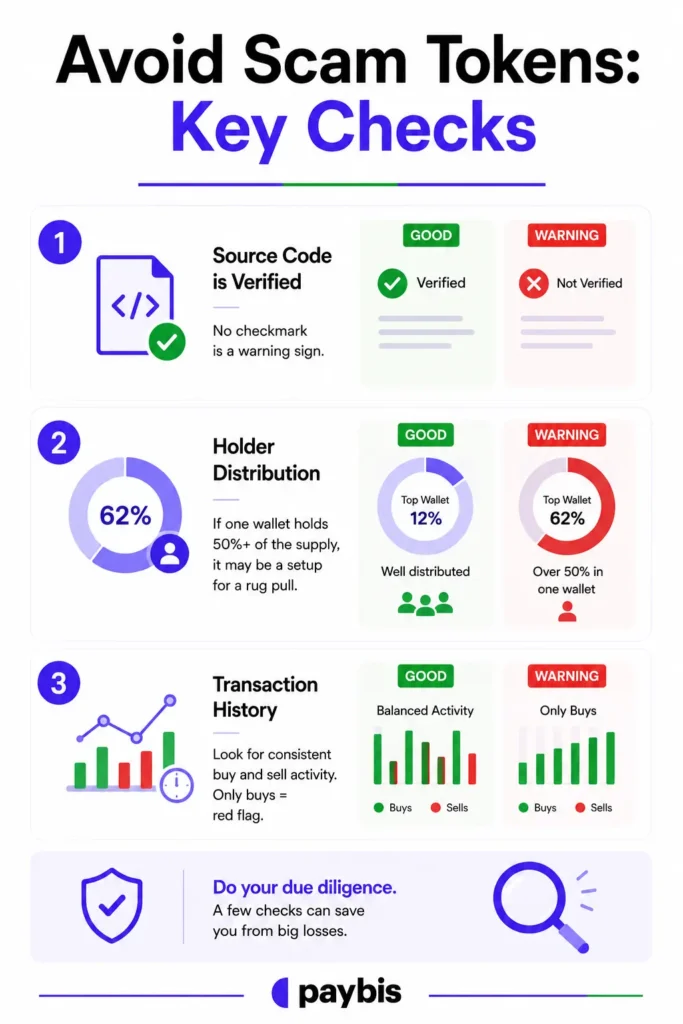
Avoid Scam Tokens: Key Checks
Once you have the contract address, paste it into Etherscan or BscScan and check:
- Green checkmark: The source code is verified. No checkmark is a warning sign.
- Holder distribution: If one wallet holds 50%+ of the supply, it may be a setup for a rug pull.
- Transaction history: A legitimate token shows consistent buy and sell activity. A scam token often shows only buys.
How to Undo a Mistaken Swap
Blockchain transactions are permanent. No platform can reverse a completed on-chain swap. If you accidentally swapped into the wrong token and sufficient liquidity exists, your only option is to swap back. If you sent crypto on the wrong network entirely, the Paybis help article on wrong network sends covers specific recovery scenarios.
How to Report a Bad Token
On Etherscan, navigate to the token contract page and use the “Report” function to flag it as malicious. On CoinGecko, use the feedback form on the asset page to report fraudulent tokens.
Troubleshoot Swaps: Platform-by-Platform Guide
Different platforms fail in different ways. Here’s what to check first on each.
Uniswap Swap Fixes & Recovery
Uniswap V3 uses concentrated liquidity, so tokens can run out of liquidity within specific price ranges. If a swap fails with a liquidity error, switch from V3 to V2 in the Uniswap interface, which applies a broader liquidity model. Per Uniswap’s documentation, slippage and insufficient funds cause the majority of failed swaps.
Resolve PancakeSwap Transaction Issues
PancakeSwap runs on BNB Chain and can experience congestion spikes. The platform’s troubleshooting documentation recommends increasing slippage tolerance for low-liquidity tokens and reducing the trade amount when the pool is shallow.
Why 1inch Swaps Fail: A Guide
1inch routes swaps across multiple liquidity pools simultaneously. When one pool in the chain runs low on liquidity at the moment of execution, the route fails. The 1inch Help Center recommends reducing the swap amount or selecting a simpler route manually if the default routing fails repeatedly.
SushiSwap: Recovering Lost Funds
SushiSwap supports cross-chain swaps, which add a bridge layer as an additional point of failure. If a SushiSwap cross-chain swap fails, check the bridge transaction separately on the relevant block explorer, as it is a distinct transaction from the swap itself.
Curve Finance: Recovering Lost Swap Funds
Curve specializes in stablecoin swaps and uses low default slippage tolerances for stable pairs. If a Curve swap fails, check whether the stablecoin you’re swapping shows an unusual price on a block explorer at the time. Our guide on USDC vs USDT can help you understand the differences between the stablecoins most commonly involved in Curve swaps. Waiting for pricing to normalize before retrying usually resolves the issue.
Paybis: Recover Funds After Swap Problems
Paybis operates differently from DEXs. When a transaction is rejected for security reasons, funds return to the original payment method. Paybis handles the blockchain interaction on the user’s behalf. The 24/7 live chat support team is available to assist with any transaction status questions.
“After struggling for a long time to sell my crypto, I finally found a platform that is incredibly easy and fast to use: Paybis. The entire process was smooth, and I received my money instantly without any delays.” – WILDCADLEY CHARLES on Trustpilot
Get Human Help: When to Reach Out and What to Say
Before contacting any support team, gather the information they’ll need to diagnose your issue quickly.
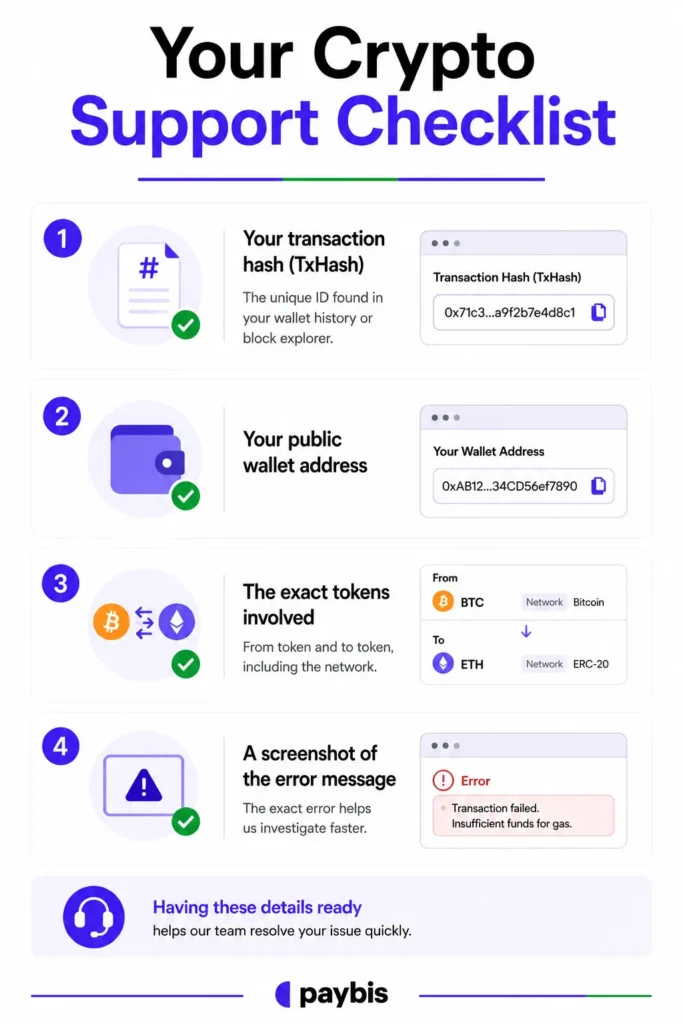
Your Crypto Support Checklist
- Your transaction hash (TxHash): the unique ID found in your wallet history or block explorer.
- Your public wallet address.
- The exact tokens involved (from token and to token, including the network).
- A screenshot of the error message you received.
Transaction Hash and Wallet Address
A transaction hash looks like a long string of letters and numbers (e.g., “0x4e3a…d72b”). It is the on-chain receipt for your transaction, and every support team needs it to locate your specific swap. Copy it directly from your wallet’s transaction history or from the block explorer. The Paybis help article on wrong destination tags shows exactly what information to include when reporting a transaction issue.
Your Crypto App Error Screens
Screenshot the exact error message as it appears in the wallet or DEX interface. The specific wording matters. “Execution reverted” and “Insufficient Output Amount” point to completely different root causes, and a support agent needs the exact text to diagnose the issue quickly.
How Fast Will Support Respond?
DEXs typically provide documentation but may not offer direct customer support when your transaction fails. Centralized exchanges may have support teams, but response times vary. For context on why many users move away from DEXs toward platforms with real support, see our piece on why crypto users switch platforms.
Paybis provides 24/7 live human support with an average response time of approximately 15 seconds.
Quick Tips for Error-Free Crypto Swaps
Prevention is faster than troubleshooting. These habits eliminate the majority of swap failures before they happen.
Gas Fees: Prevent Swap Failures
Check the Etherscan Gas Tracker before submitting any swap. During periods of high network congestion (major market events, large token launches), waiting can meaningfully reduce the cost of an attempted transaction.
Protect Funds: Verify Swap Address
Always copy contract addresses directly from CoinGecko or a block explorer rather than typing the token name into a DEX search bar. One character difference in a contract address means a completely different token. The Paybis guide on wallet transfer warnings includes specific cautions about address verification.
Time Your Swap for Smoother Trades
Network congestion on Ethereum peaks during major market events, large NFT drops, and token launches. Swapping during calmer periods typically results in lower fees and faster confirmations.
Ready to buy or swap crypto without navigating error codes alone? Create a Paybis account and complete identity verification. The system check usually takes up to 5 minutes. All fees are shown before you confirm, and 24/7 human support is available the moment anything goes wrong. Paybis has served 5M+ users across 180+ countries, with 31,000+ Trustpilot reviews with a rating of 4.1 or “Great.”
Key Terminology
- Gas: The unit measuring computational work required to process a transaction on Ethereum. Miners collect this fee whether the transaction succeeds or fails.
- Gas limit: The maximum amount of gas you authorize for a transaction. Setting it too low causes “out of gas” failures.
- Slippage tolerance: The percentage of acceptable price movement between submitting a swap and its execution. Exceeding slippage tolerance causes “Insufficient Output Amount” errors.
- Mempool: The waiting room for unconfirmed transactions. A transaction stays here until a miner includes it in a block or drops it.
- Nonce: The sequential number assigned to every transaction from a wallet address. Each new transaction must use the next number in sequence.
- Liquidity pool: A pool of two tokens locked in a smart contract that powers DEX trading. If the pool runs low on one token, rates worsen or trading stops entirely.
- Smart contract: Self-executing code on the blockchain that runs the swap automatically when conditions are met, with no human involvement.
- DEX (Decentralized Exchange): A peer-to-peer trading platform where users can trade cryptocurrencies without a centralized intermediary controlling funds. DEXs use smart contracts to facilitate trades and typically have limited or no traditional customer support teams.
- Transaction hash (TxHash): The unique ID for a specific blockchain transaction, used to look it up on a block explorer like Etherscan.
- Contract address: The unique on-chain identifier for a specific token. Two tokens with the same ticker can have entirely different contract addresses.
FAQ
Is My Crypto Lost When a Swap Fails?
No. A failed swap typically reverts the transaction, returning your tokens to your wallet as if the swap never happened. The main cost is the gas fee paid to validators or miners for the computational work they attempted.
Why Do I Keep Getting the "Insufficient Output Amount" Error?
Your slippage tolerance is set too low for the token’s current price volatility or liquidity. Increase the slippage tolerance by 1-2% in the DEX settings panel and resubmit the transaction.
How Long Should I Wait Before a Pending Swap Is Considered Stuck?
Wait at least 30-60 minutes under normal conditions. If the transaction is still pending after an hour, it’s likely stuck due to insufficient gas and you should speed it up or cancel it using the same-nonce replacement method.
Can I Get My Gas Fees Back if a Transaction Fails?
No. Gas fees are typically consumed regardless of whether a transaction succeeds or fails because validators or miners performed the computational work. No platform can refund gas fees.
What Information Does a Support Team Need to Help Me With a Failed Swap?
Provide your transaction hash (TxHash), your public wallet address, the tokens involved (from and to), the network used (e.g., Ethereum, BNB Chain), and a screenshot of the error message.
Where Can I Get Help if I'm Stuck Troubleshooting a Failed Swap?
Paybis handles the blockchain interaction on your behalf. Rejected transactions return funds automatically with zero charge, and 24/7 live human support (average response time of 1-2 minutes) is available in 9+ languages to resolve any issue in real time, unlike DEXs which have no customer support teams.
Where Can I Get Help if I'm Stuck Troubleshooting a Failed Swap?
Paybis handles the blockchain interaction on your behalf. Rejected transactions return funds automatically with zero charge, and 24/7 live human support (average response time of 1-2 minutes) is available in 9+ languages to resolve any issue in real time, unlike DEXs which have no customer support teams.
How Do I Know if a Token Is a Scam Before Swapping?
Look up the contract address on CoinGecko or CoinMarketCap to find the official address, then verify it on Etherscan. Check for verified source code (green checkmark) and review the holder distribution. If one wallet holds more than 50% of the supply or the token requires 20%+ slippage, treat it as a serious warning sign.
Disclaimer: Don’t invest unless you’re prepared to lose all the money you invest. This is a high‑risk investment and you should not expect to be protected if something goes wrong. Take 2 mins to learn more at: https://go.payb.is/FCA-Info