How to Switch from Kraken to Paybis in 4 Steps (2026)
Key Takeaways:Create and verify your Paybis account in approximately 2 minutes using a photo ID and selfie. Then, create your Paybis wallet and copy the deposit address for the coin you are moving. Withdraw funds from Kraken by pasting your Paybis address into the withdrawal field. Always verify the first and last four characters before confirming. Close your Kraken account permanently or leave it dormant and remove your banking details. What do you get with Paybis? You gain 24/7 human support with a 15-second average chat response, all fees (Service, Processing, Network) shown before you confirm payment, and an interface built for people who want to own crypto, not study charts. You can also use our USD Coin calculator to estimate costs before committing, withdraw USDT to your bank account directly, or explore what Bitcoin dominance means for the broader market.
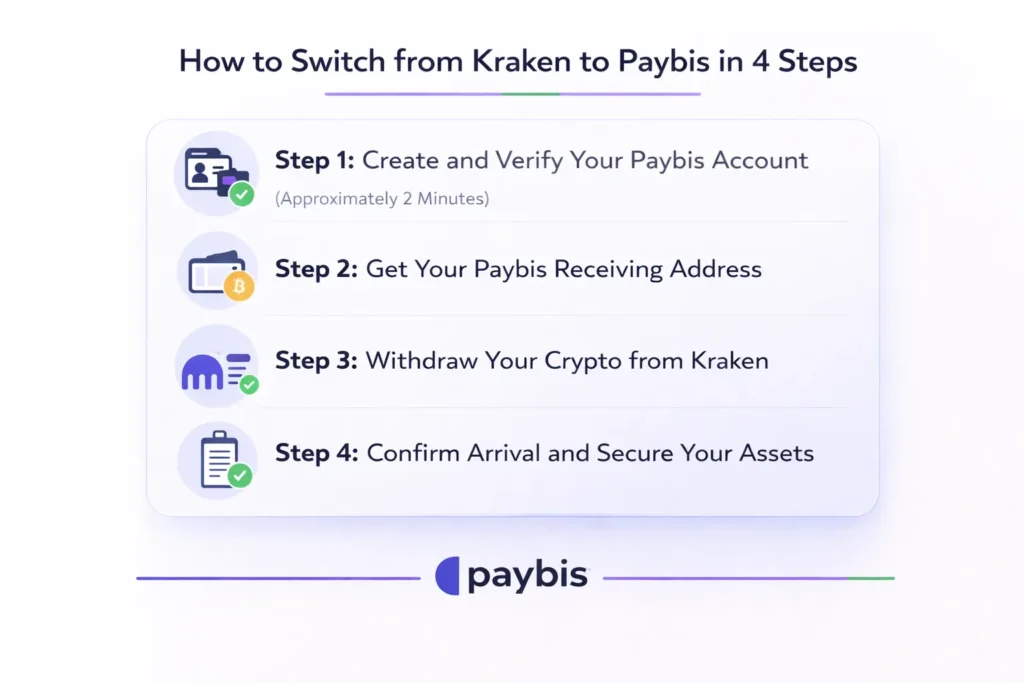
You can move your crypto from Kraken to Paybis in four steps. Kraken built its platform for professional traders who spend hours reading order books and managing margin positions. We built ours for people who want to buy Bitcoin with PayPal or a card without studying charts. This guide shows you exactly how to make the switch safely.
Why Casual Investors Are Leaving Kraken for Paybis
Kraken’s strength is also its limitation for casual buyers: it is built for traders. The platform surfaces advanced charting tools, margin trading options, and dozens of order types that experienced traders need but that overwhelm someone trying to buy $300 of Bitcoin for the first time. If you’ve ever felt frustrated by a complex exchange interface, you’re not alone: our guide on why users leave BitPay and seek Paybis alternatives explores this pattern in depth.
We built Paybis around a single calculator: enter an amount, see exactly what you receive, and confirm. No order books. No trading jargon. As one user described the experience:
The support difference is equally stark. Kraken routes users through ticket queues, which means waiting hours for a reply when a transaction goes wrong. Our 24/7 support team provides rapid chat responses from a real human agent, 365 days a year.
Account security practices also differ meaningfully. If Kraken flags a transaction as suspicious, funds can be frozen with limited visibility into resolution timelines. We take a different approach: if we reject a transaction for compliance or security reasons, your funds return to your payment source within 24 hours with applicable fees deducted, and our support team explains exactly why and what you can do next.
Pre-Migration Checklist: What You Need Before Starting
Before initiating any transfer, confirm you have each of these ready:
- Kraken account access with your 2FA device (the authenticator app or hardware token that generates your extra login codes) nearby.
- A valid government-issued ID, such as a passport, driver’s license, or national ID card, for Paybis verification.
- A smartphone for the selfie step in Paybis’s identity check.
- 15 minutes of free time with a stable internet connection.
- All open orders on Kraken cancelled. Funds tied up in active orders cannot be withdrawn.
One critical warning: Kraken places a 72-hour withdrawal hold on funds purchased via first-time debit or credit card, and a 7-day hold on ACH Plaid deposits. If you recently deposited using either method, check your account’s withdrawal status before proceeding. It’s also worth reviewing the top payment methods for buying crypto so you know your options once you’re on Paybis.
Step 1: Create and Verify Your Paybis Account (Approximately 2 Minutes)
Action: Visit paybis.com and click “Sign Up” in the top right corner.
Here is the exact sequence:
- Enter your email address and create a password. We send a 6-digit verification code to your inbox. Enter it and click “Continue.”
- Enter your phone number. We send a second 6-digit code via SMS. Enter it and click “Continue.”
- Complete identity verification. Upload a clear photo of your government ID and take a selfie. The account creation and verification guide shows exactly what the screens look like.
Verification completes in approximately 2 minutes for most users who submit clear, well-lit documents. The official Paybis identity verification video covers every screen in detail.
“The Paybis app it’s the easiest I’ve ever used… it was the easiest to just complete the account setup.” – Tammy on Trustpilot
Step 2: Get Your Paybis Receiving Address
Before you touch Kraken, retrieve the address where your crypto will land. A wallet address is the alphanumeric string that acts as your account number for receiving crypto.
Here is how to create your wallet and find your deposit address:
- Log into your Paybis account at paybis.com.
- Navigate to your dashboard and open “Crypto Wallet.”
- Create a wallet by clicking the “Plus in a circle” button and selecting the cryptocurrency you want to receive (Bitcoin, Ethereum, etc.) from the dropdown menu.
- Click “Deposit” and copy the full wallet address shown on screen. Our deposit from external wallet guide also shows how to use the QR code as an alternative to manually copying the string.
- Critical safety check: After pasting the address into Kraken, verify that the first four and last four characters match exactly. This guards against clipboard-hijacking malware, which silently replaces copied addresses with an attacker’s address. Blockchain transactions are irreversible once confirmed on the network. There is no undo.
Step 3: Withdraw Your Crypto from Kraken
Important pre-check: Confirm you have completed at least Express or Intermediate verification on Kraken. Kraken’s verification system has three tiers: Starter (basic verification for limited trading), Intermediate (enhanced verification for higher limits), and Express (expedited processing). Starter-level accounts have limited withdrawal capabilities, with a maximum withdrawal limit of $5,000 in cryptocurrency. For unrestricted crypto transfers, you need at least Intermediate verification.
Withdrawal steps on Kraken:
- Log in to your Kraken account and click “Withdraw” (or “Transfer”) in the left-hand navigation.
- Select the cryptocurrency you want to send (Bitcoin, Ethereum, etc.).
- Click “Add new address” and paste your Paybis wallet address into the address field.
- Verify the address by checking that the first four and last four characters match what you copied from Paybis.
- Enter the amount you want to withdraw.
- Complete the 2FA check using your authenticator app or device.
- Confirm and submit the withdrawal.
On withdrawal fees: Kraken charges a network fee for the transfer, approximately 0.00005 BTC for Bitcoin (roughly $3-5 at current rates, though this fluctuates with network demand). This is the cost miners charge to process the transaction on the blockchain. We charge zero fees to receive incoming crypto deposits.
Test transaction tip: If you are moving a large amount, send a small test amount first and confirm it arrives in your Paybis wallet before sending the remainder. This adds 10-60 minutes to your process but removes the risk of a large loss from an address error.
For a visual guide on sending and receiving crypto using Paybis, the Paybis send and withdraw guide covers the full process.
Step 4: Confirm Arrival and Secure Your Assets
Bitcoin transfers from Kraken typically complete within 40-60 minutes after submission. Ethereum is often faster. Total time equals Kraken’s processing time plus the blockchain network’s confirmation speed.
How to check your transfer status on Paybis:
Log in to your Paybis dashboard.
Open “Crypto Wallet” and select the coin you sent. The transaction will appear as “Pending” and transition to “Completed” once the blockchain confirms it.
We protect your funds with PCI DSS Level 1 certification, the same standard banks use for card data, plus Multi-Party Computation (MPC) technology for wallet security. We have operated since 2014 with no reported security breaches. For broader context on how Bitcoin’s value changes over time and what that means for your holdings, our blog has an accessible breakdown.
Optional: Close or Downgrade Your Kraken Account
You do not have to close your Kraken account. If there is any chance you will want advanced trading features later, leave it dormant and remove your banking details.To close it permanently:Log into Kraken, click your account icon, then select “Settings.”Scroll to “Close Account,” select your reason, and confirm.
Before closing, download your full transaction history for tax records. Kraken removes access to this data after closure. Confirm your balance is at zero before proceeding. Account deletion on Kraken is permanent and cannot be reversed.
Kraken vs. Paybis: Feature Breakdown for Casual Users
| Feature | Kraken | Paybis |
|---|---|---|
| Verification time | 5–10 minutes (Intermediate level) | ~2 minutes (photo ID + selfie) |
| Support type | 24/7 live chat, email, and ticket support | 24/7 live chat, 15-second avg. response |
| Interface | Pro trading charts, order books, 600+ pairs | Simple calculator: enter amount, see crypto |
| Fee transparency | Volume-based maker/taker fees; schedule publicly listed, but your exact rate depends on 30-day trading activity | All fees shown before you confirm payment |
| First transaction speed | Varies by deposit method | ~10 minutes average, including verification |
| Countries supported | Selective regional restrictions | 180+ countries |
| Payment methods | Bank transfer only on the main exchange (card available via Kraken app in select regions) | 20+ payment methods |
Independent reviews from Coin Bureau’s Paybis analysis and 99Bitcoins’ fee and security breakdown consistently highlight verification speed and support quality as Paybis’s primary advantages for casual buyers. FXEmpire’s 2025 Paybis review echoes this, noting the streamlined experience compared to trading-focused platforms. If you’re weighing different ways to gain exposure to Bitcoin, our comparison of Bitcoin ETFs vs. buying Bitcoin directly is also worth reading before you decide.
Troubleshooting Common Migration Issues
“My withdrawal is on hold on Kraken.”
Check whether you recently changed your password, added a new 2FA device, or made a first-time card deposit. Kraken places a 72-hour hold on withdrawals after first-time card purchases and cannot bypass these time-based security holds for security reasons.
“I got an ‘Invalid Address’ error on Kraken.”
This usually means a network mismatch. Sending Bitcoin (BTC) to an Ethereum (ETH) address, or vice versa, triggers this error. Return to your Paybis wallet, confirm you selected the correct coin, and copy the address again. Our transfer warnings guide covers network-specific guidance in detail.
“Where is my crypto? It has been over an hour.”
Bitcoin typically confirms within 10-60 minutes. Ethereum is often faster. Suppose it has been more than 2 hours, open Paybis live chat. A human agent responds in approximately 15 seconds and can look up the transaction hash (the unique ID for your transfer on the blockchain) to confirm its status. Step-by-step confirmation help is also available in our Paybis send support section. If you run into account access issues on any platform, our guide on what to do when your account is locked on Coinbase illustrates how support quality can make or break the recovery experience.
Ready to Make the Switch?
We serve 5M+ retail users across 180+ countries and hold 30,700+ Trustpilot reviews with a rating of 4.1 or “Great” as of March, 2026. We are FinCEN-registered as a US Money Services Business (entity 31000272911973), FINTRAC-registered in Canada as a Money Services Business (M22061209), and PCI DSS Level 1 compliant.
Create your Paybis account and complete identity verification in approximately 2 minutes. All fees appear before you confirm payment. Service fees start from 1.49%, and we show you the complete breakdown upfront.
Key Terminology
- Wallet address: The alphanumeric string (like an account number) used to receive crypto. Sending to the wrong address results in permanent, unrecoverable loss.
- Network fee: The cost miners charge to process and confirm a transaction on the blockchain. This fee is set by the network, not by Paybis or Kraken, and fluctuates with network traffic.
- 2FA (Two-Factor Authentication): An extra security code, usually generated by an authenticator app, required alongside your password to authorize withdrawals on Kraken.
- Blockchain confirmation: The point at which the blockchain network has verified and permanently recorded your transaction. Bitcoin typically requires several confirmations before funds are considered fully received, contributing to the 10-60 minute transfer window.
- Custodial wallet: A wallet where we hold your crypto on your behalf, protected by institutional-grade security including PCI DSS Level 1 certification and cold storage standards (offline security for your funds).
FAQ
Is it free to transfer crypto from Kraken to Paybis?
Kraken charges a network withdrawal fee for the transfer, approximately 0.00005 BTC for Bitcoin (as detailed in Step 3 above). We charge zero fees to receive an incoming crypto deposit.
How long does the transfer take?
It depends on the blockchain. Bitcoin transfers from Kraken typically take 40-60 minutes after submission. Ethereum is often faster. Total time equals Kraken’s processing time plus blockchain confirmation speed.
Can I transfer USD or EUR directly from Kraken to Paybis?
No. Withdraw fiat to your bank from Kraken first, then use your bank account or card to buy crypto on Paybis.
Does Paybis support buying more crypto after the transfer?
Yes. Once your funds are in your Paybis wallet, you can buy 90+ cryptocurrencies using 20+ payment methods including Visa, Mastercard, and local bank transfers. Our fee calculator shows your exact cost before you confirm.
Disclaimer: Don’t invest unless you’re prepared to lose all the money you invest. This is a high‑risk investment and you should not expect to be protected if something goes wrong. Take 2 mins to learn more at: https://go.payb.is/FCA-Info