PayPal Crypto Alternatives: Other Payment Methods on Paybis
Key Takeaways:PayPal restricts crypto by region, locks funds inside its own ecosystem, and limits weekly transfers to $25,000. Paybis gives you 20+ payment alternatives across 180+ countries. Use your Visa, Mastercard, SEPA transfer, or PIX in Brazil to buy Bitcoin with PayPal or buy USDT with PayPal. Before you choose, you can check what Bitcoin dominance means for your portfolio mix. Buy 90+ cryptocurrencies in under 10 minutes. Your first card transaction carries a 0% Paybis service fee. After that, fees start from 1.49%, and we itemize every cost before you confirm. Identity verification takes ~2 minutes. If anything goes wrong, 24/7 live chat connects you to a human in 1-2 minutes.
PayPal’s core crypto feature (BTC, ETH, LTC, BCH, SOL, and LINK) is primarily available in the US and US Territories, keeps your funds inside a closed platform, and caps weekly transfers at $25,000. Paybis supports 20+ payment methods across 180+ countries, from instant card purchases to local bank transfers and PIX in Brazil. This guide breaks down each method, the exact costs, and how fast your crypto arrives.
Why PayPal Falls Short for Crypto Buyers
PayPal lets you buy crypto, but it doesn’t give you a private key. You hold a balance inside PayPal’s platform, not actual self-custodied crypto (self-custody means you control your own assets with your own private key, like keeping cash in your own wallet instead of a bank). PayPal’s own terms confirm you can transfer to external wallets, but weekly transfer limits cap at $25,000 and the available countries remain narrow.
PayPal Crypto Not Supported by Region
PayPal’s crypto hub operates in the US and a small number of other markets. Users outside those regions find the feature simply unavailable. Paybis operates in 180+ countries and supports local payment methods built for those regions. If you’re based in the EU, our guide to how to buy crypto in Germany walks through the local options in detail.
Avoid Slow, Costly Crypto Buys
Other platforms embed costs that don’t appear until the final screen. Paybis shows the complete fee breakdown before you confirm: Service Fee, Processing Fee, and Network Fee (the amount miners charge to confirm your transaction on the blockchain), all itemized. What you see is what you pay.
Buy Crypto with Your Debit or Credit Card
Card purchases are the fastest way to own crypto on Paybis. The whole sequence, from entering your amount to seeing crypto in your wallet, takes under 10 minutes for most users. For a broader look at how cards compare to other options, see our guide on alternative payment methods vs credit cards.
Is Your Visa/Mastercard Accepted?
Paybis accepts Visa globally across the US, EU, Latin America, Southeast Asia, and Africa. Mastercard is accepted in 43 specific countries due to BRAM program restrictions, and customers whose country is not in that list are advised to use Visa cards, which are accepted without such limitations.
How Fast Are Card Crypto Buys?
Card transaction processing is instant (<1 minute). Settlement, meaning when the crypto actually arrives in your wallet, is near-instant and depends on the blockchain. As Paybis explains, card purchases clear in real time, not through the ACH batch system that makes Coinbase bank transfers take 3-5 business days.
Card Fees & Max Purchase Amounts
Here’s the full cost breakdown for a card purchase:
- Service Fee: 1.49% per transaction. Your first card transaction carries a 0% service fee.
- Processing Fee: 4.5-8.5% for transactions over $50 (depending on the currency used). Flat fees apply for smaller amounts: $2 for $5-$20, and $3 for $20.01-$50.
- Network Fee: Varies by blockchain congestion. Bitcoin fees average around $0.82 per transaction currently. Ethereum and other chains vary based on network demand.
The minimum card purchase is $5. Verified accounts can buy up to $20,000 per day and $50,000 per month. ETH, ERC-20 tokens, and DOT carry a separate $10 minimum per transaction.
Step-by-Step: Buying Crypto with Your Card
- Select crypto and amount on the Paybis homepage calculator and review the itemized fee breakdown.
- Verify your identity by uploading a government-issued ID and taking a selfie. This takes around 2 minutes for most users, as Sumsub’s data on Paybis onboarding confirms.
- Enter your card details and complete the 3D Secure check (3D Secure is an extra security step your bank uses for online card payments, like sending a code to your phone to confirm it’s you).
- Receive your crypto in your specified wallet once the blockchain confirms the transaction.
You can also watch Paybis’s card buying tutorial to see the interface before you start.
How to Buy Crypto via Bank Transfer on Paybis
Bank transfers cost less in processing fees than card purchases. They suit larger purchases where saving on fees matters more than saving a few minutes. If you want to understand all the methods available across the industry before deciding, our overview of top payment methods to buy crypto covers the landscape in full.
How to Buy Crypto with SEPA
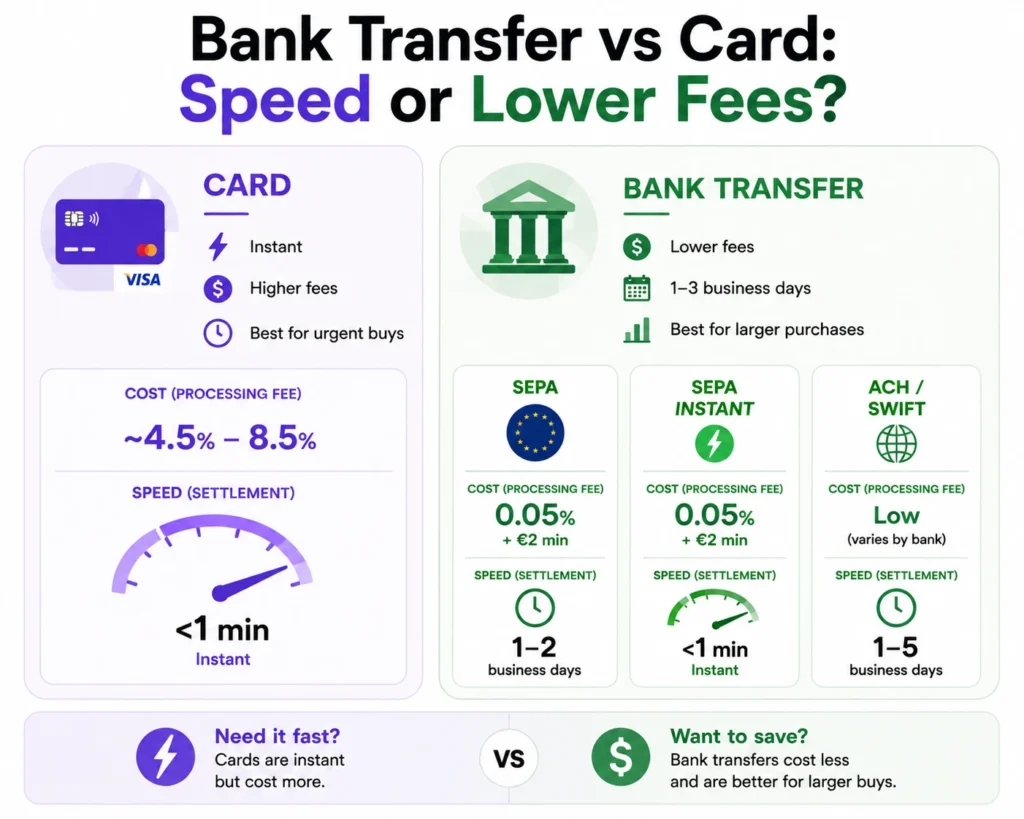
SEPA (the Single Euro Payments Area standard used across EU countries) is the lowest-cost option on Paybis for European users. Paybis charges a processing fee of just 0.05% or a minimum of €2, plus a 0.99% service fee on the amount received. Standard SEPA takes 1-2 business days, while SEPA Instant settles in under 1 minute where supported. For a $200 purchase, total costs run approximately $4-$5 compared to $12-$20 for a card transaction, making SEPA the better choice for larger EU-based buys.
ACH and SWIFT for US and International Users
US users can connect bank accounts through ACH, which processes in 1-3 business days, as Paybis details in their bank transfer overview. For international wire transfers, SWIFT connects banks across countries for cross-border payments. SWIFT processing follows standard international wire timelines, typically 1-5 business days depending on the corridor and intermediary banks involved.
Bank Transfer: Decide on Speed & Cost
The trade-off is straightforward. Cards cost more (4.5-8.5% processing) but settle instantly (<1 minute). Bank transfers cost less (0.05% or €2 minimum for SEPA) but take 1-3 business days. For time-sensitive purchases, cards win. For larger amounts where the fee savings are meaningful, bank transfers make more sense.
Fast PIX Payments for Crypto in Brazil
PIX is Brazil’s instant payment system, launched by the country’s central bank and now used by over 150 million Brazilians. It processes around the clock, seven days a week, and settles in seconds.
PIX: Instant Crypto Buying for Brazilians
PIX works through QR codes or Pix keys (phone number, CPF, or email). It removes the friction of traditional bank transfers and processes with no banking hours. Paybis explicitly supports PIX as a payment method, giving Brazilian users a fast, local alternative to international card rails or wire transfers.
PIX Transaction Speed and Costs
PIX processing on Paybis is instant. The service fee is 0.99% after your first transaction (which carries a 0% service fee), and processing fees are lower than international card rates. PIX also removes the currency conversion friction that comes with using a Brazilian card on an international platform by processing directly in BRL.
Local Payment Methods in 180+ Countries
Beyond cards, bank transfers, and PIX, Paybis supports a range of e-wallets and local methods that vary by location. The platform surfaces the options available in your region based on your IP address, as covered in the 2024 platform overview.
Which Payment Methods Paybis Accepts
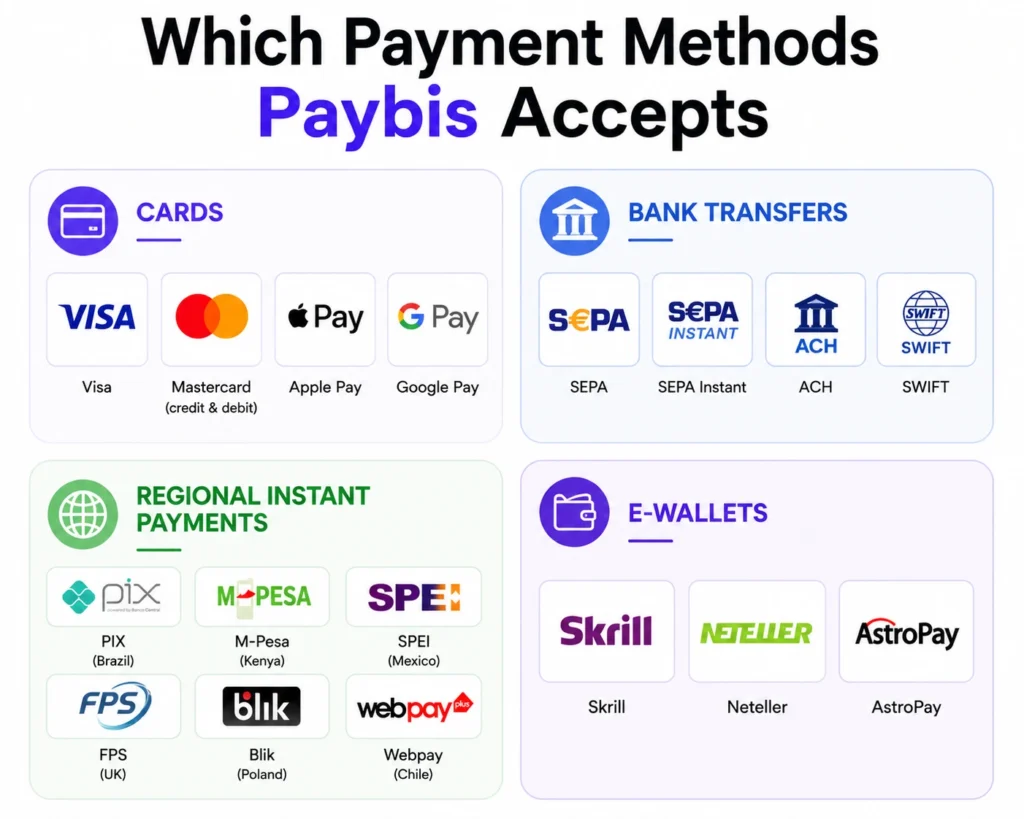
Paybis supports 20+ payment methods, grouped by type:
- Cards: Visa, Mastercard (credit and debit), Apple Pay, Google Pay
- Bank transfers: SEPA, SEPA Instant, ACH, SWIFT
- Regional instant payments: PIX (Brazil), M-Pesa (Kenya), SPEI (Mexico), FPS (UK), Blik (Poland), Webpay (Chile)
- E-wallets: Skrill, Neteller, AstroPay
“I like how easy it is to buy crypto with my card and send it directly to my wallet. The interface is clear, transactions are fast, and support has been helpful whenever I had questions.” – Verified user review of Paybis
Crypto Buying via Local Payments
Skrill and Neteller fees follow a tiered structure, where the percentage you pay decreases as your transaction amount increases. These e-wallets are useful if you’ve loaded funds from a local bank account and want a faster route to crypto than a standard bank wire. Watch the e-currency to crypto walkthrough for a practical overview. Once you’ve moved funds into crypto, it’s also worth knowing how to cash out Bitcoin when you’re ready to convert back to fiat.
Comparing Payment Methods: Speed, Fees, and Limits
| Method | Speed | Processing Fee | Best For |
|---|---|---|---|
| Credit/Debit Card | Instant, under 1 minute | 4.5–8.5% over $50 | Speed and convenience |
| SEPA Bank Transfer | Instant (SEPA Instant) or 1–2 days (standard) | 0.05% or min €2 | Large EU purchases, lower fees |
| PIX (Brazil) | Seconds | Lower than card rates | Brazilian users, instant local payments |
| Skrill/Neteller | Near-instant | 3.65–4% (EUR, tiered) | Those who prefer e-wallet payment methods |
Lowest-Fee Payment Options
Here’s what a $200 Bitcoin purchase costs via credit card (subsequent transaction):
- Service Fee: $2.98 (1.49%)
- Processing Fee: $9-$17 (4.5-8.5%)
- Network Fee: ~$0.82 and up (varies by blockchain congestion)
- Total: approximately 221
SEPA bank transfer brings that total down to approximately $5 in fees, making it the lower-cost option for larger EU-based purchases at the expense of speed.
Transaction Limits by Payment Type
- Cards: $5 minimum, $20,000 per day, $50,000 per month
- ETH, ERC-20 tokens, DOT: $10 minimum per transaction
- Skrill/Neteller: $20 minimum, $200,000 daily and monthly
Match Payment to Your Crypto Needs
Use cards when you need crypto today and instant settlement outweighs the higher processing fee. Use SEPA or ACH when you’re making a larger purchase and can wait 1-3 days for lower fees. Use PIX if you’re in Brazil and want instant settlement with local payment rails. Use Skrill or Neteller if your local bank card has trouble with crypto purchases.
How to Choose Your Payment Method on Paybis
See Your Exact Cost Before You Pay
Every Paybis transaction carries three fee types. The Service Fee (1.49% after your first card transaction) is Paybis’s margin. The Processing Fee is what the payment network charges and varies by method and amount. The Network Fee is what blockchain miners charge to confirm your transaction, which fluctuates based on congestion. Paybis’s calculator shows all three before you confirm, so you know the exact total before entering payment details. The checkout screen itemizes each charge, and the amount shown is exactly what Paybis charges. If you’re still comparing platforms, our guide to the best Bitcoin trading platforms can help you evaluate the alternatives.
Update Your Payment Method
You can add multiple cards and bank accounts to a single Paybis account at any time. If one method is declined, you can switch to another without restarting the verification process. The Paybis support center is available 24/7 if you need help updating payment settings.
Troubleshooting Your PayPal-Free Crypto Buys
What if My Preferred Payment Method Isn’t Available?
Paybis shows payment options based on your location. If a specific local method isn’t available, Visa is the most reliable card fallback across the 180+ supported countries, while Mastercard is accepted in 43 specific countries due to program restrictions. The Paybis homepage calculator shows your available options in the dropdown before you start.
Credit Cards: Instant Crypto Purchases?
Card processing runs in under 1 minute, but two things can introduce a brief delay. First, 3D Secure authentication requires you to approve the transaction through your bank’s app or SMS code. Second, some banks automatically flag crypto purchases and decline the transaction. If your card is declined, call your bank’s fraud line and ask them to allow the crypto merchant category code, then try again.
Why Your Paybis Payment Failed
There are two main reasons a payment fails on Paybis. Your bank blocked the transaction (fix: call your bank). Or Paybis’s security system flagged it for compliance reasons. In both cases, Paybis does not charge you, and your funds return to your source. If they don’t return, contact Paybis support directly via live chat.
Your Exact Crypto Purchase Cost
Before completing any purchase, use the Paybis fee calculator to see the exact Service Fee, Processing Fee, and Network Fee for your specific amount and payment method. With 30,900+ Trustpilot reviews at a 4.1 rating and $1.2B+ in annual transaction volume processed in the last 12 months, Paybis has a consistent track record on transparent pricing.
Ready to buy crypto without PayPal? Create a Paybis account, complete the 2-minute identity verification, and see your exact total in the calculator before you pay. Your first credit or debit card transaction carries a 0% Paybis service fee.
Buying vs Owning: Why PayPal Crypto Isn’t Really Crypto
The article mentions PayPal doesn’t give you a private key, but it’s worth understanding why that matters in practice.
When you buy Bitcoin on PayPal, you hold a number in PayPal’s ledger. You can’t send it to a hardware wallet. You can’t use it to pay on a Bitcoin network. You can’t move it to another exchange without first selling and repurchasing. PayPal keeps your crypto in a custodial account without giving you a private key. To understand why that matters, see our explainer on how custodial and non-custodial wallets differ.
The short version: custodial means the platform controls access. Non-custodial means you do. When you buy on Paybis and send to your own wallet address, you own the asset directly. If Paybis shut down tomorrow, your funds would be unaffected because they live in a wallet only you control.
More Ways to Buy: Bank Transfers, RevolutPay, and Regional Options
The article covers SEPA and ACH in detail. A few other options are worth knowing about.
If you want the lowest fees for larger purchases, you can buy Bitcoin with a bank account via SEPA or ACH and save significantly compared to card processing rates. For a $1,000 purchase, SEPA costs around $10-12 total versus $55-85 with a card. For users making regular larger purchases, that difference adds up quickly.
European users with a Revolut account can also buy Bitcoin with RevolutPay, adding another fast alternative to traditional card or bank transfer payments. RevolutPay is particularly useful when your bank blocks a card transaction on a crypto merchant, which happens more often than it should.
Once you’ve bought crypto through any of these payment methods, you can also sell Bitcoin back to fiat whenever you’re ready to exit your position. The same fee transparency applies on the sell side, and you receive funds back via your original payment method.
If you’re weighing your options beyond just buying, our guide to the easiest crypto-to-fiat conversions covers the off-ramp side in detail, including which methods are fastest and which carry the lowest fees when cashing out.
Key Terminology
- 3D Secure: An extra security layer your bank uses for online card payments. It typically sends a code to your phone or prompts your banking app for approval before a transaction completes.
- Self-custody: You hold your crypto directly with a private key, like keeping cash in your own wallet rather than in a bank. Paybis lets you send to any external wallet address you choose.
- Network fee: The cost paid to blockchain miners to confirm your transaction. It’s set by network demand, not by Paybis, and fluctuates with congestion.
- SEPA: The Single Euro Payments Area, a bank transfer standard used across EU countries that enables euro-denominated transfers with low fees and 1-2 day settlement (or seconds for SEPA Instant).
- ACH: The US bank transfer system. Standard ACH takes 1-3 business days to settle.
- SWIFT: The global interbank messaging network used for cross-border wire transfers. Processing typically takes 1-5 business days depending on the corridor.
- PIX: Brazil’s instant payment system, operated by the central bank. Settles in seconds, available 24/7, and used by over 150 million Brazilians.
- Service Fee: Paybis’s transaction fee, starting from 1.49%. Your first credit or debit card purchase carries a 0% service fee.
- Processing Fee: The fee charged by the payment network (Visa, Mastercard, your bank). Paybis passes this through at cost, from 4.5-8.5% for card transactions over $50.
FAQ
Does Paybis support PayPal as a payment method?
Yes, for Bitcoin purchases in the EEA. PayPal is available on Paybis if you reside in the European Economic Area and want to buy Bitcoin. Visa, Mastercard (accepted in 43 specific countries), SEPA bank transfers, PIX, Skrill, Neteller, and 20+ other methods are available across 180+ countries.
What happens if my card transaction is declined on Paybis?
Paybis does not charge you for declined transactions. Contact your bank to allow the crypto merchant category code, then retry or switch to an alternative payment method.
How long does identity verification take on Paybis?
Verification takes approximately 2 minutes for most users. You upload a government-issued ID and take a selfie, and the automated system processes both when documents are clear and valid.
How long does identity verification take on Paybis?
Verification takes approximately 2 minutes for most users. You upload a government-issued ID and take a selfie, and the automated system processes both when documents are clear and valid.
What is the minimum purchase amount on Paybis?
The minimum is $5 for card purchases on most cryptocurrencies. ETH, ERC-20 tokens, and DOT carry a $10 minimum per transaction.
Are fees higher on cards than bank transfers?
Yes. Card processing fees are 4.5-8.5% for transactions over $50, while SEPA bank transfers charge 0.05% or a minimum of €2. Regarding settlement times, cards process instantly while SEPA transfers take 1-2 business days.
Can Paybis users send crypto to any external wallet?
Yes. Paybis places no restrictions on which external wallet addresses you send to. You can withdraw to a personal wallet, another exchange, or any address you control, with no blacklist restrictions.
Is Paybis regulated and registered?
Paybis is registered with FinCEN as a Money Services Business in the US (US entity 31000272911973), with FINTRAC as an MSB in Canada (CA entity C100000646), and with the Revenue Chamber in Katowice as a VASP in Poland (RDWW-805). Paybis is also PCI DSS Level 1 compliant, the highest certification available for payment processing, and has operated since 2014 with no security breaches.
Why can't I use PayPal crypto outside the US?
PayPal’s crypto feature is primarily limited to US users and a small number of other markets. Users outside those regions either don’t see the option or face restrictions on sending to external wallets. Paybis operates in 180+ countries with local payment methods built for each region.
Does Paybis let me send Bitcoin to my own wallet?
Yes. After purchase, you can send crypto to any external wallet address you control. You’re not required to leave funds on the platform. This is a core difference from PayPal, which restricts what you can do with the crypto you purchase.
What is the cheapest way to buy Bitcoin on Paybis?
SEPA bank transfer for European users is the lowest-cost option, with a processing fee of 0.05% or a minimum of €2. ACH is the equivalent for US users. Both carry significantly lower fees than card transactions, at the cost of 1-3 business days for settlement.
Can I cash out Bitcoin on Paybis after buying?
Yes. Paybis supports selling as well as buying. You sell through the same interface, see the full cost breakdown before confirming, and receive fiat back to your original payment method. No separate trading account required.
Disclaimer: Don’t invest unless you’re prepared to lose all the money you invest. This is a high‑risk investment and you should not expect to be protected if something goes wrong. Take 2 mins to learn more at: https://go.payb.is/FCA-Info