How to Transfer Crypto to Bank Account Without Getting Rejected
– Most crypto withdrawal rejections come from three fixable causes: incomplete identity verification, a name mismatch between your bank account and your crypto profile, or bank-side policies blocking crypto-related transfers.
– Paybis shows every fee (service, processing, and network) before you confirm, so you always know the exact amount reaching your bank with zero surprises.
– If a transfer fails, your funds return to your original payment method with no charge applied. The issue is temporary, not permanent.
– Paybis’s 24/7 live chat (average response time: 1-2 minutes) connects you with a human agent, not a bot, when something goes wrong. Prefer funding via alternative methods? You can also buy Bitcoin with PayPal or buy Bitcoin with a credit card before withdrawing.
Crypto assets can increase or decrease in value. Paybis is a payment gateway, not an investment service. This content is for informational purposes only and does not constitute financial advice.
Getting your crypto into your bank account should not feel like a gamble. Whether you face a compliance hold, a name mismatch, or a network delay, this guide explains exactly why withdrawals fail and gives you a step-by-step process to clear funds safely and quickly.
Why Crypto Withdrawals Fail and How to Prevent It
Understanding the cause behind a rejection removes the fear from it. Every common failure mode has a direct fix.
Crypto Withdrawal Blocked by AML
A compliance hold is a routine security check, not a punishment. Anti-Money Laundering (AML) regulations require crypto platforms to verify that funds moving out of their system are going to a legitimate, identified account. Many countries now also enforce a Crypto Travel Rule, which requires platforms to attach sender and receiver information for transactions above defined thresholds, typically $1,000-$3,000.
When a withdrawal triggers an AML check, the platform pauses the transfer until the review completes. The hold protects you. Without it, your funds could end up in a flagged account that regulators then freeze entirely. If you are new to the process, the beginner’s guide to using Bitcoin covers how compliance fits into the broader ecosystem.
Fixing Name and Address Mismatch Rejections
A name mismatch happens when the name on your bank account does not exactly match the name registered on your crypto platform. This is one of the most common and entirely preventable causes of rejection.
Even minor differences trigger a failed transfer. A nickname, a middle name included on one account but not the other, or a formatting difference (“Jon Smith” vs. “Jonathan Smith”) is enough. The Paybis wallet transfer support article explicitly warns that if you input incorrect recipient account details and funds transfer to a wrong account, recovery is not guaranteed. Double-check the name before you submit.
Some crypto networks also require a memo or reference number alongside a wallet address, particularly for assets like XRP or XLM. Sending to an exchange wallet without the required memo means funds arrive at the exchange but never credit to the correct account. The Paybis wrong-network recovery guide explains what to do if this happens. For XRP specifically, the guide to choosing the right XRP wallet is a useful companion read.
Network Fees and Available Balance Issues
A minimum network fee is required for every transaction on any blockchain. If the fee you set falls below the current minimum, miners deprioritize your transaction and it sits pending indefinitely. Think of it like a highway toll: pay the standard rate and traffic flows. Pay too little and you queue behind everyone who paid the full amount.
Network congestion directly affects both the cost and the success rate of transactions. Research on blockchain transaction timing shows that congestion is typically lowest on weekends and during late-night or early-morning UTC hours. These windows are ideal for large or time-sensitive transfers. For live Ethereum gas conditions, Milk Road’s gas tracker shows current fee levels in real time.
Also confirm the amount you want to send is fully available and unencumbered before initiating. Pending orders can tie up part of your balance, and the system blocks a withdrawal if the full amount is not free. The Paybis cryptocurrency withdrawal guide covers the minimum thresholds for each supported asset.
Why Your Bank or Card Fails
Some banks maintain blanket policies blocking crypto-related outgoing transfers. Others flag them as suspicious based on transaction metadata that does not match the user’s typical behavior. When a bank-side rejection occurs, the crypto platform receives a decline code and the transfer does not process.
In the event of a bank-side or compliance rejection, no charge applies and funds return to your original payment method. Your crypto is safe. The practical fix is to call your bank’s fraud line before reattempting, confirm that crypto transfers are permitted on your account, and request pre-authorization for the amount. For a broader comparison of how different payment routes handle crypto transactions, see the overview of alternative payment methods vs. credit cards.
Pre-Withdrawal Checklist
Running through these four checks before initiating any withdrawal prevents the vast majority of rejections.
Verify Identity Before Withdrawal
Paybis completes identity verification in approximately 2 minutes for most users: upload a government-issued photo ID and take a selfie. Paybis’s step-by-step KYC video walks through the exact flow.
The most common reasons for a failed KYC submission are blurry or poor-quality document photos, expired identification, and mismatched information between account details and submitted documents. The fix is straightforward: resubmit with a clear, well-lit photo in good lighting.
The takeaway: complete identity verification before you buy crypto, not after. Waiting until withdrawal time adds unnecessary delay when you want your funds fast.
Confirm Bank Account Details Match Your Profile
Open both your bank app and your crypto profile side by side. Confirm these details match exactly:
- Full legal name (as it appears on your government ID)
- Bank account number
- Routing number or IBAN (depending on your country)
- SWIFT/BIC code for international transfers
If your bank issues the wire without your name in the transfer metadata, the receiving institution will reject it. The Paybis guide on international transfers confirms that the simplest remedy is to call your bank and request that your full legal name appears in the wire instructions. Update your billing address on file if it no longer matches your current bank records.
Check Your Limits and Available Balance
Paybis sets a daily sell limit of $250,000 USD equivalent for crypto-to-fiat transactions. Bank transfers support up to €100,000 per week for EU users. Current card purchase limits for verified accounts are detailed in the Paybis withdrawal limits video.
The Paybis withdrawal limits video shows exactly how to check your available balance and daily limits before submitting. Attempting to withdraw above your current limit blocks the entire transaction, not just the excess amount.
Factor In All Withdrawal Costs Before Confirming
Paybis updates the network fee in real time on the transaction preview screen, so you always see the current minimum before confirming. Three fee components appear before you click confirm:
- Service Fee: Starts from 1.49% (0% on your first card transaction per asset)
- Processing Fee: 4.5-8.5% for card transactions over $50 (varies by currency)
- Network Fee: Set by blockchain miners, updated in real time (not controlled by Paybis)
For more context on how fees and payment methods compare across platforms, the top payment methods for buying crypto article breaks down the tradeoffs.
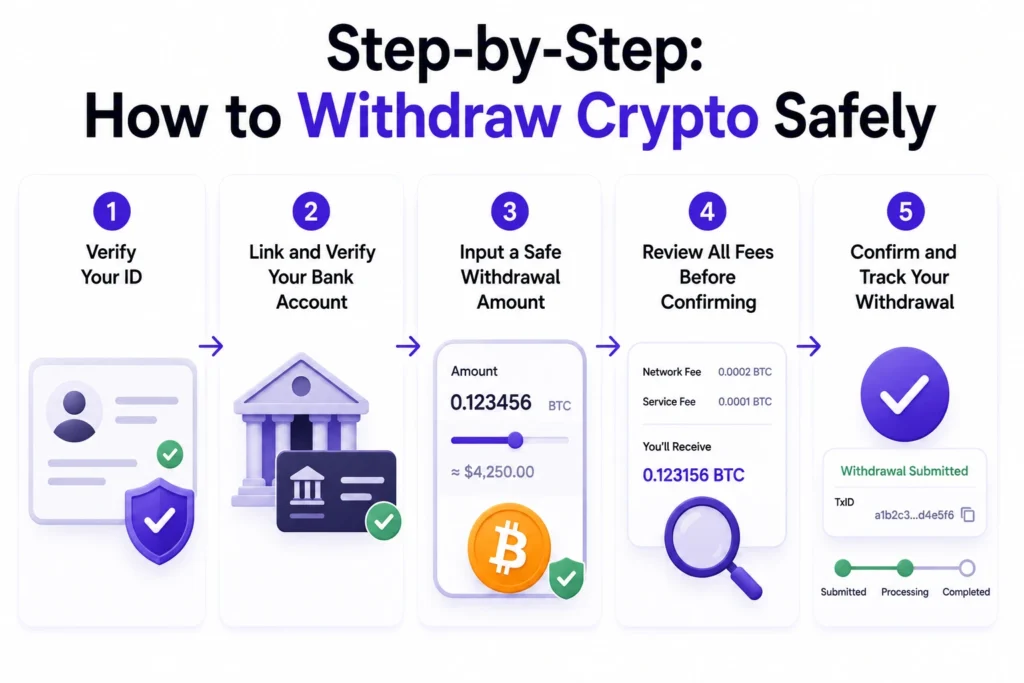
Step-by-Step: How to Withdraw Crypto Safely
1. Verify Your ID
Log in to your account and confirm your identity verification status is fully approved. If it is pending or incomplete, upload a government-issued photo ID and take a selfie. Approval typically completes within minutes, and a first-check approval rate of 75% means most users pass immediately.
2. Link and Verify Your Bank Account
Navigate to the payment methods section and add your bank details. Enter your full legal name, account number, and routing number or IBAN (International Bank Account Number, used in place of a routing number for most non-US bank accounts). For international transfers, include your SWIFT/BIC code (an 8-11 character bank identifier that tells the sending institution exactly which bank and branch to route funds to). Confirm your billing address matches the address registered with your bank before proceeding.
3. Input a Safe Withdrawal Amount
Enter an amount below your daily limit and above the minimum withdrawal threshold for the asset you are sending. Build in a small buffer above the minimum to account for a network fee increase between the time you check and the time you confirm. The Paybis withdrawal video for US users shows exactly how to enter the amount and verify the available balance before submitting.
4. Review All Fees Before Confirming
This full fee breakdown appears before you click confirm:
| Fee Type | Who Controls It | Typical Range |
|---|---|---|
| Service Fee | Set by Paybis | Starts from 1.49% (0% on first card transaction per asset) |
| Processing Fee | Payment processor | 4.5–8.5% for card transactions over $50 |
| Network Fee | Blockchain miners | Fluctuates with congestion, shown in real time |
5. Confirm and Track Your Withdrawal
After confirming, Paybis sends a transaction ID (TXID), a unique 64-character string assigned to your transfer on the blockchain. This is your receipt. Copy it immediately.
To track the status, paste the TXID into a block explorer like Blockchair:
- The explorer shows three possible statuses: Pending, Confirmed, or Failed. Pending means miners have received the transaction but not yet confirmed it. Confirmed means the transfer is complete. Failed means the transaction did not process and your funds remain in your account. The Paybis Bitcoin withdrawal video walks through how to use a TXID to verify transfer status step by step.
Troubleshoot a Declined Crypto Transfer
Find Your Withdrawal Rejection Reason
Check your email immediately after a rejection. Paybis sends a rejection notification, though specific reasons for individual rejections cannot be disclosed to maintain the effectiveness of security protocols. The Paybis live chat team can help identify next steps. When a transaction fails for security or compliance reasons, you receive an email with next steps.
If the email is unclear, open live chat. A human agent responds within 1-2 minutes on average and can identify the specific cause from your account record.
Steps to Fix Common Withdrawal Failures
Use this checklist immediately after a failed withdrawal:
- Check your email for a rejection notification.
- Verify your KYC status is fully approved in your account dashboard.
- Confirm your bank account name matches your profile exactly.Check the network fee on the preview screen and ensure your withdrawal amount covers it.
- Call your bank to confirm crypto transfers are permitted and not blocked on your account.
- Open live chat if the first five steps do not resolve the issue. Have your TXID, the transaction date and time, and payment method details ready.
When Funds Are Returned to Your Account
A rejection does not mean your crypto is lost. Funds are never permanently taken on a failed transaction. The Paybis rejection policy ensures they return to your original payment method with no charge applied. Contact your bank or card issuer if the funds do not appear within their standard processing window.
Paybis Approach to Smooth Withdrawals
Know Your Withdrawal Limits First
Paybis publishes withdrawal limits clearly before you initiate a transaction. The daily sell limit for verified accounts is $250,000 USD equivalent for crypto-to-fiat transfers. Bank transfers support up to €100,000 per week for EU users. Current card transaction limits are detailed in the Paybis withdrawal limits video.
For very large transactions, the Paybis OTC desk offers customized pricing and direct account management. Contact the Paybis corporate withdrawal support team to discuss your requirements.
How Paybis Verifies Your Withdrawal
Paybis uses automated document recognition to complete KYC in approximately 2 minutes. Paybis accepts over 6,500 document types from 220+ countries.
For transactions that trigger AML checks (typically larger amounts or transfers to new bank accounts), the Paybis compliance team reviews the transaction before funds are released. Paybis operates in 180+ countries, supporting 90+ cryptocurrencies and 20+ payment methods.
Paybis holds FinCEN registration (the US Financial Crimes Enforcement Network, which regulates money services businesses in the United States) and FINTRAC registration (the Financial Transactions and Reports Analysis Centre of Canada, the equivalent regulatory body for Canadian money services businesses). Paybis has processed significant transaction volume with no security breaches since 2014, demonstrating that its compliance infrastructure works at scale. For a direct platform comparison, the Paybis vs. Binance guide outlines how the two services handle verification and speed.
24/7 Human Support for Stuck Transactions
The most common fear with a failed withdrawal is that your money is gone with no way to recover it. Many large centralized crypto exchanges rely on ticketing systems where support is handled through email or queued requests. Resolution times for complex account issues can stretch from hours to several days. In some cases, users are first routed through automated triage systems before reaching a human agent. Paybis takes a different approach: a human agent responds within 1–2 minutes on average, 24 hours a day, 365 days a year. No bot triage, no automated deflection before you reach a person who can actually look at your account.
To get the fastest resolution, have the following ready when you open a chat:
- Your TXID
- The date and time of the failed transfer
- The payment method you used
Paybis holds 31,480+ Trustpilot reviews with a rating of 4.1 or “Great” (as of May 2026), with users consistently citing support responsiveness as a key differentiator.
Ready to withdraw safely? Complete identity verification in 2 minutes, link your bank account, and see your exact withdrawal costs before confirming. If a transaction is currently stuck on another platform, the Paybis 24/7 live chat is available now at paybis.com.
Key Terminology
- Compliance Hold: A temporary pause on a withdrawal triggered by AML (Anti-Money Laundering) regulations. The platform verifies that the transfer meets legal requirements before releasing funds. Completion time varies depending on the transaction and documentation provided.
- Network Fee: The cost paid to blockchain miners to process and confirm your transaction on the blockchain. This fee fluctuates based on network congestion and is not set or retained by the crypto platform.
- TXID (Transaction ID): A unique 64-character string assigned to your transfer the moment it broadcasts on the blockchain. Paste it into a block explorer to check the live status of your withdrawal.
- KYC (Know Your Customer): The identity verification process that confirms you are who you say you are. Most regulated crypto platforms require a government-issued photo ID and a selfie before enabling withdrawals.
- Gas Fee: The transaction cost specific to the Ethereum blockchain, paid in ETH or its sub-unit gwei. Like the general network fee, gas prices rise when the Ethereum network is busy and fall when traffic is low.
- Travel Rule: A regulation applied in many countries that requires crypto platforms to attach sender and receiver information to transfers above certain thresholds. Providing this information correctly prevents compliance holds on qualifying transactions.
FAQ
Why Was My Crypto Withdrawal Rejected?
The most common causes are incomplete identity verification (KYC), a name mismatch between your bank account and crypto profile, or a bank-side policy blocking crypto-related transfers. Check your email after a rejection for a notification with next steps, then contact live chat for guidance.
How Do I Reattempt a Rejected Transfer?
Resolve the specific cause first (fix the name mismatch, complete KYC, or call your bank to authorize the transfer), then initiate a new withdrawal request. The original rejected transaction does not carry over, so start a fresh transfer with corrected details.
Will I Lose My Crypto if My Withdrawal Is Rejected?
No. If a transfer fails for compliance or security reasons, your funds return to your original payment method with no charge applied. Contact your bank or card issuer if funds do not appear within their standard processing window.
Can I Withdraw to Someone Else's Bank Account?
No. Paybis requires that the name on the payment method matches the name on the document submitted for account verification. Third-party payment methods are not accepted. This protects both you and the platform from fraud.
Disclaimer: Don’t invest unless you’re prepared to lose all the money you invest. This is a high‑risk investment and you should not expect to be protected if something goes wrong. Take 2 mins to learn more at: https://go.payb.is/FCA-Info