Crypto Withdrawal and Settlement: How Long Until Funds Hit Your Bank Account?
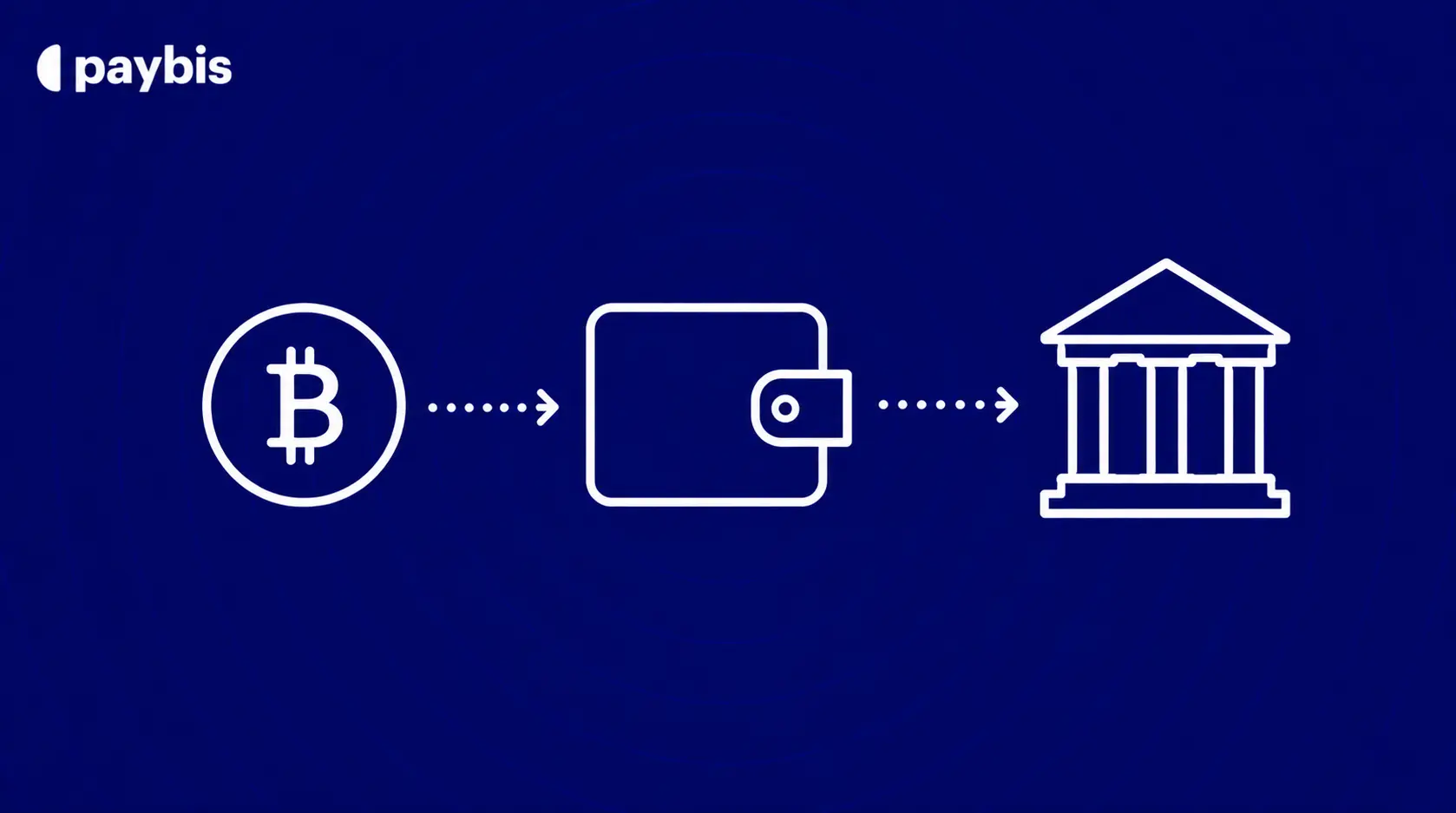
– Paybis converts your crypto to fiat as soon as you confirm the transaction while any additional waiting time usually comes from traditional banking networks.
– The time it takes to receive your money depends on the payment method; use the Paybis bitcoin calculator to see your exact payout before you confirm, with some bank transfer options arriving within minutes and others taking several business days.
– All transaction fees are displayed before you confirm the sale, so you can see the total cost upfront; whether you buy bitcoin with Paysafe card or sell crypto to a bank account.
– Completing identity verification before your first withdrawal helps avoid delays when you are ready to cash out
– Banks may delay or review incoming crypto-related transfers, especially during weekends, public holidays, or routine compliance checks.
Crypto assets can increase or decrease in value. Paybis is a payment gateway, not an investment service. This content is for informational purposes only and does not constitute financial advice.
Fast crypto networks do not guarantee fast bank deposits. Most first-time sellers discover this the hard way, watching their funds sit in “processing” for days after the blockchain confirmed the transaction in seconds. The bottleneck is almost never the blockchain but the traditional banking system, and understanding how it works puts you back in control.
This guide breaks down the exact timelines, fees, and steps to convert your crypto to cash, including why Paybis processes your sale instantly while your bank takes 1-5 business days to complete the transfer. If you want to fund your account first, you can also buy bitcoin with a credit or debit card before selling.
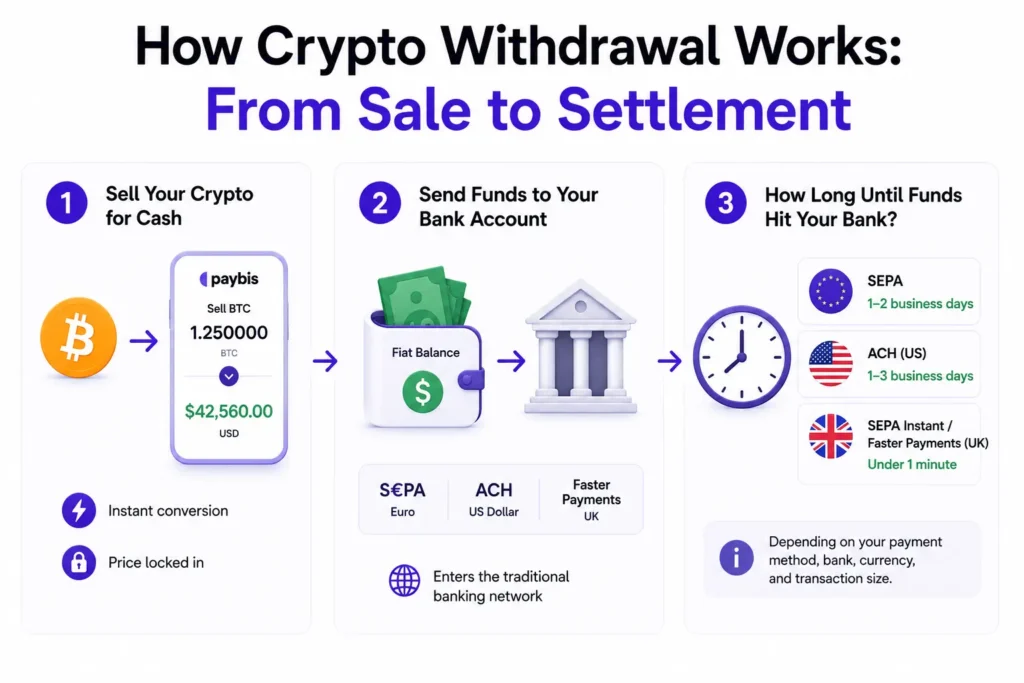
How Crypto Withdrawal Works: From Sale to Settlement
Settlement is the moment money officially moves, and a transaction is complete. In crypto, the blockchain confirms your transaction within seconds to minutes. In traditional banking, funds travel through clearing networks that run on business-day schedules. Selling crypto for cash triggers both systems in sequence.
Sending crypto wallet-to-wallet only involves the blockchain phase. Cashing out to a bank account adds the traditional banking rail on top. You can see the full mechanics in the Paybis crypto withdrawal help guide. If you are new to how crypto transactions work on a deeper level, the Paybis guide on whether bitcoin transactions are traceable explains the blockchain layer clearly.
Step 1: Sell Your Crypto for Cash
When you sell crypto with Paybis, the platform converts your cryptocurrency to fiat currency on its internal ledger instantly. The Paybis wallet sell functionality lets you select any of 90+ supported cryptocurrencies, enter your amount, and receive an immediate quote. Your funds move from a crypto balance to a fiat balance in real time, locking in the price shown on screen.
Step 2: Send Funds to Your Bank Account
Once the crypto sale completes, Paybis routes your fiat payout through the payment rail you selected, such as SEPA, ACH, or UK Faster Payments. At this stage, the transaction leaves the crypto world entirely and enters the traditional banking network. Your bank’s clearing schedule, not the Paybis systems, determines when the funds appear in your account. For a broader look at top payment methods to buy crypto, the Paybis blog covers regional options in detail.
Step 3: How Long Until Funds Hit Your Bank?
Expect 1-2 business days for SEPA transfers in Europe, 1-3 business days for ACH in the US, and under 1 minute for SEPA Instant or UK Faster Payments. According to the Paybis bank transfer guide, for fiat-to-bank transfers via ACH or SEPA, funds typically arrive in 1 to 5 business days. The exact timeframe depends on your payment method, bank, currency, and transaction size.
Paybis Payout Speed: How Long Until Funds Arrive?
Paybis processing is instant on the platform’s end. The 1-5 business day window you experience is entirely on the banking side, not Paybis’s. Many platforms delay at the exchange level before funds even reach the banking network. Paybis does not.
Typical Payout: 1-2 Business Days
For most European users, SEPA transfers complete in 1-2 business days. UK Faster Payments typically settles in under 1 minute. US ACH transfers take 1-3 business days under standard conditions, though NACHA operating rules permit same-day ACH for an additional fee. For bank transfer sell transactions, Paybis charges a 0.99% service fee plus a 0.05% processing fee for SEPA, with the full breakdown shown upfront before you confirm.
Tracking Your Crypto Withdrawal
Check the status of any payout in your transaction history. The video below shows you exactly where to find it.
If the status reads “Pending,” the funds have not left the Paybis system yet. If it reads “Completed,” the payout has been sent and your bank is now processing it. For crypto-to-wallet withdrawals, a Transaction ID (TxID) is provided so you can verify the blockchain confirmation independently.
What Determines Crypto Withdrawal Time?
Several variables affect how quickly funds reach your bank. Understanding them helps you choose the fastest method for your situation.
| Payment Rail | Region | Estimated Time | Typical Fees | Key Notes |
|---|---|---|---|---|
| SEPA Instant | Europe (EUR) | Under 1 minute | Minimal | Best for urgent EUR withdrawals |
| UK Faster Payments | UK (GBP) | Under 1 minute | Minimal | Domestic UK bank transfers |
| SEPA Standard | Europe (EUR) | 1–2 business days | Low | Standard euro bank transfers |
| ACH | US (USD) | 1–3 business days | $0.26–$0.50 median | US domestic bank network |
| SWIFT | International | 1–5 business days | $25–$50 sending fee | Cross-border payments; total fees $50–$150+ |
Sources: Nacha AFP Survey: ACH cost data, Wise: SWIFT fee reference
Does Your Bank Delay Crypto Payouts?
Your receiving bank has its own processing timeline that runs independently from the Paybis exchange. Even after Paybis sends the funds, some banks take additional time to credit incoming transfers. Large withdrawal amounts, sudden behavioral changes, new accounts, and recent KYC updates can all trigger additional review by the receiving bank. If your bank has flagged crypto-related transfers before, call them ahead of a large withdrawal to confirm they will accept incoming transfers.
Local Currency and Withdrawal Speed
SEPA Instant and UK Faster Payments are the fastest options, settling in under a minute. Standard SEPA processes in 1-2 business days. ACH in the US takes 1-3 business days, and SWIFT for international transfers can take 1-5 business days depending on intermediary banks involved. Paybis supports 20+ payment methods across 180+ countries, including local rails like PIX in Brazil, which delivers near-instant settlement.
Your Withdrawal Size and Speed
Transactions above standard thresholds may trigger additional review. If you are processing a very large transaction, be aware that additional verification steps may apply. The Paybis blog on strategic importance of knowing average purchase amounts globally provides useful context on how transaction sizing works across different markets.
Passing Security for Faster Cash Out
Before any withdrawal, identity verification (Know Your Customer checks) must be completed. According to Sumsub’s KYC documentation, KYC typically involves a government-issued ID, proof of address, and a selfie for facial recognition. Paybis completes this process in under 2 minutes for most users. Additional holds can occur if you recently changed your password, updated your two-factor authentication, or linked a new bank account. The Paybis transfer warnings guide details what to expect during these reviews.
When Funds Hit on Weekends and Holidays
Crypto markets run 24/7. Traditional banking does not. ACH, SEPA, and SWIFT all pause on weekends and public holidays. A withdrawal initiated on Friday afternoon via ACH will not start processing until Monday morning at the earliest. SEPA Instant and UK Faster Payments operate 24/7, including weekends, making them the best choice when you need funds outside business hours.
How to Move Crypto From Paybis to Bank
Here is the complete process for selling crypto and receiving fiat to your bank account. You can also follow the Paybis send and withdraw step-by-step guide for a visual walkthrough.
1. Select Your Cryptocurrency to Sell
Log in to your account and open the sell interface. Paybis supports 90+ cryptocurrencies including Bitcoin, Ethereum, USDT, and more. Select the coin you want to sell and choose your fiat payout currency. Multiple fiat currencies are supported including USD, EUR, and GBP. The Paybis wallet functionality guide has full details on supported assets. If you are still deciding whether crypto is right for you, the Paybis guide on buying bitcoin is a practical starting point.
2. How Much Cash to Withdraw?
Enter the amount of crypto you want to sell or the fiat amount you want to receive. The calculator shows both simultaneously and updates in real time. You can also tap “Send All” to liquidate your entire balance. The withdrawal amount video covers this in under two minutes.
3. Link Your Bank for Payouts
Select your payout method. Options include bank transfer (SEPA, ACH, UK Faster Payments), Skrill, and Neteller, depending on your region and currency. If you are linking a bank account for the first time, enter your account details carefully. Ensure your bank account name matches your verified name on the Paybis platform to avoid payout issues.
4. Review and Confirm Your Withdrawal
Before you confirm, Paybis displays the complete fee breakdown on screen. The Paybis fee comparison guide shows how Paybis breaks down service, processing, and network fees as separate line items, unlike competitors who embed spreads into quoted prices. What you see on the confirmation screen is what your bank statement will show. There are no additional charges after you click confirm.
“Paybis is fast, accurate, exact to quote, offer promotions, offer paybis or external address, clean, simple interface and provide email processing updates. Bravo!” – G. Cham on TrustPilot
The Exact Cost of Cashing Out Crypto
Withdrawal fees fall into three categories. Knowing which ones Paybis controls and which are set externally helps you plan the true cost of your cash-out.
Platform Withdrawal Charges
Paybis charges a 0.99% service fee for bank transfer sell transactions, plus a 0.05% processing fee for SEPA. For card-based sell transactions, the service fee starts at 1.49% after your first purchase, plus a processing fee of 4.5-8.5% depending on currency. All fees are shown upfront before you confirm. For a detailed look at how hidden fees work at other platforms, the Paybis guide on hidden Coinbase fees is worth reading before you compare options.
Your Crypto Network Withdrawal Costs
The network fee (also called a gas fee) is the cost blockchain miners charge to confirm your transaction. Paybis displays this fee in the calculator before you confirm. The amount varies by blockchain and network congestion at the time of your transaction. Paybis updates this figure automatically so you always see the current network cost. The Paybis blog glossary defines all key terms clearly.
Cost to Move Crypto to Your Bank
SEPA standard transfers carry a 0.05% processing fee through Paybis. ACH transfers are free in many cases. SWIFT international wires can carry initiating fees upward of $50 depending on your bank, plus intermediary fees if the payment routes through correspondent banks. For most users in Europe and the US, SEPA and ACH represent the most cost-effective paths to bank settlement.
“Paybis always fast and efficient / Only my bank keeps me back / But once my Bank approves / Paybis transaction are very efficient.” – Yolanda Anastasia S. on TrustPilot
Paybis: Convert Crypto to Bank Funds Fast
Paybis is a payment gateway built specifically for buying and selling crypto without trading knowledge. Since 2014, Paybis has served 5M+ retail users and processed over $5B in volume across 180+ countries. For a first-time seller, the platform is built around one goal: get your money out quickly with zero surprises.
Instant Crypto Withdrawal Processing
Paybis processes the crypto side of your sell transaction instantly. The Paybis internal ledger updates the moment you confirm, converting your crypto balance to fiat in real time. The only waiting period after that is the traditional banking settlement window.
“Paybis is a good site for crypto if you are sending smaller amounts. You get it all done usually within 10-15 minutes. Sending funds, buying crypto, and getting it to your wallet… In a hurry and need it now this is the way to go. No waiting like the other sites.” – Rebecca A. on Paybis
No Waiting: Verified for Instant Payouts
Paybis identity verification takes under 2 minutes for most users (photo ID plus a selfie). Completing verification before you initiate your first withdrawal removes the biggest potential delay. Once verified, repeat sell transactions require no additional ID steps. You move from sell confirmation to bank payout initiation in minutes.
Instant Cash-Out to Your Bank
Ready to cash out? Create an account, complete identity verification in under 2 minutes, and use the Paybis sell calculator to confirm your exact payout before entering bank details. Fees start from 0.99% for bank transfer sells, shown in full before you confirm. Check out the Paybis sell to card video guide for a walkthrough of each stage of the process.
Is Your Crypto Withdrawal Stuck? Get Answers.
A stuck withdrawal is stressful. Here is how to diagnose what is happening and fix it quickly.
Check Crypto Withdrawal Time
Start with your transaction history. If the status is “Pending,” the funds have not left the Paybis system yet and support can investigate. If it says “Completed,” Paybis has sent the funds and your bank is now processing them. For crypto-to-wallet withdrawals, copy the TxID (Transaction ID) and check it on a blockchain explorer to confirm the blockchain status independently. If you have ever experienced an account hold on another platform, the Paybis guide on fixing a locked Coinbase account shows what to expect and how to resolve it.
Double-Check Bank Details for Payout
Incorrect bank details are a common cause of rejected payouts. Common errors include a mismatched account holder name, a wrong routing number, or a closed account. If you submitted incorrect details, contact Paybis support immediately. Funds from a failed payout typically return to your account, though recovery becomes significantly more complex if the incorrect details accidentally match another valid account. The Paybis corporate withdrawal guide has additional guidance on account detail requirements.
Get Human Help for Delayed Funds
If your bank transfer is overdue and your transaction history shows “Completed,” start with your bank. Ask them to confirm whether they are blocking or delaying the incoming transfer. If the bank confirms no issue on their end, contact Paybis support via live chat with your transaction ID and ask for escalation to the payments team.
Paybis support operates 24/7 in 9+ languages with an average response time of 1-2 minutes. Paybis has 31,520+ Trustpilot reviews with a rating of 4.1 or ‘Great’. Create an account, complete identity verification in approximately 2 minutes, and reach 24/7 human support with average response times of 1 to 2 minutes if anything comes up.
Key Terminology
- Fiat currency: Government-issued money backed by law, such as USD, EUR, or GBP, as opposed to cryptocurrency. When you “cash out,” you are converting crypto to fiat.
- Settlement: The final step in a transaction where money officially moves from one account to another and the transaction is complete. Blockchain settlement happens in seconds to minutes, while bank settlement follows business-day clearing schedules.
- Authorization hold: An authorization hold is a temporary reservation of funds on a payment card that verifies enough money is available for a transaction, but the money has not yet been fully charged or transferred. The held amount is usually released automatically if the transaction is canceled, declined, or not completed within the card issuer’s specified timeframe.
- ACH (Automated Clearing House): A US-based electronic payment network governed by NACHA that processes direct deposits and direct payments between US bank accounts, typically in 1-3 business days.
- KYC (Know Your Customer): The identity verification process required by law for crypto platforms. It involves submitting a government-issued ID and a selfie, and takes under 2 minutes with Paybis.
- Spread: The difference between the real market price of a cryptocurrency and the price a platform actually charges or pays you. Paybis does not embed a spread into quoted prices, and all fees are itemized separately before you confirm.
FAQ
Which Banks Does Paybis Support for Crypto Payouts?
Paybis supports payouts to any bank that accepts SEPA (Europe), ACH (US), or UK Faster Payments (UK), covering the vast majority of banks in those regions. If your bank does not support direct bank transfers, Paybis also offers payout via Skrill or Neteller.
What Are the Minimum Withdrawal Limits on Paybis?
Minimum transaction amounts vary by payment method and currency. For bank transfer sell transactions, check the Paybis calculator for the limits applicable to your specific currency and payout method before initiating a transaction.
Can My Bank Block an Incoming Crypto Withdrawal?
Yes. Some banks flag incoming transfers from crypto platforms and may hold or return the funds. If a transfer does not arrive within the expected timeframe and your Paybis transaction shows “Completed,” call your bank directly and ask them to confirm whether they are processing or blocking the incoming transfer.
How Do I Find My Crypto Withdrawal Time?
Log in to your account, go to your transaction history, and check the status of your transaction. If it reads “Completed,” the estimated arrival depends on your payment method: under 1 minute for SEPA Instant or UK Faster Payments, 1-2 business days for standard SEPA, and 1-3 business days for ACH. Weekends and public holidays extend ACH timelines.
How Do I Fix Incorrect Bank Details on a Pending Payout?
Contact Paybis live chat immediately with your transaction ID and the correct bank details. If the payout has already been sent with incorrect information, the funds typically return to your account within 1-3 business days for most banks. Some banks process returns more slowly, with timelines extending up to 14 business days depending on the receiving bank’s processing rules.
Disclaimer: Don’t invest unless you’re prepared to lose all the money you invest. This is a high‑risk investment and you should not expect to be protected if something goes wrong. Take 2 mins to learn more at: https://go.payb.is/FCA-Info