How to Buy Solana: A Beginner’s Guide
- Buying Solana (SOL) on Paybis takes under 15 minutes. Create an account, verify your ID in under 2 minutes, pay, and receive SOL in your wallet.
- Paybis’s Service Fee starts from 1.49%, and your first card purchase has a 0% Service Fee. Paybis shows every fee before you confirm.
- Paybis accepts cards, Apple Pay, Google Pay, PayPal (select regions), and SEPA bank transfers (EU). Cards process in under 1 minute, while SEPA costs less but takes 1-2 business days.
- SOL is the native token of Solana, a blockchain where typical network fees are a fraction of a cent.
- Paybis is registered with FinCEN (US) and FINTRAC (Canada) and has had no security breaches since 2014. It has 32,700+ Trustpilot reviews with a rating of 4.1 or “Great” (as of September 2026).
- SOL is volatile, so only spend what you can afford to lose.
Crypto assets can increase or decrease in value. Paybis is a payment gateway, not an investment service. This content is for informational purposes only and does not constitute financial advice.
Quick Answer: Paybis lets you buy Solana in under 15 minutes using a credit card. Verify your identity (under two minutes for most users via photo ID and selfie), enter the amount, pay with Visa, Mastercard, Apple Pay, or Google Pay, and receive SOL in your wallet. The Service Fee starts from 1.49%, and the platform shows the total before you confirm. Paybis operates in 180+ countries and maintains PCI DSS Level 1 compliance.
If you’re buying crypto for the first time and want SOL today, this guide is for you. It explains what Solana is, how buying works, which payment methods you can use, and how to stay safe, then walks you through a first purchase step by step. No trading charts. A clear path from “I want SOL” to “I own SOL.”
Understanding Solana for First-Time Buyers
Solana is a blockchain (a digital ledger that records transactions across a network of computers) designed for speed and low costs. SOL powers that network as its native token.
You use SOL to pay transaction fees and interact with apps built on Solana, similar to how you need dollars to buy things in the United States. For a short primer, Paybis maintains an intro to Solana in its help center.
How Does Solana Work?
Solana uses a system called Proof of History (PoH), which works like a built-in cryptographic clock. As blocks are produced, transactions are hashed into a continuous sequence that proves the order they happened in. Because validators (the computers confirming transactions) can check that order from the ledger itself, they need less back-and-forth communication to agree on it.
The result: Solana is built for high throughput. The Solana Foundation cites a benchmark of 65,000 transactions per second for simple transfers.
Each transaction pays a base fee of 0.000005 SOL per signature, plus an optional priority fee when the network is busy. At recent SOL prices, the base fee is well under a tenth of a cent. That combination of speed and near-zero cost is why beginners often pick SOL as a first purchase.
Practical Uses for Your SOL
SOL is not only something to hold. It powers real activity on the network:
- Paying transaction fees: Every action on Solana, from sending tokens to using apps, requires a small fee paid in SOL.
- Sending money: SOL transfers typically confirm in under a second, usually for a fraction of a cent, which makes it practical for sending value to friends or family.
- Using apps and games: Solana hosts decentralized exchanges (platforms where crypto trades happen automatically, without a middleman) and games. Fast block times and low fees suit it to in-game microtransactions and other real-time apps.
What Are the Risks of Buying Solana?
SOL is volatile and can move sharply in either direction. Three practical points:
- Only spend what you can afford to lose.
- Decide how you would sell before you buy.
- Consider network history. Solana has experienced outages (covered below).
This guide focuses on how to buy SOL safely, not on predicting prices.
Simple Steps to Purchase Solana Safely
This section covers where to buy SOL, how to get started, and how to manage what you hold once you own it.
Where to Buy Solana Safely
You have three main options for buying SOL:
- Crypto exchanges (Binance, Coinbase, Kraken): Binance charges a standard spot trading fee of 0.1%, with lower rates for high-volume traders. Paybis processes card transactions in under 1 minute with zero trading interface to learn. Coinbase is a large, regulated US platform, but ACH bank transfers can take several business days to clear before you can withdraw the funds. Paybis card purchases settle near-instant (depends on the blockchain).
- Peer-to-peer platforms: Unregistered exchangers can operate outside anti-money-laundering rules, per the US DOJ Cryptocurrency Enforcement Framework. Paybis counters that risk with 24/7 live chat support (average response time about 15 seconds) and a full fee breakdown before you pay.
- Payment gateways (Paybis): Built for buyers, not traders. Pick an amount, pay with a method you already use, and receive SOL. Paybis holds an EU MiCA CASP authorization and a PSD2 Payment Institution license granted in May 2026, as this crypto license page outlines.
For a first purchase, a regulated gateway with transparent fees and human support lowers the risks beginners worry about most. This guide on checking whether an exchange is regulated explains what to look for.
Quick Steps to Start Buying SOL
Buying SOL on Paybis follows four steps: create an account and verify your ID, choose a payment method, enter your amount and review the fees, then confirm and receive SOL. The full walkthrough is in the step-by-step section below.
How to Manage Your SOL Holdings
A wallet stores your SOL. Two options:
- Custodial wallet (Paybis wallet): Paybis secures the private keys (the codes that control access to your crypto) on your behalf, per the Paybis wallets FAQ. Paybis wallets are free, and you can withdraw to any external wallet at any time. You can also create a Paybis wallet automatically during your first purchase.
- Self-custody wallet: You hold the keys yourself. Full control, full responsibility. Lose your keys, lose your SOL.
Start with custodial and learn self-custody later. You can buy directly to your wallet and withdraw to an external wallet when ready. If you already hold SOL elsewhere, deposit it from an external wallet by copying the deposit address shown in your Paybis SOL wallet and double-checking the network before sending.
Payment Methods for Buying Solana
This section covers each payment method available on Paybis, how each one works, and what to expect on speed and cost.
Buying Solana with Cards
Cards are the fastest way to buy SOL. You enter your Visa or Mastercard details, complete the 3DS security check (a one-tap approval your bank sends to your phone), and the transaction processes in under 1 minute. Your first card transaction on Paybis carries a 0% Paybis Service Fee, so you only pay the Processing Fee and Network Fee.
How to Buy Solana via Bank Transfer
Bank transfers cost less but take longer. Paybis charges a 0.99% Service Fee plus a 0.05% Processing Fee (minimum €2) on SEPA purchases. See this payment methods breakdown for current processing times by transfer type.
If you need SOL today, a card wins. If you are buying a larger amount and can wait, a bank transfer reduces fees.
Tap to Buy Solana Instantly
To buy Solana with Apple Pay, open Paybis in Safari on your Apple device and choose Credit/Debit card. Then select Apple Pay and confirm with Face ID or Touch ID, following this Apple Pay purchase guide. Google Pay is also supported, with a 3DS check to confirm, per the Google Pay guide.
Explore More Global Payment Methods
Paybis supports 50+ payment methods across 180+ countries, including local options like PIX (Brazil), Webpay (Chile), and FPS (UK). Paybis supports PayPal in the EEA, the UK, and most US states, which helps if your bank blocks direct card purchases but you hold a PayPal balance. For buyers in Latin America, Africa, and Southeast Asia, local payment support is often the difference between buying SOL today and not buying at all.
Here is how the main options stack up:
| Payment Method | Speed | Typical Fees | Notes |
|---|---|---|---|
| Credit/Debit Card | Under 1 minute | 1.49% + 4.5-8.5% over $50* | 180+ countries |
| Apple Pay / Google Pay | Under 1 minute | Shown upfront at checkout | Confirm on your phone |
| PayPal | A few minutes | Shown upfront at checkout | EEA, UK, and most US states |
| SEPA Bank Transfer | 1-2 business days | 0.99% + 0.05% (min €2) | EU only |
Your first card transaction on Paybis carries a 0% Service Fee. You pay only the Processing Fee and Network Fee on that purchase.
Safety Standards for First-Time SOL Buyers
Is Solana safe to buy? Two questions hide inside that one: is the network reliable, and is your buying platform trustworthy?
On the network side, Solana had several network-wide outages between 2021 and February 2024. The last was a 4-hour, 46-minute halt on February 6, 2024, per the Solana network performance report. The official Solana status page has recorded no network-wide outage since.
On the platform side, Paybis has operated since 2014 with no security breaches and holds a 4.1 rating across 32,700+ Trustpilot reviews.
How Verification Protects Your Funds
Identity verification (uploading a photo ID and taking a selfie) protects you as much as the platform. Anti-money laundering rules require regulated crypto providers to verify your identity to prevent money laundering and other financial crime, per FinCEN guidance. Criminals find verified accounts far harder to abuse, which keeps the whole system safer.
Paybis verifies most new users in under two minutes, per the Paybis buy Solana page. In rare cases, manual review can take longer.
Required Documents for Your First Purchase
You need two things:
- A government-issued ID: Driver’s license, passport, or national ID card.
- A selfie: A quick liveness check completed on-screen.
Larger transactions may need proof of address or proof of source of funds.
Three Tips for Account Safety
- Secure your email with a strong, unique password: Paybis uses passwordless email login, so your email account is the key to your Paybis account. Mix uppercase and lowercase letters, numbers, and special characters, as Paybis recommends in its account security guide, and never reuse a password.
- Enable two-factor authentication (2FA) on your email: Use an authenticator app rather than SMS where possible, and never share verification codes with anyone, as the FTC recommends.
- Watch for phishing: Always check the URL before entering login details, and never click links in unsolicited emails claiming to be from a crypto platform, as the FBI’s Internet Crime Complaint Center advises.
How to Check a Crypto Platform Is Safe
Before you enter card details anywhere, check four things:
- Regulatory registrations: Paybis USA LTD is registered with FinCEN as a money services business (31000272911973), and Paybis Canada is registered with FINTRAC (C100000646).
- Security standard: PCI DSS Level 1 compliant, the highest compliance level set by the card networks.
- Track record: Operating since 2014 with no security breaches.
- Independent reviews: A 4.1 rating across 32,700+ Trustpilot reviews (as of September 2026), plus assessments on independent review sites.
If a platform cannot show all four, walk away.
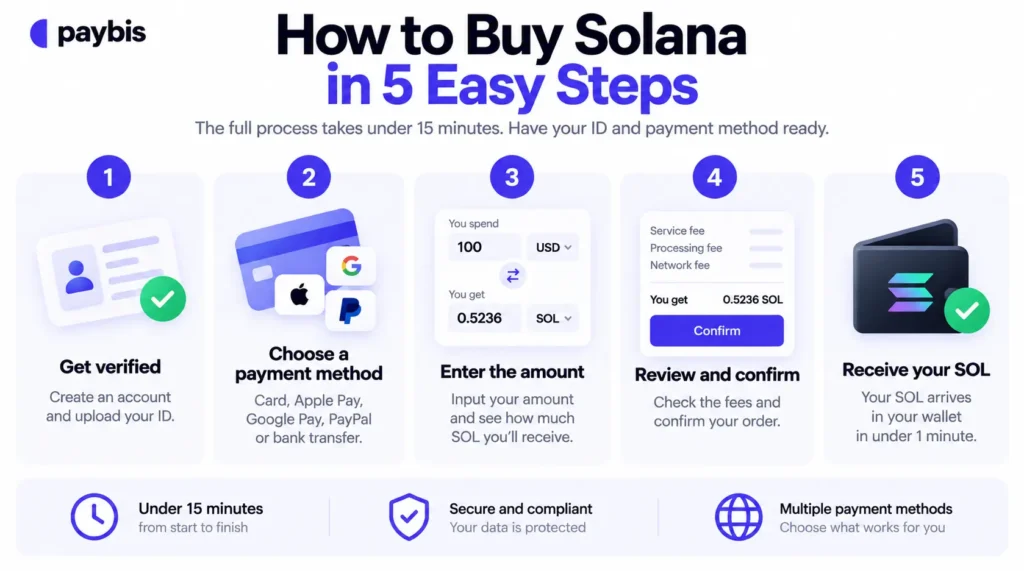
How to Buy Solana in 5 Easy Steps
The full process takes under 15 minutes. Before you start, have a valid photo ID and your payment method ready. Here is each step.
Step 1: Get Verified to Buy Solana
Visit Paybis and create an account. Then upload a clear photo of your ID (show all four corners, make all text readable, per this step-by-step verification guide) and complete the selfie liveness check. Most users finish in about 2 minutes.
Step 2: Fund Your First Solana Purchase
Select your payment method: credit or debit card, Apple Pay, Google Pay, PayPal (where available), or bank transfer. The method you choose determines your speed and cost, so pick a card or mobile wallet if you want SOL today.
Step 3: Decide How Much SOL to Buy
Enter the amount in your local currency. Card purchases start from a few dollars, though limits can change, so check the calculator for the current minimum before you start.
For a first purchase, starting with a small amount lets you test the process before committing more. The calculator shows exactly how much SOL you will receive at the current rate.
Step 4: Verify Your SOL Order Details
Before you confirm, Paybis displays the Service Fee, Processing Fee, and Network Fee as separate line items, plus the exact amount of SOL you will receive. Choose your Paybis wallet or paste an external wallet address, then confirm.
Step 5: Access Your SOL Balance
Card transactions process in under 1 minute, and settlement is near-to-instant (depends on the blockchain). Your SOL appears in your wallet, and you receive an email confirmation.
From there you can hold it, send it to another wallet, swap it for another crypto, or sell it back to cash later. Paybis’s 24/7 live chat responds in about 15 seconds if you need help.
“I appreciate Paybis for its ability to facilitate instant cryptocurrency purchases using my card, which significantly enhances the efficiency of my transactions.” – Denis I. on G2
Transparent Costs and Purchase Timelines
This section breaks down every fee that applies to a SOL purchase, the timeline from payment to delivery, and what happens if a transaction is declined.
Breakdown of Typical Buy Fees
Three fees make up your total cost, and Paybis shows all of them before you confirm:
- Service Fee: Paybis’s commission. Starts from 1.49%, and your first card transaction has a 0% Service Fee.
- Processing Fee: Paybis charges this for card transactions. For card transactions over $50, this runs 4.5% to 8.5% depending on currency.
- Network Fee: The cost the Solana network charges to process your transaction. Solana’s typical network fee is a fraction of a cent, so this line item stays negligible for SOL.
Here is a sample $500 card purchase after your first transaction:
| Fee Type | Amount |
|---|---|
| Service Fee (1.49%) | $7.45 |
| Processing Fee (4.5-8.5%) | $22.50-$42.50 |
| Network Fee | Fraction of a cent (typical) |
| Total charged | ~$530-$550 |
Timeline for Your First Purchase
| Step | Estimated Time |
|---|---|
| Account creation and identity verification | About 2 minutes |
| Card payment processing | Under 1 minute |
| Blockchain settlement | Near-to-instant |
| Total | Under 15 minutes |
Compare that to a standard bank transfer, which usually takes at least a business day to settle, and some platforms add holds before you can use or withdraw the funds. Speed is the entire point of paying by card.
Know Your Total Costs Upfront
Paybis shows the complete fee breakdown before you confirm. And if a transaction fails security checks, you pay nothing: Paybis reverses rejected transactions per compliance and payment provider rules, and any deducted funds return to your original payment method automatically.
Buy Solana with Paybis
Paybis has earned a 4.1 rating across 32,700+ Trustpilot reviews (as of September 2026), supports 50+ payment methods across 180+ countries, and shows every fee (Service, Processing, and Network) before you confirm.
Ready to buy Solana? Create a Paybis account, complete identity verification in about 2 minutes, and confirm your total cost at checkout. Fees start from 1.49%, and your first card transaction carries a 0% Service Fee.
Key Terminology
- Solana: A blockchain designed for fast, low-cost transactions, built to handle up to 65,000 transactions per second under benchmark conditions.
- SOL: The native token of the Solana blockchain, used to pay transaction fees and interact with apps.
- Blockchain: A digital ledger that records transactions in blocks linked by cryptography.
- Wallet: A digital tool for storing, sending, and receiving cryptocurrency.
- Network Fee: The cost you pay the blockchain network to process a transaction. On Solana, this is a fraction of a cent.
- Verification: The process of confirming your identity with a government-issued ID and a selfie, required by law on regulated platforms.
- Custodial Wallet: A wallet where a platform manages the keys and holds them on your behalf.
- Self-Custody: Holding your own private keys in a personal wallet, giving you full control and full responsibility.
- Proof of History (PoH): Solana’s built-in cryptographic clock. Transactions are hashed into a continuous sequence that proves the order they happened in, so validators need less back-and-forth communication to agree on the ledger.
FAQ
How Do I Buy Solana with a Credit Card?
Create a Paybis account, verify your identity (about 2 minutes), enter the amount of SOL you want, select credit card as the payment method, review the total cost, and confirm. SOL arrives in your wallet within minutes, and your first card purchase carries a 0% Paybis Service Fee.
Can I Buy Solana with PayPal or Apple Pay?
Yes. Paybis supports Apple Pay and Google Pay for quick mobile checkout, and PayPal in certain regions. The checkout calculator shows your exact fee breakdown and confirms which methods are available in your country before you pay.
What Is the Minimum Amount of Solana I Can Buy?
Card purchases start from a few dollars, though limits can change without prior notice. Check the calculator for the current minimum before you start. Minimums for other payment methods vary by method and region.
What Happens If My Payment Is Declined?
Paybis does not charge you for a declined payment. If your bank reserved the amount, the hold is typically released within 72 business hours, though it can occasionally take up to 14 business days, per the Paybis declined payment guide. Common causes include bank fraud blocks on crypto purchases, insufficient funds, or incorrect card details, so call your bank’s fraud line first and then retry. If you are still stuck, Paybis live chat responds in about 15 seconds, 24/7.
Can I Sell My Solana Back to Cash Later?
Yes. Paybis supports selling SOL back to cash via card, bank transfer, Skrill, or Neteller, with the same upfront fee breakdown as buying. Settlement times vary by method.
Is Solana Safe to Buy for a Beginner?
Buying through a regulated platform with identity verification, transparent fees, and human support lowers your risk. The asset itself is volatile, so only spend what you can afford to lose and treat SOL as a high-risk purchase.
Disclaimer: Don’t invest unless you’re prepared to lose all the money you invest. This is a high‑risk investment and you should not expect to be protected if something goes wrong. Take 2 mins to learn more at: https://go.payb.is/FCA-Info