Common PayPal Crypto Mistakes to Avoid (and How to Fix Them)
Key Takeaways:PayPal makes buying crypto look simple, but its hidden spreads, withdrawal limits, and custodial model create real risks for first-time buyers. The most common mistakes include sending crypto to the wrong wallet address (which is nearly always permanent), paying undisclosed spread fees on top of stated transaction fees, buying crypto you can’t transfer to your own wallet, and getting caught by fake PayPal invoice scams. If your account is frozen, navigate to PayPal’s Resolution Center immediately. For a safer, fully transparent alternative, we offer 2-minute verification, itemized upfront fees starting from 1.49%, and 24/7 live human support with 1-2 minute average response times. If you’re planning to buy Bitcoin with PayPal, understanding these mistakes first will save you time and money.
Imagine you bought Bitcoin on PayPal to hold long-term. Three months later, you try to send it to your own wallet and discover that transfer fees vary by method and aren’t always broken out as a separate line item before you confirm, and now your account is frozen for “unusual activity.” This guide breaks down the five most common PayPal crypto mistakes, explains how to recover if things go wrong, and shows what a truly transparent crypto purchase looks like. If you’re new to the space, our guide on everything you need to know about buying Bitcoin is a useful starting point before diving in.
The Root Causes of PayPal Crypto Errors
Most PayPal crypto errors don’t happen because users are careless. They happen because PayPal built its interface for sending fiat money to friends, then bolted crypto features on later. Crypto purchases sit alongside standard payments, balance transfers, and invoices on the same screen, which creates confusion about what you’re actually buying, where it goes, and what fees apply. On top of that, PayPal discloses a transaction fee but embeds a conversion spread in the exchange rate that isn’t shown as a separate line item. You pay more than the stated fee without ever seeing the exact cost broken out before confirming.
Mistake #1: Sending Crypto to the Wrong Wallet Address
A digital wallet (where your crypto is stored) is identified by a long string of letters and numbers called a wallet address. Sending crypto to the wrong one is, in nearly all cases, permanent. PayPal’s own documentation is direct: “Crypto transfers cannot be cancelled or reversed. Crypto that is sent to the wrong recipient, wrong address, or via unsupported networks will be lost.” The only narrow exception is if you own both the sending and receiving wallets. If the wrong address belongs to a major exchange, that exchange’s support may cooperate, but there is no guarantee. Understanding how Bitcoin wallets work can help you avoid this mistake entirely.
Verify Your Crypto Wallet Address
Different cryptocurrencies use different address formats. Sending Bitcoin to an Ethereum address means the funds cannot be recovered. Confirm the address type matches the coin you’re sending before every transaction.
Here’s how to verify before you send:
- Copy from the source: Use the recipient’s official wallet display, never a screenshot or chat message.
- Verify the network: Paste the address into a blockchain explorer (a public tool that shows all transactions on the network) to confirm it matches the correct network.
- Cross-check characters: Compare the first 4 and last 4 characters of the address after pasting.
- Consider a test transfer: For large transfers, some users send a minimal amount first to confirm the address is valid and reachable before committing the full transfer.
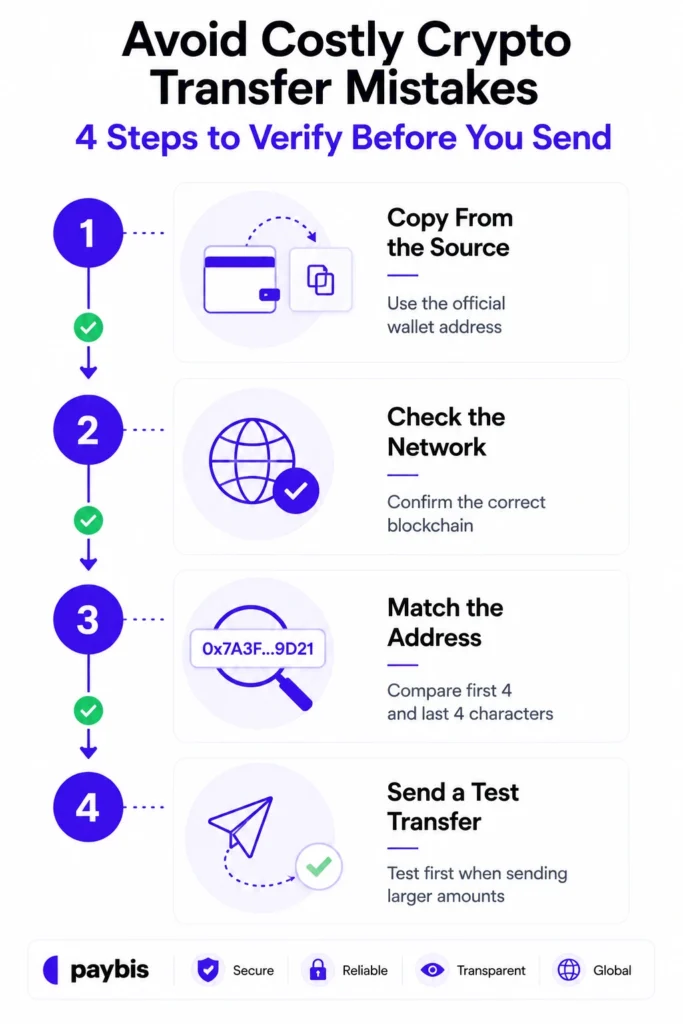
We display the wallet address clearly at the confirmation step, giving you a final review before funds move. Our transfer warnings guide covers the full verification process, including what to do if you’ve sent on the wrong network. Paybis’ wallet transfer walkthrough gives you a visual guide on what to do.
Spotting PayPal’s Hidden Crypto Fees
PayPal charges a transaction fee that varies based on purchase amount. It also adds a conversion spread embedded in the exchange rate. That spread is not shown as a separate line item, so you see the effective cost only after confirming. For external wallet transfers, PayPal charges a further 1% withdrawal fee on top of the blockchain’s network fee.
What You Actually Pay Per Transaction
| Fee Type | PayPal | Paybis |
|---|---|---|
| Transaction / Service Fee | Varies by purchase amount | 1.49% (0% first card transaction) |
| Spread / Processing Fee | Embedded, not itemized | 4.5–8.5% shown separately |
| Withdrawal Fee | Reportedly 1% transfer fee | Network fees only |
| Network Fee | Not itemized separately | Shown in real time |
| Fee Visibility | Spread hidden | All fees itemized upfront |
Get Clear Upfront Crypto Fees
Our fee calculator on the homepage shows the exact crypto amount you’ll receive for any fiat input, with service fee, processing fee, and network fee listed separately before you confirm. For a $500 Bitcoin purchase on your second transaction:
- Service fee: $7.45 (1.49%)
- Processing fee: $22.50-$42.50 (4.5-8.5% depending on currency)
- Network fee: Varies by current Bitcoin network demand, shown in real time
What you see before confirming is what you pay. Our Paybis crypto calculator guide walks through how to read the breakdown before committing. For a broader look at your options, our guide on the top payment methods to buy crypto compares approaches across platforms.
Mistake #3: Buying Crypto You Can’t Move Off PayPal
PayPal’s Crypto Withdrawal Limitations
PayPal supports transfers of certain cryptocurrencies to external wallets in the US, but imposes a $25,000 weekly transfer limit per their transfer documentation. Outside the US, transfer availability varies by country. Users in unsupported markets hold crypto that exists only as a balance inside PayPal’s system, with no path to an external wallet.
PayPal supports only 7 cryptocurrencies in the US. Users outside the US face even more limited options. If you’re curious about how many cryptocurrencies exist across the entire market, our guide on how many cryptocurrencies are there puts the landscape in perspective.
How to Buy Crypto You Can Withdraw
Before buying on any platform, confirm that the platform supports transfers to a wallet address you control, and that the specific coin can be sent on the correct network.
We support direct transfers to external wallets for select cryptocurrencies. You specify the destination wallet before paying, so your crypto goes directly where you want it with no intermediary hold. Verified users have a daily transaction limit of $20,000 and a monthly limit of $50,000. Our how to pay with PayPal guide covers the exact steps for purchasing and routing crypto to your wallet using PayPal as the payment method.
Mistake #4: Sending Crypto to a Frozen or Restricted Account
Unauthorized activity means transactions on your account that you did not initiate or approve.
What Triggers PayPal Crypto Freezes?
PayPal’s automated systems flag accounts based on unusual patterns. According to PayPal’s own hold documentation, logging in from an unfamiliar IP address or unusual transaction patterns may trigger a review. As their hold guidance states, reviews can take several days to weeks. If an account stays frozen without action, PayPal’s standard holding period reaches 180 days.
Fake PayPal invoice scams make this worse. Scammers send professionally designed email invoices referencing a Bitcoin transaction you never made. According to PayPal’s invoice scam guidance, these emails use generic greetings like “Hello, PayPal Client” rather than your actual name. PayPal always addresses you by your first and last name in official communications. Calling the number in a fake invoice hands scammers your financial details. We’ve documented the most common PayPal cryptocurrency scam patterns and the specific warning signs to check before acting on any payment request. Our broader guide on how to spot and avoid crypto scams covers tactics used across platforms, not just PayPal.
Resolve Blocked PayPal Crypto Buys
If PayPal blocks your transaction:
- Log in and check the Resolution Center: Navigate to the Resolution Center to see exactly what PayPal needs.
- Verify your identity: Follow the steps PayPal outlines to provide documentation.
- Contact official support only: Use PayPal’s official help pages, not numbers from emails.
- Escalate if stalled: If the review drags on without updates, contact PayPal support directly to request a status update and ask what additional steps may be needed to resolve the hold.
If we reject a transaction for security reasons, you are not charged, and the funds return to your payment method. You can then reach our 24/7 live chat, which averages a 1-2 minute response time, to understand what happened and try again. We have over 30,880+ Trustpilot reviews with a 4.1 rating, and support responsiveness is among the most cited positives.
“I like how easy it is to buy crypto with my card and send it directly to my wallet. The interface is clear, transactions are fast, and support has been helpful whenever I had questions.” – Elizar S. on G2
Mistake #5: Not Understanding PayPal’s Crypto Custody Model
PayPal Manages Your Crypto Holdings
PayPal operates a custodial cryptocurrency service. According to their terms and conditions, “PayPal combines users’ Crypto Asset balances with other PayPal accountholders and holds those Crypto Assets in one or more omnibus accounts.” This means PayPal controls the private key, not you. You see a balance, but you don’t hold the actual asset on the blockchain the way you would with a self-managed wallet. If PayPal’s platform is compromised, restricted, or changes its policies, your access to that balance depends entirely on PayPal remaining operational and cooperative. Our custodial wallets guide explains the trade-offs in plain terms. For further reading on wallet security, see our guide on whether crypto wallets can be hacked.
When to Move Crypto Off PayPal
Move crypto to a dedicated platform or your own wallet when:
- Your holdings exceed what you’d be comfortable having frozen for 6 months
- You live outside the US and can’t confirm PayPal supports external transfers
- You want to buy assets PayPal doesn’t support (PayPal offers 7 vs. our 90+)
- You plan to send crypto to another wallet or person regularly
Watch the independent Paybis wallet review for an overview of how the wallet and custody model work in practice.
Recovering Funds From PayPal Crypto Mishaps
How to Contact PayPal and What’s Covered
For frozen accounts or failed transactions:
- Log in to PayPal and go to the Resolution Center for account holds.
- Use PayPal’s official crypto help pages for documentation on what is covered.
- File disputes through the official portal only. Never call numbers from unsolicited emails.
PayPal’s Buyer Protection does not apply to cryptocurrency purchases. Crypto transactions are covered for unauthorized activity only, meaning transactions you did not initiate yourself. If you authorized a payment but sent it to the wrong address, PayPal’s standard Buyer Protection does not apply.
Quick Fixes for PayPal Crypto Issues
- Wrong address sent: Contact the recipient immediately. If the address belongs to an exchange, contact that exchange’s support with the transaction ID found via a blockchain explorer.
- Account frozen: Go to the Resolution Center and follow the steps. Do not attempt to create a new account.
- Suspected scam invoice: Do not pay it. Forward the email to phishing@paypal.com and delete it.
- Transaction on hold: Check the Resolution Center for required actions. Expect a multi-day review.
Control Your Crypto: Your Wallet, Your Rules
The clearest difference between PayPal and a dedicated crypto gateway is fee visibility and custody. We show every fee as a separate dollar amount before you confirm, with no spread embedded after the fact. The Coin Bureau review of Paybis confirms this transparency as a consistent strength, and the FXEmpire Paybis review and 99Bitcoins analysis both cite support quality as a key differentiator.
Paybis sends crypto directly to whichever wallet address you specify at the time of purchase, with no funds held in an internal ledger balance between purchase and delivery. That said, transaction limits do apply and restrict how much verified users can transfer ($20,000 daily, $50,000 monthly). For users who prefer a managed option, Paybis also offers a custodial wallet with MPC (multi-party computation) security.
The Paybis beginner’s guide video covers the full process from account creation to receiving crypto in your wallet. If you’d like to understand what makes one asset worth holding over another, our piece on what makes Bitcoin valuable is a useful read before committing to a purchase.
Avoid Future PayPal Crypto Errors
The underlying pattern across all five mistakes is the same. PayPal was designed for fiat payments, and its crypto layer introduces restrictions, fees, and custody arrangements that beginners don’t expect. Understanding them upfront prevents the most costly errors.
Key points to remember:
- Holds happen from unusual activity: Logging in from a new device or making a sudden large transaction can trigger a freeze. Keep account details fully verified and transaction behavior consistent.
- No refunds on authorized purchases: PayPal does not offer refunds on crypto purchases outside unauthorized activity claims. There is no cooling-off period and no dispute process for a transaction you initiated yourself.
- Support speed matters: The why crypto users switch platforms analysis shows that support failures drive platform abandonment. When something breaks, reaching a human in 2 minutes beats waiting days for a ticket response.
- Get help fast: We offer 24/7 live chat with a 1-2 minute average response time. Our crypto security overview also covers the critical errors crypto holders make and how to respond quickly.
Ready to Buy Crypto With No Hidden Fees?
We’ve processed over $1.2B in annual transaction volume, serve 5M+ retail users in 180+ countries, and are registered with FinCEN (MSB US entity 31000272911973) and FINTRAC (CA entity C100000646). Every fee is shown before you confirm, and the first card transaction carries a 0% Paybis service fee. Create an account today to complete identity verification in 2 minutes and buy crypto with 20+ payment methods, including PayPal, with immediate transfer to the wallet of your choice. Watch our account creation guide to see the exact process before you start.
Key Terminology
- Digital wallet: Where your crypto is stored. Identified by a unique address (a string of letters and numbers) on the blockchain.
- Conversion spread: The difference between the market exchange rate and the rate PayPal offers you, kept as profit and not shown as a separate fee line item.
- Custodial wallet: A wallet where the platform holds the private key on your behalf. You see a balance, but the platform controls the actual asset.
- Blockchain explorer: A public tool that lets you look up any transaction on the network using a wallet address or transaction ID.
- Unauthorized activity: Transactions on your account that you did not initiate or approve, the only type of crypto transaction PayPal’s protection covers.
- Network fee: The cost paid to the blockchain network to process your transaction, separate from any platform fee. This amount changes in real time based on network congestion.
- Private key: The cryptographic code that proves ownership of crypto in a wallet. Whoever holds the private key controls the funds.
FAQ
Does PayPal protect crypto purchases with Buyer Protection?
No. PayPal’s Buyer Protection does not apply to crypto purchases. Protection only covers unauthorized activity, meaning transactions you did not initiate yourself.
What is PayPal's weekly crypto transfer limit?
PayPal caps external crypto transfers at $25,000 per week for US users. The limit resets on Thursdays for consumer accounts.
Can crypto sent to the wrong address be recovered?
Rarely. PayPal states that completed transfers cannot be reversed. If the address belongs to an exchange, that exchange’s support may assist, but recovery is not guaranteed.
What fees does PayPal charge for crypto transactions?
PayPal charges a tiered transaction fee that varies based on purchase amount, plus an undisclosed conversion spread embedded in the exchange rate. External wallet transfers add a further 1% withdrawal fee on top of the blockchain’s network fee.
How long can PayPal freeze a crypto account?
PayPal’s standard hold period is 180 days if no action is taken. Resolving through the Resolution Center can shorten this, but reviews can take several days to weeks depending on the case.
How do I spot a fake PayPal crypto invoice?
Fake invoices use generic greetings like “Hello, PayPal Client” rather than your name. According to PayPal’s guidance, never call numbers listed in suspicious invoices. Forward the email to phishing@paypal.com.
Does Paybis support buying crypto with PayPal?
Yes, we accept PayPal as a payment method alongside 20+ other options. Our PayPal payment guide walks through the exact process, and crypto goes directly to your specified wallet address on completion.
What cryptocurrencies does PayPal support in the US?
PayPal supports 7 cryptocurrencies in the US: Bitcoin, Ethereum, Litecoin, Bitcoin Cash, Solana, Chainlink, and PayPal USD. Availability varies by country. Paybis supports 90+ cryptocurrencies across 180+ countries.
Disclaimer: Don’t invest unless you’re prepared to lose all the money you invest. This is a high‑risk investment and you should not expect to be protected if something goes wrong. Take 2 mins to learn more at: https://go.payb.is/FCA-Info