Recurring Crypto Conversions: Automate Your Crypto-to-Cash Withdrawals
– Automating crypto withdrawals means converting crypto to cash on a set schedule without doing it manually each time.
– Platforms differ in how much they automate the process. If you’re exploring options, you can buy Ethereum or other assets on Paybis and then build a withdrawal routine around them.
– Paybis offers a fast, transparent sell flow with fees shown upfront.
– Paybis provides 24/7 support with quick live chat responses. For users who prefer bank-based funding, Paybis also supports buying Bitcoin with ACH transfer.
Most crypto users spend weeks deciding when to buy, then figure out how to complete a cash-out only when they urgently need the money. By then, they’re rushing through unfamiliar screens, missing hidden fees, and making costly mistakes. Setting up a consistent, scheduled approach to converting crypto to cash removes that pressure entirely.
This guide explains how recurring crypto-to-cash conversions work and walks through the setup process on Paybis, Kraken, and Coinbase. Use the comparison table to find the platform that fits your cash-out needs.
Crypto assets can increase or decrease in value. Paybis is a payment gateway, not an investment service. This content is for informational purposes only and does not constitute financial advice.
Benefits of Scheduled Crypto Withdrawals
Consistent withdrawal habits reduce the risk of rushed decisions and make crypto income easier to plan around.
Schedule Recurring Crypto Conversions
You don’t need to guess the perfect moment to cash out. Pick a fixed schedule (weekly, bi-weekly, or monthly) and stick to it. Over time, you’ll average out the highs and lows of price movement without watching charts daily. This approach, applied to withdrawals, works similarly to how dollar-cost averaging smooths out the volatility of buying, helping casual users remove emotion from the process entirely. For a deeper look at how often to time your crypto activity, see how often should I buy Bitcoin.
Weekly conversions follow a fixed calendar interval, converting a set amount of crypto to cash once per week, regardless of market conditions. Bi-weekly conversions operate on a two-week cycle. Monthly conversions follow a fixed calendar interval, converting a set amount of crypto to cash once per month, regardless of market conditions.
This works well for supplementing regular income, funding monthly expenses, or converting a fixed amount of crypto to cash each month. It suits anyone who wants a consistent routine without becoming a full-time trader.
Prevent Costly Withdrawal Mistakes
When you rush a cash-out after a price spike, you’re more likely to miss processing fees buried in fine print. You may also confirm a transaction before checking the total cost. Coin Bureau’s review of Paybis notes the platform is “very transparent about its fees,” which stands out for casual users comparing platforms.
Scheduled, routine cash-outs remove the urgency that drives those errors. When you follow the same process every two weeks, you know exactly what to expect, and the chance of a costly mistake drops sharply.
Plan Your Crypto Withdrawals
Treat your crypto withdrawals like any other financial commitment: rent, savings contributions, or bill cycles. When you convert a fixed amount of Bitcoin every month, you know precisely how much fiat to expect in your account. That predictability makes budgeting realistic rather than reactive, and it removes the temptation to hold out for a price that may or may not arrive. For a broader context on building income from your holdings, see how to make passive income with cryptocurrency.
Understanding Scheduled Crypto Cash-Outs
The mechanics behind converting crypto to cash vary depending on the platform, the payment method, and the level of automation involved.
How Automated Withdrawals Work
Converting crypto to cash involves four stages. The platform sells your specified cryptocurrency at the current rate, deducts fees, converts the result to fiat, and transfers it to your bank account or card. Each stage adds a small delay. Final transfer times range from near-instant for card payouts to five business days, depending on your method and platform. To understand why this timing gap exists, why instant crypto buys take days explains the mechanics in detail.
The Difference Between Bots and Scheduled Routines
A trading bot uses custom code, API access, and conditional logic to execute trades automatically based on price targets or technical signals. That is a tool for experienced traders, not casual users.
A scheduled withdrawal routine is simpler. You select a fixed amount, link a bank account or card, and either use a platform-native calendar feature (where available) or commit to a personal routine.
Set Your Auto-Cash-Out Frequency
The right frequency depends on your financial goals. Each sell is initiated manually through the Paybis interface, with proceeds paid out to Neteller, Skrill, or a linked bank account. Paybis’s step-by-step sell guide walks through the process you’d repeat on whatever schedule you choose.
Automatic vs. Manual Triggers
Two approaches exist for deciding when to convert. A time-based trigger fires on a set schedule regardless of price, for example every first Monday of the month. A price-target trigger fires only when crypto hits a specific value, for example selling if Bitcoin reaches a set price.
Time-based schedules are simpler to manage and don’t require constant monitoring. Price-target triggers require setting up advanced order types on a trading platform, which adds complexity most casual users don’t need. For anyone who values simplicity, a consistent time-based personal schedule combined with a fast, transparent platform is the most practical combination.
Paybis: Set Up Recurring Crypto-to-Cash
The following covers how the sell process works, which cryptocurrencies and payout methods are supported, and how fees are presented at each step.
How the Paybis Sell Flow Works
Paybis does not currently offer a platform-native recurring sell scheduler in the way some apps handle recurring bill payments. What Paybis does offer is the fastest, most transparent manual sell process available for casual users, making it straightforward to build a reliable withdrawal routine.
The sell flow runs entirely through the Paybis interface: enter the amount, review the fee breakdown, link a payout method, and confirm.
Paybis’s sell cryptocurrency help article covers the exact steps: open the sell flow, enter the amount of crypto to convert, review the complete fee breakdown on screen, link a bank account or card, and confirm. The Paybis US withdrawal guide shows the full interface in real time, which is helpful for anyone completing the process for the first time.
Supported Cryptos for Auto-Withdrawal
Paybis supports 90+ cryptocurrencies and 20+ payment methods across 180+ countries, covering Bitcoin, Ethereum, USDT, USDC, Solana, and dozens of other assets. Sell proceeds can be dispatched to a Visa or Mastercard debit card, bank account via SEPA (Single Euro Payments Area) or SWIFT (international bank wire network), Skrill, Neteller, or local options including PIX in Brazil. Paybis’s sell crypto via bank transfer guide covers each payout method in detail. For a broader overview of the easiest crypto-to-fiat conversion paths, see frictionless off-ramping.
Manage Recurring Crypto Payouts
If a sell transaction doesn’t behave as expected, Paybis’s 24/7 live chat connects you to a real person immediately rather than placing you in a ticketing queue. Paybis’s Paybis security review video covers the platform’s security model, which is relevant for anyone setting up a long-term cash-out routine.
Avoid Surprise Fees on Auto-Conversions
Fee transparency is where Paybis stands apart from alternatives. Every sell transaction shows you three numbers before you click confirm:
- Service fee: Starts from 1.49% (waived entirely on your first credit or debit card transaction)
- Processing fee: 4.5-8.5% for card transactions over $50, depending on currency
- Network fee: Set by the blockchain network based on current demand, not by Paybis
Paybis does not embed a spread in the displayed rate. The price you see is the price you pay. For a $1,000 Bitcoin sell to a debit card, Paybis shows three separate line items before you commit: the service fee, the processing fee, and the current network fee. You know the exact cash amount before clicking confirm. This matters when you’re setting up a monthly routine: Paybis answers the “what will I actually receive?” question at the quote stage, not at the final checkout screen.
Kraken: Set Up Automated Crypto Withdrawals
The following covers how Kraken handles recurring orders, what is required before fiat withdrawals are permitted, and the fee structure that applies.
Set Up Recurring Kraken Cash-Outs
Kraken’s recurring order feature is built for buying crypto, not selling it. Kraken’s recurring order documentation confirms that users can set up daily, weekly, bi-weekly, or monthly automatic purchases, but this feature doesn’t apply to cash-outs. Recurring orders are also unavailable on Kraken Pro, their advanced trading interface.
For cash-outs, Kraken users must manually sell crypto through the Trade tab or Buy/Sell interface. Then they must separately navigate to the Transfer tab and select Withdraw to complete the fiat withdrawal. Full-level identity verification, including proof of residence, is required before fiat withdrawals are permitted. The sell and the withdrawal must be executed as two separate steps. For a detailed look at how Kraken compares to other options, see Kraken complexity and alternatives.
Fee Structure for Recurring Conversions
Per Kraken’s fee schedule, Kraken charges a 1% trading fee on instant and recurring trades and a 1.5% fee on custom orders. A spread is embedded in the displayed price when using Instant Buy or Sell services, meaning the rate shown includes Kraken’s margin rather than displaying it as a separate line item.
Per Kraken’s withdrawal processing policy, for certain payment methods including debit card and credit card purchases, Kraken applies a 72-hour withdrawal hold on all crypto and fiat withdrawals. Cash deposits via ACH (Automated Clearing House) Plaid carry a 7-day hold. Anyone expecting immediate access to their fiat after a scheduled sell should factor these hold periods into their planning.
Automated Crypto Cash-Outs via Coinbase
The following covers Coinbase’s recurring sell functionality, how to configure it, and the transfer timelines to account for when planning a cash-out schedule.
Recurring Transaction Setup
Unlike Kraken, Coinbase does offer recurring sell functionality for Bitcoin alongside its recurring buy feature. Users can schedule purchases, sells, and exchanges at set intervals, useful for anyone who wants a predictable cash-out schedule.
However, Coinbase supports 350+ cryptocurrencies overall, but which specific assets are eligible for recurring sells is not confirmed in official documentation.
Set Up Auto Cash-Outs on Coinbase
To set up a recurring sell on Coinbase, navigate to the Buy/Sell section, select the asset you want to sell, choose Recurring sell from the order type dropdown, set your amount and frequency, and confirm. Coinbase then executes the sell at your chosen interval and deposits the fiat proceeds to your linked payment method.
The key limitation to plan for is transfer timing. Cashing out on Coinbase still means waiting for the fiat to arrive in your bank account after the sell executes. That bank transfer typically takes three to five business days. Plan your cash-out at least a week before you need the funds.
Before You Automate: What to Know
Per Coinbase’s pricing and fees page, Coinbase embeds a spread of approximately 0.5% on top of its advertised transaction fees, which is not always shown as a separate line item. The total cost of a cash-out on Coinbase is therefore higher than the headline fee suggests. For a side-by-side look at how Paybis compares to another major platform, see Paybis vs Binance for fast crypto purchases.
Compare Platforms: Find Your Perfect Fit
The table below summarizes the key differences across Paybis, Kraken, and Coinbase for users evaluating which platform suits a regular cash-out routine.
| Feature | Paybis | Kraken | Coinbase |
|---|---|---|---|
| Recurring sell feature | Manual sell, transparent process | Recurring buys only | Recurring sells available for Bitcoin |
| Fee transparency | Full breakdown before confirming | Spread embedded in price | ~0.5% spread, not always itemized |
| Service fee | From 1.49% (first transaction free) | 1% instant/recurring: 1.5% custom | Variable, embedded in spread |
| Verification speed | Typically ~2 minutes | Full-level identity verification | Verification required: timing varies |
| Support type | 24/7 live chat, ~1–2 min response | 24/7 live chat available | Support available: ticket-based for complex issues |
| Bank transfer hold | Near-instant to card | 72-hour hold (card): 7-day (ACH) | 3–5 business days |
| Countries supported | 180+ | 190+ | 100+ |
| Founded | 2014 | 2011 | 2012 |
| Security record | Zero breaches since 2014 | No major breaches reported | No major breaches reported |
Automated Conversion Setup
Paybis offers a clear, step-by-step sell flow designed for users who are not professional traders. Kraken requires manual execution of both a sell step and a separate withdrawal step each time. Coinbase’s recurring sell for Bitcoin is a genuine automation option. The three-to-five-day bank transfer delay may reduce its usefulness for anyone who needs timely access to cash.
Platform Charges for Scheduled Withdrawals
The key difference is what you see before you commit. Paybis displays the service fee, processing fee, and network fee as separate line items at the quote stage. Kraken and Coinbase embed their margin in the displayed exchange rate, meaning the true cost of a transaction is not immediately visible from the initial screen. On Paybis, the total cost of a transaction is visible before any payment details are entered.
Reliability of Automated Withdrawals
Paybis has operated since 2014 with no security breaches. Paybis holds FinCEN registration, FINTRAC (Financial Transactions and Reports Analysis Centre of Canada) registration, and VASP (Virtual Asset Service Provider) registration in Poland. It also holds PCI DSS Level 1 certification, the highest standard for payment processing security. These credentials mean Paybis operates under regulatory oversight in multiple jurisdictions, providing consumer protection that unregulated platforms can’t match.
Responsive Help for Withdrawals
When you’re setting up a recurring cash-out routine, support quality matters most when something goes wrong. Paybis provides 24/7 live chat with a human response in 1-2 minutes, covering 9 languages. Kraken also offers 24/7 live chat support. Coinbase provides support but leans toward ticket-based resolution for complex withdrawal issues. This can mean slower resolution when a time-sensitive cash-out hits a problem.
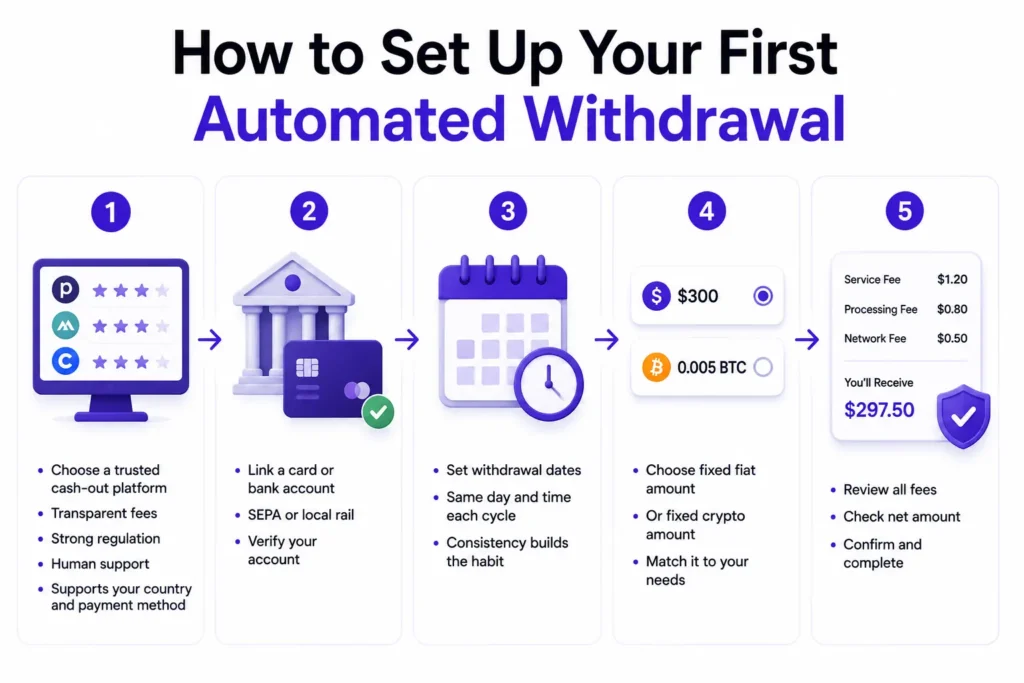
How to Set Up Your First Automated Withdrawal
The following steps use Paybis as the primary platform and apply to any casual user wanting to build a consistent cash-out routine.
- Select your cash-out platform. Look for transparent fee disclosure, strong regulatory credentials, and accessible human support. Review the comparison table above and confirm the platform supports your country and preferred payment method.
- Add your account for cash withdrawals. Link a Visa or Mastercard debit card, or connect a bank account via SEPA or your local rail. Verify the linked account before initiating any transactions. Paybis’s withdrawal help documentation walks through the linking process in detail.
- Set your withdrawal dates. Set a calendar reminder on the same day and time each cycle. Consistency removes the temptation to delay or skip based on market emotion.
- Specify the conversion value and currency. Decide whether to sell a fixed fiat amount (for example, always cash out $300 worth of Bitcoin) or a fixed crypto amount based on your needs.
- Confirm the total withdrawal cost. Before clicking confirm, review the itemized fee breakdown: service fee, processing fee, and network fee. On Paybis, this screen appears before any payment details are entered. Verify the net fiat amount matches your expectations, then confirm. Paybis’s crypto withdrawal limits guide covers withdrawal limits and the confirmation screen in detail.
Setting Up Recurring Crypto Cash-Outs
The following answers common questions about managing, adjusting, and maintaining a crypto cash-out routine over time.
Adjusting Your Recurring Crypto Conversions
You can adjust the amount or destination of your cash-out at each transaction. Each sale follows the same steps described in the Paybis sales flow section above.
What Happens if My Crypto Balance Is Too Low?
Before initiating each sell on Paybis, check that your wallet holds sufficient crypto to cover the amount you plan to convert. On Kraken, an insufficient balance causes the recurring order to be skipped. An email notification is sent, and the order is retried at the next scheduled interval.
What Are the Fees for Automated Crypto Withdrawals?
Two categories of fees apply to every crypto cash-out:
- Platform fees (Paybis controls these): Service fee starting from 1.49% and processing fee of 4.5-8.5% for card transactions over $50. These are fixed and shown upfront before you confirm.
- Network fee (Paybis does not control this): Set by the blockchain network based on congestion at the moment of your transaction. This fluctuates and can spike during high-activity periods. Paybis displays the current estimated network fee at the quote stage before you confirm, but this number isn’t guaranteed until the transaction is broadcast.
Discontinue Your Auto Crypto Withdrawals
To pause your Paybis cash-out routine, skip initiating the next sell at your scheduled time. Pausing means not initiating a sell at your next scheduled interval. For Coinbase recurring sells, cancelling the feature may delete the entire schedule. You would need to set it up again from scratch to restart.
How Secure Are Recurring Crypto Conversions?
Paybis holds PCI DSS (Payment Card Industry Data Security Standard) Level 1 certification, the highest standard for payment processing security. All data transmission uses SSL encryption. Paybis has operated since 2014 with a clean security and compliance track record. It serves 5M+ retail users and has processed over $5 billion in volume, as reviewed by Coin Bureau.
Enable two-factor authentication on any account you use in a regular cash-out routine. Paybis’s FinCEN registration and FINTRAC registration place Paybis under mandatory anti-money laundering compliance and regular regulatory audits. This provides a level of consumer protection that unlicensed platforms can’t match. Paybis holds a 4.6-star rating on Google Play across 11.2K+ reviews and 500K+ downloads, reflecting reliable performance for repeat transactions (the metric that matters most for anyone building a regular cash-out routine).
Ready to set up transparent, recurring crypto cash-outs? Create a Paybis account, complete identity verification, and see the exact fees before confirming your first conversion.
Key Terminology
- Fiat currency: Government-issued money such as US dollars, euros, or British pounds. When converting crypto to cash, the output is fiat currency deposited into a bank account or payment card.
- Network fee: A charge paid to blockchain miners or validators to process and confirm a transaction on the blockchain. This fee is not controlled by the exchange platform and fluctuates based on current network demand.
- Off-ramping: The process of converting cryptocurrency into fiat currency and transferring it to a traditional bank account or payment card. The reverse process, converting fiat to crypto, is called on-ramping.
- Stablecoin: A cryptocurrency designed to maintain a fixed value pegged to a fiat currency, typically $1 USD. Examples include USDC and USDT. Stablecoins are often used as an intermediary step in recurring cash-out routines to reduce exposure to crypto price volatility between conversion dates.
- Spread: The difference between the market price of a crypto asset and the price a platform offers when buying or selling. Some platforms embed their spread into the displayed exchange rate rather than showing it as a separate fee. This makes the true cost of a transaction less visible until checkout. Paybis does not embed a spread and displays all costs as separate line items before you confirm.
FAQ
Can I Automate Withdrawals to My Visa Card?
Yes. Paybis supports sells directly to Visa and Mastercard debit cards, with proceeds processed near-instantly after you confirm the sell. Kraken and Coinbase both support manual card-based fiat withdrawals but may apply hold periods depending on your payment method.
How Long Does an Automated Fiat Transfer Take?
Paybis’s card payouts process near-instantly after the sell is confirmed. Bank transfers via SEPA follow standard interbank settlement timelines, typically one to three business days for most destinations. Per Kraken’s withdrawal processing policy, Kraken imposes a 72-hour hold on card-funded transactions and a 7-day hold on ACH deposits. Coinbase bank transfers typically take three to five business days.
Are There Extra Fees for Scheduling a Withdrawal?
The standard fee structure applies to each transaction: a service fee starting from 1.49%, a processing fee of 4.5-8.5% for card transactions over $50, and the current network fee displayed at the quote stage before you confirm.
What Happens if the Network Fee Spikes During My Scheduled Withdrawal?
The network fee is set by blockchain miners based on congestion at the exact moment the transaction is broadcast, and it’s not controlled by the platform. Paybis displays the estimated network fee at the quote stage before you confirm. If the fee has spiked beyond your expectations, you can wait for congestion to subside before completing the transaction. Stablecoins like USDC and USDT typically carry lower, more predictable network fees than Bitcoin. This is worth considering if you want more cost-stable regular cash-outs.
Disclaimer: Don’t invest unless you’re prepared to lose all the money you invest. This is a high‑risk investment and you should not expect to be protected if something goes wrong. Take 2 mins to learn more at: https://go.payb.is/FCA-Info