Why Your Kraken Fees Are So High (and 7 Ways to Pay Less)
Key Takeaways:Kraken’s Instant Buy charges approximately 3.5% in combined trading fees, card processing fees, and hidden spreads on a single card purchase. Switching to Kraken Pro and placing limit orders drops that to 0.25%, but requires learning a trading interface designed for advanced users and waiting 1-5 days for a bank transfer. If you buy crypto 1-4 times per year and value your time, Paybis processes card purchases in under 1 minute with every fee shown upfront before you confirm. You can buy Bitcoin with a bank account, with Skrill, with Paysafe Card, or withdraw Bitcoin to your bank account; all with fees shown before you confirm.
You bought $500 of Bitcoin on Kraken, but only $468.75 showed up in your wallet. Where did the rest go? The answer is Kraken’s “Instant Buy” feature, a convenient button that quietly charges a premium most users never see coming. Kraken runs two completely different fee structures: a high-cost beginner interface and a low-cost professional platform called Kraken Pro. We’ll show you how to cut those fees by up to 80% with specific changes to how you deposit and trade, plus an honest look at whether or not the complexity is actually worth your time.
The Hidden Cost of Kraken Instant Buy
Kraken built its standard interface for simplicity. You pick a cryptocurrency, enter an amount, and click buy. But that convenience costs you money most people don’t see until they check their wallet.
Kraken’s official fee schedule shows Instant Buy and recurring trades carry a 1% trading fee. Custom instant orders add another 1.5%. Card purchases add a separate processing fee of 3.75% plus €0.25. Then there’s the spread, an additional margin built into the quoted price that varies based on market conditions, order size, and account activity. If you’re still deciding whether crypto is worth the learning curve, it helps to understand how to research cryptocurrency before committing funds to any platform.
Here’s what you actually pay for a $500 Bitcoin purchase with a card on Kraken Instant Buy:
| Cost Component | Rate | Dollar Amount |
|---|---|---|
| Trading Fee | 1.00% | $5.00 |
| Card Processing Fee | 3.75% | $18.75 |
| Spread (varies) | Variable | Variable |
| Total Fees | ~4.8% | ~$24 |
| BTC Received | — | ~$476.00 |
For comparison, Kraken Pro maker fees start at just 0.25% per trade at the base volume tier, as documented in this Kraken fee tier breakdown. For context, even Kraken Pro’s base maker fee of 0.16% runs higher than Binance’s standard 0.10% trading fee, making Binance the more cost-competitive option for active traders on a like-for-like basis.
7 Ways to Reduce Your Kraken Fees Today
We’ve ordered these tactics by impact. The first two alone eliminate the majority of fees for most casual buyers.
1. Switch to the Kraken Pro Interface
According to Kraken’s Pro interface guide, you switch between the standard interface and Kraken Pro using the platform selector in the top right corner of your dashboard.
Kraken Pro gives you access to spot trading, margin, derivatives, and staking in one view. You’ll face a real learning curve: order books, price charts, and trade history that can feel overwhelming at first. Reading up on the best Bitcoin trading platforms can help you benchmark what a good trading interface should look like before you dive in.
This is the single highest-impact change available. Every other tactic below builds on it.
2. Use Limit Orders Instead of Market Orders
Here’s the before-and-after cost comparison on a $500 BTC purchase:
| Method | Fee Rate | Total Fees | BTC Value Received |
|---|---|---|---|
| Kraken Instant Buy (card) | ~6.25% | ~$31.25 | ~$468.75 |
| Kraken Pro — Market Order (taker) | 0.40% | $2.00 | ~$498.00 |
| Kraken Pro — Limit Order (maker) | 0.25% | $1.25 | ~$498.75 |
- Maker fee: You pay this when you place a limit order that doesn’t fill immediately. Your order sits in the order book adding liquidity, and Kraken charges the lower 0.25% rate.
- Taker fee: You pay this when your order fills immediately at the current market price. Kraken charges 0.40% at the base tier.
When you place a limit order, you set a maximum price you’ll pay for Bitcoin. If the market is at $85,000, entering a limit order at $85,100 gets you filled quickly at the maker rate instead of the taker rate.
3. Choose Low-Cost Bank Deposit Methods
Deposit method selection has a direct impact on your total cost. According to Kraken’s cash deposit documentation:
- ACH (US bank transfer): Free to deposit
- SEPA (EUR transfers): Free to deposit
- Wire Transfer: $0-$10 depending on the intermediary bank
- Credit/Debit Card: 3.75% + €0.25 per transaction
The trade-off is time. ACH transfers take 1-5 business days to clear, and Kraken holds your crypto for 7 days after ACH funding before you can withdraw it, but standard SEPA takes 1-3 business days. Choosing the zero-fee deposit method may add up to 12 days before you can freely move your crypto. For a broader look at how payment methods compare on cost and convenience, see our guide to alternative payment methods vs. credit cards.
4. Batch Your Crypto Withdrawals
Kraken charges flat withdrawal fees per transaction. According to Kraken’s withdrawal fee schedule, Bitcoin withdrawals currently cost approximately 0.00015 BTC per withdrawal, and Ethereum withdrawals cost approximately 0.0035 ETH.
At $85,000 per Bitcoin, you’re paying roughly $12.75 per withdrawal. Send $50 of Bitcoin five separate times and you pay that fee five times. Send $250 once and you pay it once. Batching withdrawals into larger, less frequent transfers cuts this cost directly. Understanding how Bitcoin wallets work can help you manage withdrawal timing more effectively.
5. Avoid Direct Currency Conversion Spreads
When you convert one cryptocurrency directly to another using Kraken’s basic interface, you pay the same Instant Buy spread described above. The spread on crypto-to-crypto conversions can add 1-2% or more to your effective rate.
Using Kraken Pro to execute these as separate trades (sell Asset A for fiat, then buy Asset B with fiat) gives you access to the transparent maker/taker fee structure instead. For a simpler swap experience without the trading interface, Paybis also offers a crypto swap feature directly within the wallet.
6. Increase Your 30-Day Trading Volume
Kraken’s maker/taker fees decrease automatically as 30-day volume grows: from 0.25%/0.40% at the base tier to 0.20%/0.35% at $10,000+ volume and 0.14%/0.24% at $50,000+, per this exchange fee tier reference. If you buy crypto a few times per year, you won’t reach higher tiers. This tactic works best for users who already trade regularly.
7. Skip the Credit Card on Kraken
We’re repeating this as its own step because it’s the single most common mistake new Kraken users make. The 3.75% card fee stacks on top of the trading fee and the spread. Even on Kraken Pro, you still pay the card processing fee. Funding via free ACH or SEPA eliminates this cost entirely, with the time trade-off noted in step 3.
Kraken vs. Coinbase vs. Binance: Who Has the Lowest Fees?
Here’s how Kraken’s fees and features compare to its main competitors:
| Platform | Instant Buy Fee | Pro Trading Fee | Support | Countries |
|---|---|---|---|---|
| Kraken | ~3.5% (card) | 0.25% maker / 0.40% taker | 24/7 live chat | 190+ |
| Coinbase | Variable (spread + processing) | 0.40% maker / 0.60% taker | Automated bot | 100+ |
| Binance | Not available in all regions | 0.10% maker/taker | 24–48 hour queue | 100+ |
Kraken supports 530+ crypto assets and 7 fiat currencies across 190+ countries. Its Pro trading fees are competitive, especially at higher volume tiers. But the dual-pricing structure, where the same exchange charges beginners up to 6%+ via Instant Buy while Pro users pay 0.25%, creates real confusion when the platform doesn’t clearly signpost the difference. This pattern of fee surprises is a primary driver of why users leave crypto platforms, according to exchange behavior research. When evaluating any exchange, it’s worth consulting an independent breakdown of the safest crypto exchanges and their security features to make sure cost savings don’t come at the expense of safety.
When to Skip Kraken Pro and Use Paybis Instead
Optimizing Kraken fees requires you to learn Kraken Pro, wait 1-5 business days for a bank transfer to clear, and place limit orders correctly. For users buying crypto 1-4 times per year, that learning investment is real.
Here’s the direct time-value comparison. Getting a $500 Bitcoin purchase through Kraken Pro via ACH takes 3-7 days of waiting before you can trade and withdraw. Your fee: $1.25 (0.25% maker). The same purchase on Paybis using a credit card takes under 15 minutes from account creation to Bitcoin in your wallet. We show every fee on your checkout screen before you confirm, as documented in our fee transparency help article.
Here’s what you pay for a $500 card purchase on Paybis (after your first transaction):
| Cost Component | Rate | Dollar Amount |
|---|---|---|
| Service Fee | 1.49% | $7.45 |
| Processing Fee | 4.5% | $22.50 |
| Network Fee | Variable | ~$2–$5 |
| Total Fees | ~6–6.5% | ~$32–$35 |
That’s comparable in dollar terms to Kraken Instant Buy, but with one critical difference: you see every number before you click “confirm.” We don’t embed a spread in the quoted price.
We process transactions near-instantly, depending on the blockchain. We operate in 180+ countries with 20+ payment methods and 90+ cryptocurrencies. The Coin Bureau Paybis review cited user testimonials with verification completed in 2 minutes and Bitcoin in the wallet within 10 minutes. The 99Bitcoins analysis and FXEmpire’s review both confirm transparent fee disclosure as a consistent platform strength.
We provide 24/7 live chat in 9 languages with average response times under 2 minutes, as confirmed by independent platform testing. Kraken also offers 24/7 live chat, but response quality and times vary. The DigiChick Paybis buying guide also walks through how the first-transaction fee waiver works, which makes that initial purchase cost even lower.
“Paybis is so easy to use compared to many other companies in the same field. It is quick and you get your receipt and information right away.” – Tuula Rantanen on Trustpilot
“Excellent platform. No complicated pathways to implementation of asset movement. Extremely reliable, quick & straight forward format… Support actually responds & is extremely courteous.” – Kevin Ashley on Trustpilot
“fees and exchange rates are displayed transparently before confirmation, making it easy to understand exactly what you” [pay] – Joon Huh on Trustpilot
We hold a 4.1-star Trustpilot rating across 30,780+ reviews, with 75% being 5-star. We’re FinCEN-registered (US MSB entity 31000272911973), FINTRAC-registered (Financial Transactions and Reports Analysis Centre of Canada), and PCI DSS Level 1 compliant (Payment Card Industry Data Security Standard). We’ve processed $1.2B+ in annual transaction volume (last 12 months as of Oct 2025) across 5M+ retail users.
Pros and Cons of Using Kraken
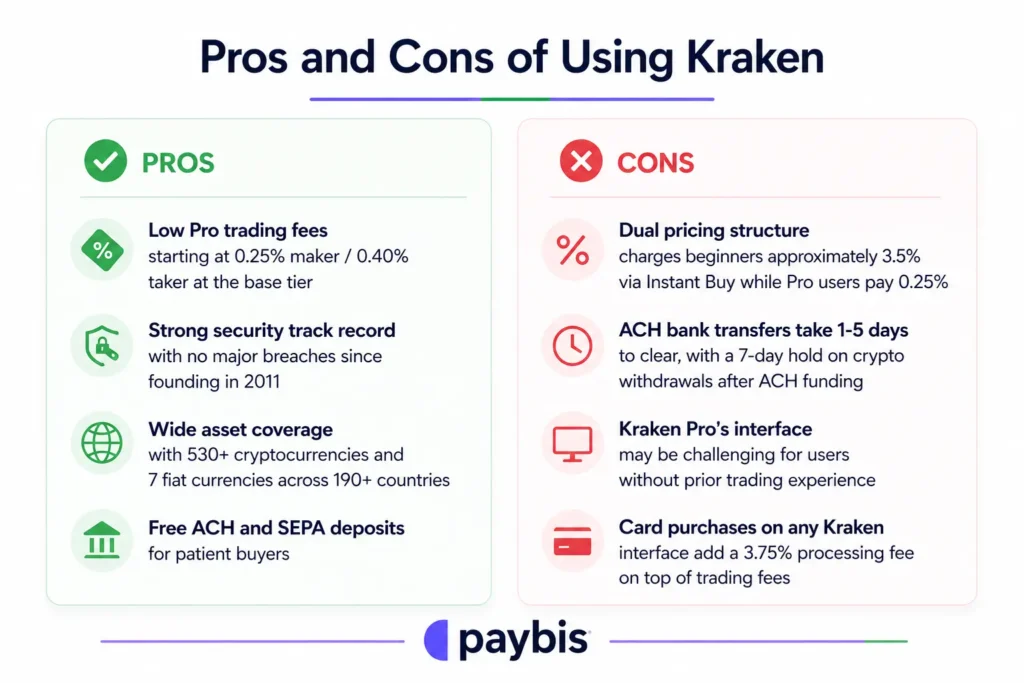
Pros:
- Low Pro trading fees starting at 0.25% maker / 0.40% taker at the base tier
- Strong security track record with no major breaches since founding in 2011
- Wide asset coverage with 530+ cryptocurrencies and 7 fiat currencies across 190+ countries
- Free ACH and SEPA deposits for patient buyers
Cons:
- Dual pricing structure charges beginners approximately 3.5% via Instant Buy while Pro users pay 0.25%
- ACH bank transfers take 1-5 days to clear, with a 7-day hold on crypto withdrawals after ACH funding
- Kraken Pro’s interface may be challenging for users without prior trading experience
- Card purchases on any Kraken interface add a 3.75% processing fee on top of trading fees
Kraken doesn’t fit users who want a simple, 3-click purchase with no trading jargon, instant card settlement, and live human support.
How to Keep Your Kraken Account Secure
Regardless of which fee strategy you use, these steps protect both your funds and account access:
- Enable 2FA immediately: Use an authenticator app rather than SMS, which is significantly more resistant to SIM-swapping attacks.
- Use a unique, strong password: A password manager generates and stores a random string that can’t be reused from another breach.
- Withdraw to cold storage for larger holdings: Cold storage keeps crypto on a device that never connects to the internet, removing exchange-side risk for holdings above $1,000.
- Enable withdrawal confirmations via email: This adds a verification step before Kraken processes any withdrawal, blocking unauthorized transfers even if your credentials are compromised.
- Watch for phishing: Kraken will never ask for a password or 2FA code via chat, email, or phone. Any message requesting credentials is a scam.
Paybis’s wallet transfer guide also covers common risks to check before sending crypto to any external address.
Ready to buy Bitcoin without navigating trading interfaces or waiting for bank transfers? Use our Paybis fee calculator to see the exact service fee, processing fee, and network fee before you commit. We waive the Paybis service fee on your first card transaction. Create an account, complete 2-minute identity verification, and get Bitcoin in your wallet within 15 minutes.
Key Terminology
- Cryptocurrency exchange: A platform where you can buy, sell, and trade digital currencies like Bitcoin and Ethereum using fiat money (dollars, euros) or other cryptocurrencies.
- Fiat currency: Government-issued money such as USD, EUR, or GBP, as opposed to cryptocurrencies which have no central authority issuing them.
- KYC (Know Your Customer): The identity verification process exchanges use to confirm your identity, typically involving a government-issued ID and a selfie to comply with anti-money laundering laws. 2FA
- (Two-Factor Authentication): A second layer of login security requiring a one-time code from an app or SMS in addition to your password, blocking unauthorized access even if your password is stolen.
- Maker fee: The fee you pay when you place a limit order that doesn’t fill immediately. Your order rests in the order book, “making” liquidity. Kraken Pro charges 0.25% at the base tier.
- Taker fee: The fee you pay when your order fills immediately against an existing order in the book, “taking” liquidity away. Kraken Pro charges 0.40% at the base tier.
- Cold storage: Keeping cryptocurrency on a hardware device that stays offline and never connects to the internet, eliminating remote hacking risk.
- Proof of Reserves: A cryptographic audit method where an exchange publicly proves it holds the customer funds it claims, without revealing individual account details.
- Instant Buy fee: The all-in cost on Kraken’s standard interface for buying crypto immediately at a quoted price, combining the trading fee, payment processing fee, and an embedded spread.
- Trading pair: A market that defines how much of one asset is needed to buy another, such as BTC/USD (Bitcoin priced in US dollars) or ETH/BTC (Ethereum priced in Bitcoin).
FAQ
Is Kraken better than Coinbase?
Kraken’s Pro fees (0.25% maker) are lower than Coinbase Advanced fees (0.40% maker), and Kraken supports 530+ assets versus Coinbase’s more limited selection. Coinbase has a larger US user base and a Nasdaq listing, while Kraken covers 190+ countries with a longer security track record.
What are the downsides of Kraken?
The primary downsides are the confusing dual-pricing structure (Instant Buy charges approximately 3.5% while Pro charges 0.25%), the 1-5 business day ACH wait, and the 7-day withdrawal hold on ACH-funded purchases.
How much does Kraken cost for a beginner?
Using Kraken Instant Buy with a credit card for a $500 Bitcoin purchase, you’ll pay approximately $31.25 in combined trading fees (1%), card processing fees (3.75%), and spread (~1.5%), receiving roughly $468.75 in BTC for your $500 spend.
What is the difference between Kraken and Kraken Pro?
Kraken is the standard beginner interface with Instant Buy and spread-based pricing. Kraken Pro is the advanced trading platform at pro.kraken.com with an order book, limit orders, and lower maker/taker fees starting at 0.25%.
Can the first Paybis purchase really have zero service fee?
Yes. We waive the Paybis service fee (1.49%) on your first credit or debit card transaction. The payment processing fee (4.5% for card transactions over $50) and network fee still apply to that first purchase.
Disclaimer: Don’t invest unless you’re prepared to lose all the money you invest. This is a high‑risk investment and you should not expect to be protected if something goes wrong. Take 2 mins to learn more at: https://go.payb.is/FCA-Info