How to Buy BNB: A Beginner’s Guide
- BNB (formerly Binance Coin) is the native token of BNB Chain and pays its transaction fees. A typical fee on BNB Smart Chain is about $0.005, per BNB Chain documentation.
- Buying BNB on Paybis takes about 15 minutes. Create an account, verify your identity in under 2 minutes, pay, and receive BNB in a Paybis or external wallet.
- Paybis shows all fees before you confirm. The Service Fee starts from 1.49% (0% on your first card purchase), plus a Processing Fee and a Network Fee.
- Paybis supports 50+ payment methods. Card payments process instantly, and SEPA bank transfers in the EU cost less than cards.
- Paybis is FinCEN- and FINTRAC-registered, PCI DSS Level 1 compliant, and has operated since 2014 with no security breaches. It has 32,800+ Trustpilot reviews with a rating of 4.1 or “Great” as of September 24, 2026.
Quick Answer: Paybis lets you buy BNB in about 15 minutes using a credit or debit card. Create an account, verify your identity in about 2 minutes via photo ID and selfie, and enter the amount. Pay with Visa or Mastercard and receive BNB in your wallet. Fees are shown upfront before you confirm: Service Fee starts from 1.49% (0% on your first card purchase), plus a Processing Fee and a Network Fee set by the blockchain. Paybis operates in 180+ countries, is FinCEN-registered, and is PCI DSS Level 1 compliant.
You want to buy BNB, but most guides assume you already know what a blockchain is. This one does not.
You do not need a trading account, a finance degree, or a three-day bank transfer to own BNB. You need a compliant platform, a payment method you already use, and about 15 minutes.
This guide covers what BNB is, how buying works, which payment methods fit your situation, how to stay safe, and the exact five-step path to your first purchase. Every fee and timeframe is spelled out, so nothing surprises you at checkout.
What Is BNB?
This section explains what BNB does, how transactions work on its network, and how it compares to Bitcoin and Ethereum.
What Does BNB Do?
BNB is the native utility token of the BNB Chain, which is typically among the top three blockchains by monthly active users, according to VanEck.
BNB is required to pay transaction fees on the network. It also fuels decentralized applications (apps that run on a blockchain rather than a central server). According to CoinDesk, BNB Chain was formerly Binance Smart Chain, the blockchain of the Binance exchange, and rebranded in 2022. You can buy and hold BNB without ever opening a Binance account.
How BNB Transactions Work
Every action on the BNB Chain, whether sending funds or using an application, requires a small fee paid in BNB. BNB Chain’s documentation confirms that BNB is used to pay transaction fees on BNB Smart Chain.
When you buy BNB, the platform sends it to your wallet (the address where your BNB is stored). The blockchain (the public network that verifies transactions) confirms the transfer, and the BNB appears in your wallet. You can track every step on a public explorer like BscScan.
How Does BNB Compare to Bitcoin and Ethereum?
Beyond paying fees, BNB works as a utility token across apps built on BNB Chain.
Here is how BNB compares to the two biggest cryptocurrencies:
| Feature | Bitcoin | Ethereum | BNB |
|---|---|---|---|
| Primary role | Store of value, payments | Smart contracts, apps | Fees, apps, ecosystem access |
| Typical transaction cost | About $0.34 average | About $0.20 average | About $0.005 typical |
| Beginner use case | Buy and hold | Buy and hold | Pay fees, use apps |
Fee figures come from BitInfoCharts daily averages for Bitcoin and Ethereum (September 18, 2026) and BNB Chain’s documentation. Network fees change with demand.
For a first-time buyer, BNB’s low fees mean you can use your crypto for transactions without watching network costs eat into your purchase.
How Does Buying BNB Work?
Here is what happens after you pay and where your BNB is stored.
Tracking Your First BNB Arrival
After payment, settlement is near-to-instant depending on the blockchain. You receive an email confirmation with a transaction reference, and you can watch the transfer confirm on a public blockchain explorer. If anything looks unclear, Paybis’s 24/7 live chat can help.
Where Should You Store Your BNB?
You have two choices for where your BNB lives:
- Paybis wallet: A free wallet to buy, sell, store, send, and swap crypto. You can buy crypto directly to your Paybis wallet or create a Paybis wallet before you buy.
- External wallet: A wallet address you specify. When you buy BNB with a bank account, the platform transfers BNB to the wallet address you provide. You can also deposit crypto from an external wallet or withdraw to an external wallet later.
Beginners usually start with the built-in wallet and move funds later once they are comfortable.
Which Payment Methods Can You Use?
Paybis supports 50+ payment methods across 180+ countries. The right choice depends on how fast you need BNB and how much you are buying.
Buying BNB with Cards Instantly
To buy BNB with a credit card, select Credit Card or Debit Card at checkout, enter your details, and approve the 3D Secure prompt from your bank. Paybis processes card payments instantly when approved, which makes cards the fastest option.
Some banks flag crypto purchases as unusual activity. If your card declines, call your bank’s fraud line, confirm the charge is yours, and try again.
How Do You Buy BNB with a Bank Transfer?
SEPA bank transfers in the EU cost less than cards. Paybis offers instant SEPA transfers that arrive in minutes.
Buying BNB via Mobile Wallets
Apple Pay and Google Pay work like card payments but skip manual card entry. Paybis also supports regional methods, including Revolut Pay purchases. With 50+ payment methods across 180+ countries, most buyers can use a method they already trust, including local payment options in many regions.
| Method | Speed | Processing fee | Best for |
|---|---|---|---|
| Credit/debit card | Instant processing | 4.5-8.5% over $50 | Speed, first buys |
| Bank transfer | Minutes (SEPA Instant, EU) | Lower than card | Large amounts, lower fees |
| Apple Pay / Google Pay | Instant processing | – | Mobile buyers |
How to Ensure Your BNB Purchase Is Secure
Security on a crypto platform comes down to two things: what the platform does, and what you check before you pay. This section covers both.
How Verification Keeps Your Funds Safe
Is BNB safe to buy? The token itself is established, but using a registered platform lowers your risk. Identity verification exists because the law requires it.
FinCEN guidance says businesses that accept and transmit crypto must register with FinCEN as a money services business and follow anti-money-laundering program requirements. That registration must be renewed every 24 months. For you as a buyer, verification helps the platform screen out fraudulent accounts.
Steps to Get Your Account Verified
Paybis verification takes under 2 minutes for most users:
- Upload a photo of a government-issued ID (passport, driver’s license, national ID, or residence permit).
- Take a selfie so the platform can confirm you are a real person.
- Confirm your personal details.
For more on accepted document types, see the Paybis verification documentation.
How to Spot a Secure BNB Platform
Check these markers before entering payment details anywhere:
- Regulatory registration: Paybis holds FinCEN registration (MSB in the US): 31000272911973 (Paybis USA LTD), 31000224635628 (US state operations), 31000277275964 (Paybis Poland). FINTRAC (MSB in Canada): C100000646 (Paybis Canada), C100000816 (Paybis Poland). Paybis is also PCI DSS Level 1 compliant. You can check Paybis’s guide on how to check whether your crypto exchange is secure.
- Track record: Paybis has operated since 2014 with no security breaches.
- Public reviews: Paybis has 32,800+ Trustpilot reviews with a rating of 4.1 or “Great” as of September 18, 2026. Blockchain Reporter’s Paybis profile notes users most often praise transaction speed and support responsiveness.
The Paybis blog also explains how to choose a regulated exchange and how to check whether your exchange is regulated before you hand over payment details.
Warning Signs of Risky Exchanges
Walk away from any platform showing these red flags, drawn from consumer protection guidance:
- No compliance mention: Zero reference to licensing, registration, or identity verification policies. Get Smarter About Money’s fraud guide warns that an unregistered platform may turn out to be fraudulent. In that case, there is typically no way to get your money back.
- Guaranteed returns: No legitimate platform can promise fixed profits. The FTC notes that only scammers will guarantee profits or big returns.
- Withdrawal blocks: Deposits work fine, but withdrawals get delayed or locked behind extra “fees.” The FTC warns that some fake crypto sites don’t let you withdraw your money at all, or only if you pay high fees.
- Pressure tactics: Countdown timers, “limited windows,” or unsolicited contact pushing you to act fast. The CFTC and SEC warn that fraudsters create a false sense of urgency and advise extreme caution with unsolicited offers.
- Fake websites: Fake websites can look almost identical to registered crypto platforms. Type the address yourself instead of clicking links in unexpected messages.
Get Started: A Beginner Path to Buying BNB
This is the step-by-step process for your first BNB purchase. If you searched for Binance Coin, it is the same asset under its current name.
Step 1: Sign Up for Your Account
Go to paybis.com and create an account with your email address and mobile phone number. The Paybis account creation and verification guide includes a step-by-step video.
Step 2: Submit ID for Fast Approval
Upload your ID photo and complete the selfie check. The platform approves most users in about 2 minutes. The official Paybis identity verification video walks through the ID upload and selfie check. It includes tips like making sure your document is clear and legible to avoid delays.
Step 3: Compare Your Payment Options
Pick the method that fits your goal. Card or mobile wallet for instant processing, bank transfer for lower fees.
Paybis supports 50+ payment methods, including local payment options in many regions. The Paybis guide to buying crypto with a credit or debit card walks through choosing your payment method.
“I appreciate Paybis for its ability to facilitate instant cryptocurrency purchases using my card, which significantly enhances the efficiency of my transactions… I found the initial setup with Paybis to be easy and fast, contributing to a smooth onboarding experience.” – Denis I. on G2
Step 4: Specify How Much BNB to Buy
Enter the dollar amount you want to spend. The calculator shows exactly how much BNB you receive and the full fee breakdown before you confirm payment.
Nothing hides in fine print. Your first card purchase carries a 0% Paybis Service Fee.
Step 5: Verify Your BNB Arrival
Confirm payment, approve your bank’s security prompt, and Paybis processes the transaction instantly. Settlement is near-to-instant depending on the blockchain.
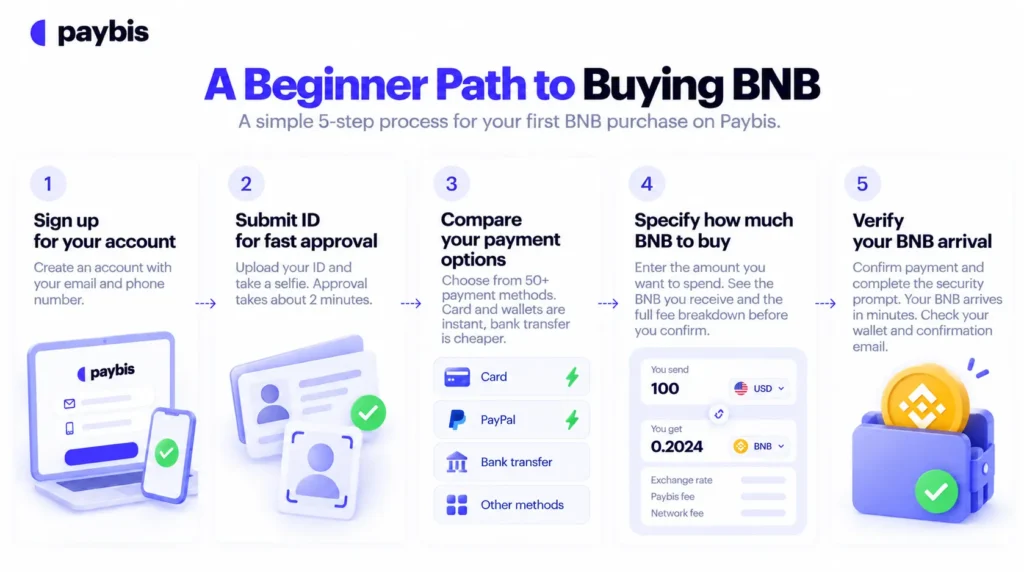
Check your wallet balance, and match the transaction reference in your confirmation email against the public explorer record.
Know Your Total Price Before Buying
Paybis shows every fee before you confirm a purchase. Here is what each charge covers and what a real transaction costs.
What Fees Do You Pay When Buying BNB?
Most checkout surprises come from three fee types. Paybis shows all of them before you confirm, as the platform explains in its guide to how crypto exchanges work:
- Service Fee: Starts from 1.49%. Your first card transaction has a 0% Service Fee.
- Processing Fee: 4.5-8.5% for card transactions over $50, depending on currency.
- Network Fee: The fee paid to the BNB Chain network to confirm your transaction. This varies with network congestion, and the network sets it, not Paybis.
What Is the Processing Fee?
Paybis sets the Service Fee and Processing Fee. The Network Fee is set by the blockchain.
Card payments cost more to process than bank transfers, which explains why bank transfers carry lower fees. Promotions typically apply only to the Service Fee, not to Processing or Network Fees, so read promotion terms carefully.
Typical Wait Times for BNB Buys
Verification takes about 2 minutes, Paybis processes card payments instantly, and settlement is near-to-instant depending on the blockchain. That means you own BNB the same day you decide to buy.
Real-World BNB Purchase Breakdown
Here is what a $500 BNB card purchase looks like after your first transaction, based on the Paybis $500 worked example:
| Fee component | Amount |
|---|---|
| Service Fee (1.49% of $500) | $7.45 |
| Processing Fee (4.5-8.5%) | $22.50-$42.50 |
| Network Fee | Varies with congestion |
| Total charged | About $530-$550 plus the Network Fee |
You see this exact breakdown before you confirm payment. What you see is what you pay.
Buy BNB with Paybis
Paybis is a crypto payment gateway operating since 2014, FinCEN-registered, FINTRAC-registered, and PCI DSS Level 1 compliant. Paybis serves users in 180+ countries with 50+ payment methods and 90+ cryptocurrencies.
Create a Paybis account, complete identity verification in about 2 minutes, and confirm your total cost at checkout before you pay (fees start from 1.49%).
Key Terminology
- BNB: The native utility token of the BNB Chain, used to pay transaction fees and access applications in the ecosystem.
- BNB Chain: The blockchain network where BNB transactions and applications run. It confirms transactions and records them publicly.
- Wallet: The place where your BNB is stored, either the built-in Paybis wallet or an external wallet you control.
- Network Fee: The fee paid to the BNB Chain network to confirm your transaction. It fluctuates with network demand.
- Identity verification: The ID upload and selfie check compliant platforms use to confirm your identity, prevent fraud, and meet regulatory obligations.
- 3D Secure: The extra approval step your bank sends to your phone or banking app when you pay by card online.
- Settlement: The moment the blockchain confirms your transaction and the BNB officially arrives in your wallet.
FAQ
What Can I Do with BNB After I Buy It?
BNB has practical uses on the BNB Chain. You can pay transaction fees when sending funds or using apps built on the network.
If you buy BNB through Paybis, it arrives in your wallet ready to use. You can hold it there or transfer it to an external wallet to start using it.
How Much BNB Should I Buy First?
The Paybis minimum card transaction is $5, so your first purchase can be small while you learn the process.
Can I Buy BNB with a Credit Card in the US?
Yes. Paybis operates in 48 US states, is registered with FinCEN as a Money Services Business, and accepts Visa and Mastercard. Some banks block crypto card charges, so a quick call to your bank’s fraud line resolves most declines. The CSBS notes that states also regulate crypto money transmission, so availability can vary by state.
Is It Safe to Buy BNB Online?
Using a registered platform lowers your risk. Look for FinCEN or equivalent registration, PCI DSS Level 1 compliance for card handling, and a long operating history. Paybis has operated since 2014 with no security breaches and is PCI DSS Level 1 compliant.
What If My Purchase Fails or Gets Rejected?
If a transaction is declined for security reasons, you are not charged, and the full payment returns to your original card automatically. The timeline depends on your card issuer, and Paybis’s 24/7 live chat responds in roughly 15 seconds in 9+ languages if you need help.
How Long Does It Take to Buy BNB the First Time?
Up to 15 minutes for most first-time buyers: about 2 minutes for verification, instant card processing, and near-to-instant settlement depending on the blockchain.
Disclaimer: Don’t invest unless you’re prepared to lose all the money you invest. This is a high‑risk investment and you should not expect to be protected if something goes wrong. Take 2 mins to learn more at: https://go.payb.is/FCA-Info