How to Buy Tron (TRX): A Beginner’s Guide
- Tron is a blockchain designed for fast payments and decentralized applications. TRX, its native token, is used to pay network fees. You can buy Tron on Paybis using a card, bank transfer, or supported local payment method.
- A first TRX purchase typically takes up to 15 minutes. Create an account, complete identity verification, choose a payment method, and receive your TRX. ID verification takes about 5 minutes for most users.
- Approved card payments typically process in under a minute. Paybis charges a 0% Service Fee on the first card purchase. After that, Service Fees start at 1.49%, plus a 4.5% to 8.5% Processing Fee. SEPA bank transfers cost 0.99% plus 0.05%.
- TRX settlement finalizes in about 1 minute on the Tron network.
- Paybis is registered with FinCEN and FINTRAC and has more than 32,800 Trustpilot reviews, with a 4.1/5 rating as of September 2026.
- TRX purchases are unavailable to residents of 9 additional US states (Alabama, Alaska, Arkansas, Minnesota, Nevada, New Mexico, North Dakota, Vermont, Washington) and Puerto Rico, on top of the 2 states (New York, Louisiana) where Paybis doesn’t operate at all.
Quick answer: Paybis lets you buy Tron (TRX) usually within 15 minutes using a credit card. Bank transfers take longer to process before crypto is released. Verify your identity in about 5 minutes, enter the amount, pay, and receive TRX in your wallet. Fees are shown upfront: the Service Fee starts from 1.49%, and the total is displayed before you confirm. Paybis operates in 180+ countries, is FinCEN-registered, and is PCI DSS Level 1 compliant.
You can buy Tron (TRX) with a card in one session. This guide shows each step and the full cost before you pay.
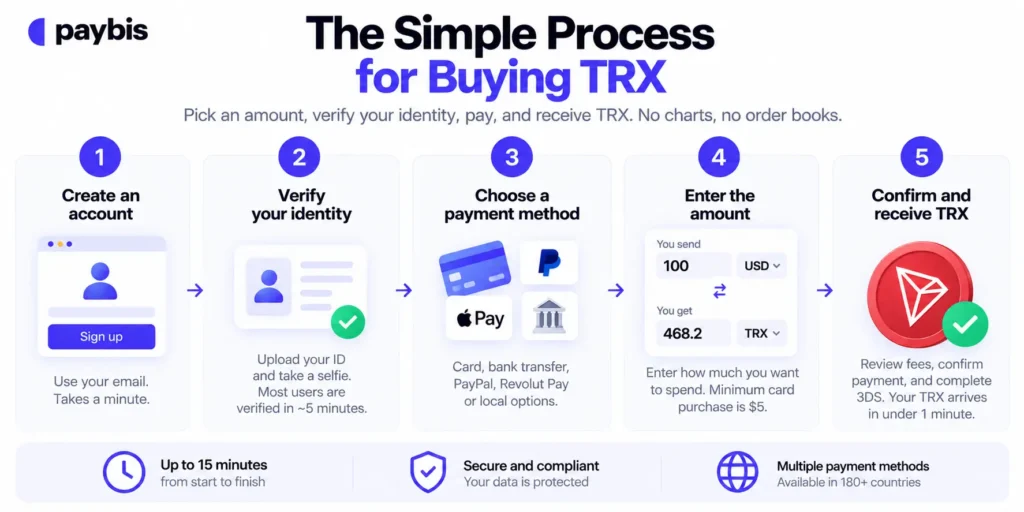
The Simple Process for Buying TRX
Buying Tron works like ordering something online, not like learning to trade. You pick an amount, prove your identity, pay, and receive TRX. No charts, no order books, no “limit orders.”
Step 1: Register Your Personal Account
Go to paybis.com and sign up with your email. US buyers follow the same steps. Paybis operates in 48 US states (all except New York and Louisiana). TRX purchases are not available to residents of Alabama, Alaska, Arkansas, Minnesota, Nevada, New Mexico, North Dakota, Vermont, Washington, or Puerto Rico. See Paybis’s US state cryptocurrency restrictions page for more information.
Step 2: Complete Quick ID Verification
Upload a photo of your government ID and take a selfie. Automated checks approve most users within about 5 minutes. Complex cases go to manual review, which can take longer, per the Paybis identity verification guide.
Step 3: Fund Your TRX Purchase
Select your payment method: card, bank transfer, PayPal, Revolut Pay, or a regional option. The calculator shows “You send X, you get Y” with the TRX amount updating in real time.
Step 4: Enter Your Purchase Amount
Enter how much you want to spend in your local currency. The minimum card transaction is $5. Start small on your first purchase if it helps you feel comfortable with the process.
Step 5: Confirm and Pay for Tron
Review the fee breakdown (Service Fee, Processing Fee, Network Fee) and the total, then confirm. Card payments typically process in under a minute once approved. Settlement is near-to-instant (depends on the blockchain). The first purchase, including verification, usually takes up to 15 minutes, per the Paybis FAQ.
Confirming Your Tron Transaction
TRX settlement finalizes in about 1 minute, per the Tron consensus documentation and Tron transaction protocol. You receive an email confirmation with a transaction reference you can check on TRONSCAN, Tron’s public network explorer.
How Your TRX Tokens Are Secured
If you receive TRX in your Paybis wallet, Paybis keeps the majority of user funds in cold storage. Paybis also protects your payment information through PCI DSS Level 1 compliance. Please note that Paybis wallet is not available in every location. See where it is offered on Paybis’s wallet access page. If you later want to move your TRX to a wallet you control, follow this guide on withdrawing to an external wallet, because blockchain transfers cannot be reversed. Read the transfer warnings too, since some token transfers need TRX in your balance to cover network fees.
How to Pay for Your First Tron Coins
Where to buy Tron depends less on geography and more on which payment method works with your bank. Paybis supports 50+ payment methods across 180+ countries. Here is a comparison:
| Payment Method | Estimated Fee | Processing Time | Best For |
|---|---|---|---|
| Credit/Debit Card | 4.5% to 8.5% processing + 1.49% service | Instant | Speed, first purchase |
| Bank Transfer (SEPA) | 0.99% service + 0.05% processing | Longer than card | Lower cost |
| PayPal / Revolut Pay | Varies | Typically fast | Users who avoid sharing card details |
| Regional (BLIK, Skrill) | Varies by method | Varies | Local currency buyers |
Buying TRX with Cards
Buying Tron with a credit card works like any online checkout: enter your Visa or Mastercard details, complete any required security verification, and the purchase processes instantly. Card processing fees run 4.5% to 8.5% for transactions over $50 depending on currency, and your first card purchase carries a 0% Paybis service fee.
Buying TRX with a Bank Transfer
Bank transfers (ACH in the US, SEPA in Europe) take longer than card purchases but carry very low percentage costs. SEPA purchases carry a 0.99% service fee plus a 0.05% processing fee (minimum €2), per this exchange payment methods guide. If you are in the US, the ACH transfer option works with over 3,000 US banks.
Setting Up Your First TRX Wallet
You have two options. The simplest option, where available, is the built-in Paybis wallet. At checkout you can send TRX to your Paybis wallet or paste an external wallet address. For a first purchase, the built-in wallet removes the risk of typing a wrong address.
Buying Tron with Local Currencies
Paybis supports over 80 local currencies and regional methods like BLIK in Poland. Revolut Pay covers 27 currencies with fast processing. This matters if your bank blocks card purchases on unfamiliar platforms: a local method often works when a card does not.
Safety Checks for Your First TRX Purchase
Tron has had security flaws, including a high-severity bug found and fixed in 2019. The bigger risk for most beginners is not the network itself but the platform you buy through. Here is how to check one.
Paybis Registration and Security Record
Paybis is registered as a Money Services Business with FinCEN in the US and FINTRAC in Canada. You can check out Paybis’s regulatory permissions documentation and registration details to learn more. The platform has operated since 2014 with no major security breaches. Paybis holds 32,800+ Trustpilot reviews with a rating of 4.1 or “Great” as of September 2026, with 74% of reviewers rating it 5 stars, often citing speed and ease of use.
“My transactions are always quick and efficient. And that is what I’m looking for thank you” – Joe Elwin Hulse on Trustpilot
How Verification Protects Your Funds
Identity verification (uploading an ID and selfie) is a legal compliance requirement, not a hurdle. It stops fraudsters from using stolen cards, which protects legitimate buyers. Paybis verifies most users within about 5 minutes using automated checks, per the Paybis account verification guide and this verification walkthrough. If manual review is needed, it may take slightly longer. Prepare a valid passport, national ID card, residence permit, or driver’s license, and take photos in a well-lit area so the text is readable.
Safe Buying: Identifying Real Sites
Scam sites copy legitimate platforms. Before entering card details anywhere:
- Check the URL: It should be paybis.com exactly, with no extra words or hyphens.
- Look for regulatory proof: Real platforms publish registration numbers you can verify. For example, Paybis’s FinCEN MSB registration numbers are 31000272911973 and 31000224635628, and its FINTRAC registration number is C100000646. You can check these against the official government databases.
- Avoid “guaranteed profit” language: No legitimate platform promises returns.
- Read independent reviews: Check Trustpilot before your first purchase, not after.
This guide on choosing a regulated exchange walks through the full checklist, and this companion piece explains how to spot regulated platforms.
Best Practices for Tron Account Safety
Keep two-factor authentication on, use a unique password, and never share verification codes with anyone, including people claiming to be support. Paybis support is available 24/7 via live chat with an average response time of about 15 seconds, so if anything looks wrong, ask a human before acting.
“I like how easy it is to buy crypto with my card and send it directly to my wallet. The interface is clear, transactions are fast, and support has been helpful whenever I had questions.” – Elizar S. on G2
Fees and Timing for Tron Purchases
Every Tron purchase on Paybis carries three fees and a processing window that depends on your payment method. Both are shown below before you reach the checkout screen.
Breakdown of Tron Transaction Costs
Three fees apply to every purchase, and Paybis shows all of them before you confirm, per this payment methods overview:
- Service Fee: Starts from 1.49%. Your first card transaction carries a 0% service fee.
- Processing Fee: 4.5% to 8.5% for card transactions over $50, depending on currency. This covers the card processor’s costs.
- Network Fee: The cost of sending your TRX on the Tron blockchain, shown at checkout before you confirm.
Typical Tron Transaction Wait Times
Card purchases process in real time. TRX settlement finalizes in about 1 minute. Most buyers see TRX in their wallet within 15 minutes of starting. Bank transfers take longer to clear before the crypto is released.
Total Cost Breakdown Before Buying
Here is a sample $500 card purchase after your first transaction, based on the Paybis payment methods overview:
| Fee | Amount |
|---|---|
| Service Fee (1.49%) | $7.45 |
| Processing Fee (4.5% to 8.5%) | $22.50 to $42.50 |
| Network Fee | Variable, shown at checkout |
| Total charged | Approximately $530 to $555 |
Processing fees vary by currency and payment method. Your exact total displays at checkout before you confirm. The number you see at checkout includes every Paybis fee. That is the standard to hold any platform to.
What Is Tron and How Does TRX Work?
Tron is a blockchain (a shared digital ledger that records transactions) designed for fast payments and decentralized applications, often called dApps. Tron is among the busiest blockchains, processing about 977 million transactions in Q1 2026, per Nansen’s Tron Q1 2026 report.
TRX is the network’s native token. According to the Tron developer documentation, TRX pays for transaction fees on the network, including running apps built on Tron.
In 2023 the US SEC sued Tron founder Justin Sun and the TRON Foundation over unregistered TRX sales, wash trading, and paid celebrity promotions without disclosure, per the SEC press release. The case resolved in March 2026. A Sun-owned company paid a $10 million civil penalty without admitting or denying the allegations, and all claims against Sun and the TRON Foundation were dismissed, per the SEC litigation release.
How Fast Is Tron and What Do Transfers Cost?
Based on the Tron consensus documentation, Tron adds a new block about every 3 seconds, so your transaction usually appears on the network within seconds and becomes final in about 1 minute. Tron fees depend on what you send. A simple TRX transfer can cost nothing if your account has enough bandwidth (a free daily allowance of network capacity). Token transfers also use energy (the network resource for running apps), so they usually cost some TRX, per the Tron bandwidth and energy documentation. The dollar cost moves with the TRX price.
Tron’s blocks are produced by 27 elected validators (computers that confirm transactions) called Super Representatives. That is a much smaller group than on networks with thousands of independent validators, which analysts flag as a centralization risk, per Messari’s State of Tron Q1 2025.
The Origins of the Tron Project
TRX launched in 2017 as a token on Ethereum. Tron’s own blockchain went live on May 31, 2018, and TRX moved fully onto it on June 25, 2018.
Buy Tron with Paybis
Paybis is a regulated crypto payment gateway operating in 180+ countries since 2014, with no major security breaches on record. It is FinCEN-registered, FINTRAC-registered, and PCI DSS Level 1 compliant. Paybis supports 50+ payment methods and 90+ cryptocurrencies, with 24/7 live chat support and an average response time of approximately 15 seconds. Paybis has 32,800+ Trustpilot reviews with a rating of 4.1 “Great” as of September 2026.
Ready to buy Tron now? Create a Paybis account, complete identity verification in about 5 minutes, and confirm your full fee breakdown at checkout before paying. Fees start from 1.49%, and the total is displayed before you confirm.
Key Terminology
- TRX: The native token of the Tron blockchain, used to pay transaction fees and interact with apps on the network.
- Blockchain: A shared digital ledger that records transactions publicly.
- dApp (decentralized application): An app that runs on a blockchain.
- Network Fee: The cost the blockchain charges to process your transaction, set by the network, not by Paybis.
- Service Fee: Paybis’s commission on a purchase, starting from 1.49% and waived on your first card transaction.
- Identity verification: The ID and selfie check required by law to prevent fraud and money laundering.
- Settlement: The point where your TRX transaction is final and cannot be reversed. On Tron this typically takes about 1 minute, per the Tron transaction protocol.
FAQ
Can I Buy Tron with a Credit Card?
Yes. Visa and Mastercard purchases process instantly on Paybis, with a 0% service fee on your first card transaction and processing fees of 4.5% to 8.5% on amounts over $50.
What Happens If My Transaction Fails?
If Paybis rejects a transaction for security reasons, you are not charged any fees and the full payment returns to your original payment source automatically, per Paybis’s guide on rejected transactions.
Can I Sell Crypto Back to Cash on Paybis?
Paybis supports selling a range of assets back to local currency on the Tron network. TRX is not currently on the sellable list, so check the current list before you buy if you plan to cash out.
Do I Need a Separate Wallet for Tron?
No. Where available, you can receive TRX in your Paybis wallet or send it to an external wallet address at checkout. You can also move funds to an external wallet later if you choose.
Disclaimer: Don’t invest unless you’re prepared to lose all the money you invest. This is a high‑risk investment and you should not expect to be protected if something goes wrong. Take 2 mins to learn more at: https://go.payb.is/FCA-Info