How to Send Crypto from Paybis to Your External Wallet After Buying with PayPal
Key Takeaways:Sending crypto from Paybis to an external wallet takes four steps: access your wallet, enter transfer details, select a network fee tier, and confirm with verification. We show all fees, including the network fee, before you confirm. Our internal processing typically takes 10 to 20 minutes, with blockchain settlement depending on your chosen fee tier. Always copy-paste your wallet address and verify as much of it as possible before sending. Our 24/7 live chat connects you to a human agent in roughly 15 seconds. You can also buy Bitcoin with PayPal, buy Ethereum with Paypal, and other cryptocurrencies before withdrawing.
You bought Bitcoin or Ethereum with PayPal on Paybis. Now you want to move it to a wallet you personally control. This guide walks you through the exact six-step withdrawal process, explains the difference between network fees and service fees, and covers every safety check that prevents irreversible mistakes. If you’ve already completed a PayPal crypto purchase on Paybis, follow this from start to finish.
For a visual walkthrough, watch our official withdrawal video and our send and withdraw guide alongside the written steps below.
Prevent Account Freezes: Use Your Own Wallet
True Crypto Ownership: Your Keys
When crypto sits on any exchange, including Paybis, the exchange holds it on your behalf. Self-custody means moving your crypto to a wallet where only you hold the private key (the unique code that authorizes transactions). No exchange can freeze, restrict, or lose crypto that’s in your own wallet. If you’re curious about what makes Bitcoin valuable in the first place, our blog covers that in depth.
Benefits of External Wallet Custody
Moving crypto to your personal wallet provides several practical advantages:
- Direct control: No third party can restrict access to your funds.
- No platform risk: If an exchange has technical issues, your self-custodied crypto is unaffected.
- Portability: You can use your funds with any compatible app or service immediately.
- Long-term storage: Your own wallet is the standard approach for holding crypto beyond a few days.
Our wallet transfer warnings cover important considerations before you initiate any withdrawal.
When to Keep Crypto on Paybis vs. Withdraw
Keep crypto on Paybis when you plan to sell back to fiat soon, since the sell flow is faster without an extra transfer step. Withdraw to an external wallet for long-term holding, use crypto in decentralized apps, or send funds to another person. Paybis applies a Service Fee when you buy or sell crypto, so the right choice depends on how and when you intend to use your funds rather than on storage costs alone. For context on payment methods available when you’re ready to buy again, our top payment methods for buying crypto guide is a helpful resource.
Essential Steps for Sending Crypto Safely
Before you start the withdrawal, you’ll need an external wallet already set up and your receiving address ready. Two types of wallets are common: a hardware wallet stores your private key on a physical device that never connects to the internet (best for large, long-term holdings), and a software wallet is a free app on your smartphone or computer (convenient for everyday use and smaller amounts). Both types give you a receiving address to paste into Paybis.
Find Your External Wallet Address
Every wallet has a “Receive” button or section. Tap it to reveal your wallet’s address, which looks like a long string of letters and numbers (a Bitcoin address starts with “1”, “3”, or “bc1”). This is the address you’ll paste into the Paybis withdrawal form. Our guide on depositing crypto also explains address formats clearly.
Match Sending and Receiving Networks
Sending Bitcoin to an Ethereum address permanently destroys your funds. Each cryptocurrency runs on its own blockchain, and addresses from different blockchains are incompatible. Before confirming any withdrawal, verify that the crypto you’re sending matches the network of your receiving address. Think of it like mailing a letter: wrong address means it never arrives. Our guide on how to send Bitcoin to another wallet covers network matching in more detail.
Check Paybis Withdrawal Eligibility
You need a verified Paybis account with a verified phone number before withdrawing. According to our withdrawal guide, if your phone isn’t verified, a red message appears at the bottom of the screen prompting you to contact support. Our standard KYC process takes around five minutes and requires a valid government ID and a liveness face scan, as outlined in our verification requirements. You can also read our step-by-step post on how to create and verify an account if you’re setting up for the first time.
How to Withdraw Crypto from Paybis Step-by-Step
Our PayPal Bitcoin buying video provides useful context for the platform layout if you’re new to the Paybis interface.
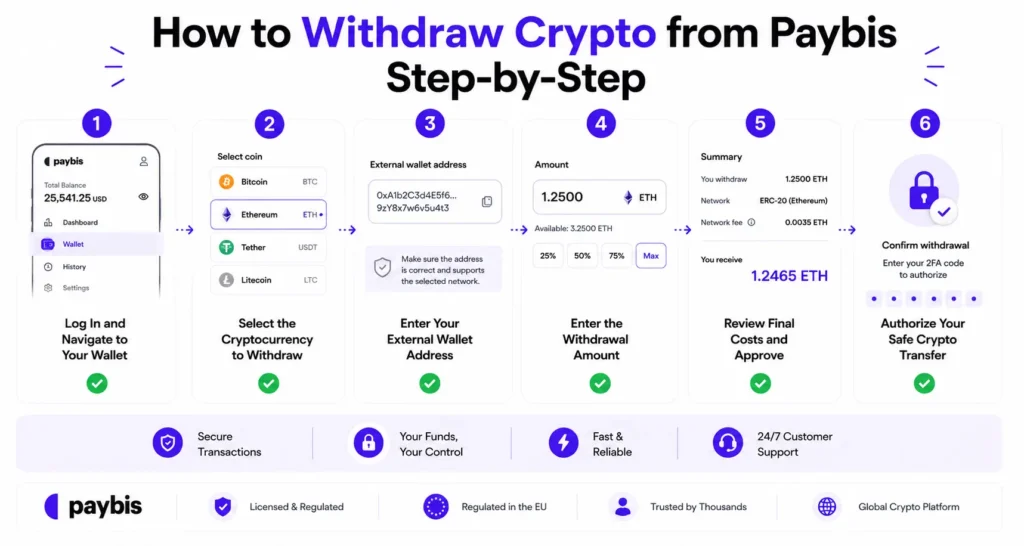
Log in to your Paybis account and click “Member Area” in the top-right corner. Then click the “Wallet” button on the top left, or go directly to your paybis crypto wallet. All cryptocurrencies currently held in your Paybis wallet appear here.
Step 2: Select the Cryptocurrency to Withdraw
Find the specific cryptocurrency you want to send (for example, Bitcoin or Ethereum) and click the “Send” button next to it. A pop-up window opens to begin the withdrawal process.
Step 3: Enter Your External Wallet Address
Paste your external wallet address into the “Sending to” field. Do not type it manually. Our withdrawal documentation states clearly that transfers are irreversible and there is no refund for a mistakenly sent transfer.
Step 4: Enter the Withdrawal Amount
Type the amount to send, or tap “Send All” to transfer the entire balance of that asset. Minimum withdrawal amounts vary by cryptocurrency. For small holdings, check that your amount exceeds the current network fee before proceeding. The Paybis withdrawal limits video shows how this screen works in practice.
Step 5: Review Final Costs and Approve
Before confirming, Paybis displays the complete fee breakdown. According to our fee documentation, fees include the service fee (our commission for facilitating the transaction) and the network fee (paid to blockchain miners). You’ll see the full total before you confirm. You can also choose from three network fee tiers: Low (cheapest, slowest), Medium (default, balanced), or High (fastest, most expensive).
![Paybis withdrawal fee review screen][screenshot_step5_fee_review]
Step 6: Authorize Your Safe Crypto Transfer
After clicking “Send,” we send a 6-digit SMS code to your verified phone number. Enter that code to complete the transfer. Once you submit the SMS code, the transaction broadcasts to the blockchain and cannot be reversed or canceled.
Verify Crypto Addresses Before Sending
Copy-Paste Wallet Addresses Safely
Always copy the receiving address directly from your external wallet app. Never type it manually. A single incorrect character in a long alphanumeric address results in permanent, unrecoverable loss of funds. Our guide on how to spot and avoid crypto scams covers address-related fraud tactics in more detail.
Verify the Full Address Before Confirming
After pasting the address into the Paybis form, compare it character by character against the original address in your external wallet app. Pay particular attention to the middle section of the address, not just the beginning and end. Some malware can silently replace a pasted address with a visually similar one that matches only the first and last few characters. Research published on arXiv demonstrates that attackers can generate addresses that match 25% of digits to achieve a 50% chance of fooling partial-verification checks. The only reliable defense is verifying the full string.Full crypto wallet address verification
Avoid Errors: Test with a Small Sum
Before sending a large amount to a new external wallet address for the first time, send a small test amount first. Confirm it arrives correctly in your external wallet before completing the full transfer.
Can Wrong Address Funds Be Recovered?
No. As we state in our Bitcoin withdrawal documentation, once Bitcoin leaves a wallet, you cannot retrieve it. The blockchain is a permanent, immutable record. We cannot reverse a transaction once it broadcasts to the network. This isn’t a Paybis policy; it’s how blockchain technology works.
Paybis Withdrawal Fees and Processing Times
Why You Pay Network Fees
The network fee (sometimes called a gas fee for Ethereum) goes to miners or validators who process and verify transactions on the blockchain. We don’t receive this money. Think of it like a postage stamp: it pays for delivery, not the store. This fee fluctuates based on blockchain congestion. According to blockchain confirmation time data, congestion is highest during significant market events. If you’d like to understand more about how often Bitcoin’s value shifts in response to these conditions, our post on how often Bitcoin’s value changes is a useful read.
Paybis Withdrawal Speed Explained
Our internal processing typically takes 10 to 20 minutes, though it can take up to 24 hours in rare cases requiring additional security review. After we process your withdrawal, blockchain settlement time depends on the network and fee tier you selected. Bitcoin typically settles in 10 to 60 minutes for standard confirmations, while Ethereum often confirms within minutes. Selecting the “High” fee tier speeds this up on both networks.
The table below shows how our withdrawal experience compares to two common alternatives:
| Feature | Paybis | Coinbase | Binance |
|---|---|---|---|
| Fee transparency | All fees shown before confirmation | Spread embedded in price | Shown upfront |
| Support response | ~15 seconds, 24/7 live chat | Bot-first, human access slow | Long queues, limited human access |
| Withdrawal process | Clear step-by-step flow | Varies by user | Varies by user |
| Network fee control | Low, Medium, High tiers | Varies | Varies |
For an independent look at how our fees and withdrawal speed compare, the Coin Bureau Paybis review and 99Bitcoins Paybis analysis cover both in detail. The FXEmpire Paybis review also addresses the withdrawal experience for beginners.
Check Your Withdrawal Status
After submitting your withdrawal, the transaction hash (a unique ID for your transfer on the blockchain, similar to a tracking number) appears in your Paybis transaction history. Enter this hash into any public blockchain explorer to track confirmation status in real time.
Steps to Fix Failed Crypto Withdrawals
Why Is My Crypto Withdrawal Stuck?
The two most common causes are network congestion during high-volatility markets and our security review process. If you selected the “Low” fee tier during a busy period, your transaction may sit unconfirmed on the blockchain for an extended time. If the transaction is stuck on our end, a security review may be underway, and our why crypto users switch platforms article explains how we handle these situations transparently.
Troubleshoot Unrecognized Wallet Address
If the external wallet address format doesn’t match the selected network (for example, an Ethereum address requires the “0x” prefix), the withdrawal may not proceed. Always confirm your address matches the blockchain you’re sending to before submitting.
Withdrawal Fails Due to Fees
If your withdrawal amount is smaller than the current network fee, the transaction cannot proceed. This happens most often with small balances during high congestion. You can either wait for fees to drop or add more funds to bring the withdrawal amount above the fee threshold.
Paybis Support Channels and Hours
Our support team is available 24/7, 365 days with an average live chat response time of approximately 15 seconds. Access the live chat widget from the bottom-right corner of any page on paybis.com, or through the app’s menu. We support 9+ languages. For urgent withdrawal issues, live chat is the fastest route. You can also reach us at support@paybis.com for non-urgent questions.
One recent user described their experience on Trustpilot:
“I would just like to call out a person on PayBis. Amelia!!! This agent within this app / platform helped me beyond belief tonight! Not only did she handle my situation quickly concisely and solved it…” – Verified user review of Paybis
Another user highlighted the overall speed:
“Paybis is a good site for crypto if you are sending smaller amounts. You get it all done usually within 10-15 minutes. Sending funds, buying crypto, and getting it to your wallet… In a hurry and need it now this is the way to go. No waiting like the other sites” – Verified user review of Paybis
Paybis has 30,780+ Trustpilot reviews with a rating of 4.1 or “Great” as of March 2026, with 75% of reviewers giving it five stars.
Ready to complete your withdrawal? Log in to your Paybis account, navigate to your wallet, and follow the six steps above. If anything feels unclear, open the live chat widget at paybis.com for a human response in under a minute.
Key Terminology
- Network fee: The payment that goes to blockchain miners or validators to process and confirm a transaction. This fee is not kept by Paybis and fluctuates based on how busy the blockchain network is.
- External wallet: Any cryptocurrency wallet outside of the Paybis platform, which may be custodial (a third party holds the private key on your behalf) or non-custodial (you hold your own private key). This includes hardware (offline physical device) and software (app-based) wallets.
- Private key: A unique code that proves ownership of a cryptocurrency wallet. Whoever holds the private key controls the funds. With an external wallet, you hold it yourself.
- Transaction hash: A unique identifier for a specific blockchain transaction, similar to a tracking number. Use it in a blockchain explorer to check the real-time status of a withdrawal.
- SMS verification: Our two-step confirmation method for withdrawals, requiring a 6-digit code sent to your verified phone number before the transaction broadcasts. KYC (identity verification): The process of verifying your identity using a government-issued ID and liveness check. A completed KYC is required to withdraw from Paybis.
FAQ
How fast can I withdraw crypto I bought with PayPal?
We process withdrawals internally in 10 to 20 minutes in most cases. Blockchain settlement time varies by network and the fee tier you selected, with Bitcoin typically taking 10 to 60 minutes and Ethereum settling within minutes.
What are the minimum withdrawal amounts on Paybis?
Minimum withdrawal amounts vary by cryptocurrency. You must hold enough crypto in your Paybis wallet to cover network fees separately: they are not deducted from the withdrawal amount. Check the Paybis FAQ page or the withdrawal screen itself for current minimums before initiating a transfer.
Can I cancel a submitted withdrawal?
No. Once you enter the 6-digit SMS confirmation code, the transaction broadcasts to the blockchain and cannot be reversed or canceled. Double-check your destination address and amount before submitting the SMS code.
What are the maximum daily crypto transfer limits?
Your limits depend on your KYC verification level. Credit and debit card-linked accounts support up to USD 20,000 per week and USD 50,000 per month. For current limits by verification tier, visit the Paybis FAQ or contact our support team directly.
Do I need to report crypto withdrawals for taxes?
Transferring crypto between wallets you personally own is generally not a taxable event in most jurisdictions, but tax rules vary by country. Consult a local tax professional for guidance specific to your location. For those who do need to report, our guide to best crypto tax software can help you find the right tool.
Disclaimer: Don’t invest unless you’re prepared to lose all the money you invest. This is a high‑risk investment and you should not expect to be protected if something goes wrong. Take 2 mins to learn more at: https://go.payb.is/FCA-Info