How to Sell and Cash Out TRX
- TRX is the native token of the Tron blockchain. Cashing out on Paybis takes three steps: convert TRX to a local currency, choose a payout method, and receive the funds.
- Card payouts cost a 1.49% service fee plus a 4.5% to 8.5% processing fee and typically arrive near-instantly. SEPA bank transfers cost 0.99% plus 0.05%, or a €2 minimum, and take 1 to 2 business days.
- A $1,000 card sale nets roughly $900 to $955 before the Tron network fee. That fee stays low because Tron gives each account free daily bandwidth.
- PIX in Brazil settles in under 10 seconds, while SEPA Instant settles within 10 seconds, according to Banco Central do Brasil and the European Central Bank.
- Paybis is registered with FinCEN and FINTRAC, is PCI DSS Level 1 compliant, and had a Trustpilot rating of 4.1/5 (“Great”) across 32,800+ reviews as of September 2026.
- Identity verification takes about 2 minutes. Paybis also provides 24/7 live chat support in 9+ languages.
Quick Answer: Selling TRX on Paybis takes about 10 minutes from sign-up to confirmed sale. Verify your identity with a photo ID and selfie (roughly 2 minutes), enter the TRX amount, and choose your payout method. Card payouts are near-instant. Fees are shown before you confirm: the service fee starts at 1.49% (waived on your first card transaction), processing fee is 4.5% to 8.5% for card transactions over $50, and the network fee is set by the Tron blockchain. Paybis operates in 180+ countries, is FinCEN-registered, and is PCI DSS Level 1 compliant.
You hold TRX. You want cash. The process is straightforward, but the fees and payout times are where most people get surprised, and one wrong click on a complex platform feels costly. This guide on how to sell Tron walks through every method and shows you realistic net proceeds after fees. Follow the step-by-step path below to complete your cash-out today without surprises.
What Happens When You Convert TRX to Cash
When you sell TRX, three things happen in sequence. Your Tron is converted to a local currency (USD, EUR, BRL, and so on). That balance is sent to your bank account or card, and your bank deposits the funds. The total cost is always the sum of three fees: the network fee, the service fee, and the processing fee.
Withdrawing TRX Funds to Local Currency
The conversion step works like this: the platform matches your sell order with a buyer or acts as the counterparty. The result is a balance in your local currency that is ready to withdraw. On a payment gateway like Paybis, this happens in one flow. You select TRX, enter the amount, and see the payout in your currency before you confirm, as outlined in Paybis’s wallet sell guide.
Breakdown of Transaction Costs
Every TRX cash-out includes up to three fees. Knowing who sets each one removes the mystery from your final payout.
| Fee Type | Who Sets It | Typical Range |
|---|---|---|
| Network fee | Tron blockchain | Low (varies by platform) |
| Service fee | The platform | 1.49% on Paybis |
| Processing fee | Payment provider | 4.5% to 8.5% (card) |
The network fee (the cost the blockchain charges to process your transaction) varies depending on the platform. When selling on a centralized exchange, you typically pay both the blockchain network cost and a platform withdrawal fee. Tron gives every account a free daily bandwidth allowance, so a simple TRX transfer often costs little or nothing on the network side, per the Tron resource model. For a plain TRX sale, the network fee is typically a minor line item compared to service and processing fees. Some platforms also add a withdrawal fee on top of the base network cost, so the total amount deducted can vary depending on where you sell.
How the Three Fees Add Up
The formula is simple: Net proceeds = TRX sale amount – network fee – service fee – processing fee. For card withdrawals on Paybis, the service fee is 1.49% (waived on your first card transaction), and the processing fee ranges from 4.5% to 8.5% for amounts over $50, depending on your currency. The exact numbers appear on screen before you confirm, as described in how Paybis displays fees when selling to a card or bank.
Simple Steps to Withdraw TRX to Your Bank
There are two main routes for how to cash out Tron: selling on a traditional exchange and withdrawing, or using a payment gateway that converts and pays out in one flow.
Converting Tron to Cash on Exchanges
The exchange method has five steps: create an account, verify your identity, deposit TRX, sell TRX for a local currency, then withdraw to your bank. The trade-off is time. Standard ACH bank transfers in the US take 1 to 3 business days, and some platforms add a further hold before funds can be moved, per Paybis’s withdrawal times guide.
Paybis card payouts complete near-instantly, with every fee shown before you confirm. The calculator interface requires no trading knowledge.
The best part of Paybis is it supports a wide selection of international currencies. – Rajat R. on G2
Cash Out TRX Directly to Your Bank
The direct method skips the multi-step exchange process. A payment gateway converts TRX to your local currency and sends it to your bank account or card in one transaction. Paybis supports direct card payouts to Visa or Mastercard, with successful transactions completing nearly instantly, per the crypto-to-cash guide.
For bank payouts, Paybis charges a 0.99% service fee plus a 0.05% processing fee (or a €2 minimum, whichever is higher) on SEPA transfers, per the bank transfer fee page. If you hold funds in an e-wallet instead, the Neteller, Skrill, and bank transfer sell guide covers those routes, and the AstroPay sell guide handles that option.
Fastest Ways to Convert Tron to Cash
Speed ranked, fastest first:
- Card payout: Near-instant on Paybis, best for amounts where speed matters most.
- PIX (Brazil’s instant bank transfer network): Settles in under 10 seconds, per the Banco Central do Brasil SPI Annual Report 2024.
- SEPA Instant (instant euro bank transfers): Settles within 10 seconds, per the European Central Bank.
- UK Faster Payments (instant UK bank transfers): Typically settle within minutes.
- Standard bank transfer: 1 to 2 business days for SEPA, 1 to 3 business days for ACH.
Speed often trades off against fees. Card payouts carry higher processing fees (4.5% to 8.5%) but settle fastest. Bank transfers cost less (0.99% service fee plus 0.05% processing on SEPA) but typically take longer. Choose based on your urgency.
Calculating Your Net Proceeds After Fees
This is the section most guides skip. Here is what actually lands in your account when you sell TRX for cash.
A $1,000 TRX Sale, Worked Through
Take a $1,000 TRX sale with a card payout on Paybis:
- Network fee: Low (set by the Tron blockchain and varies by platform)
- Service fee: $14.90 (1.49%, waived on your first card transaction)
- Processing fee: $45 to $85 (4.5% to 8.5% for card transactions over $50, varies by currency and card type)
- Net payout: roughly $900 to $955 before the Tron network fee. At 1.49% service and 8.5% processing you net $900.10. On a first card transaction at 4.5% processing you net $955.
The Tron network fee is a minor additional deduction set by the blockchain. The processing fee range exists because card networks charge different rates depending on your card type and currency. Paybis shows the exact fee for your specific card before you confirm.
Typical Net Proceeds from TRX Sales
Here is what to expect at three common sale sizes, using Paybis’s published fee structure with card payouts:
| Sale Amount | Service Fee | Processing Fee | Network Fee | Net Payout (before network fee) |
|---|---|---|---|---|
| $100 | $0 to $1.49 | $4.50 to $8.50 | Low | ~$90 to $95.50 |
| $500 | $0 to $7.45 | $22.50 to $42.50 | Low | ~$450 to $477.50 |
| $1,000 | $0 to $14.90 | $45 to $85 | Low | ~$900 to $955 |
Bank transfer payouts typically cost less than card payouts. SEPA transfers on Paybis charge a 0.99% service fee plus a 0.05% processing fee (or a €2 minimum, whichever is higher). That is significantly lower than the 4.5% to 8.5% processing fees on card withdrawals, which means higher net proceeds on larger amounts.
Expected Payout Times for Your Tron Cash-Out
The total wait time from confirming your sale to seeing funds in your account depends on which withdrawal method you choose.
Estimated TRX Payout Duration
Every payout moves through four stages. The platform sells your cryptocurrency, deducts fees, converts the result to your local currency, and sends it to your bank account or card. Conversion happens quickly. Withdrawal processing ranges from instant to 1 business day. Bank deposit timing depends on your payment network, anywhere from seconds to 3 business days. Paybis processes transactions in under 1 minute, and settlement is near-to-instant depending on the blockchain.
Typical Payout Speed for TRX Sales
| Withdrawal Method | Payout Timeline |
|---|---|
| Card (Visa/Mastercard) | Near-instant |
| PIX (Brazil) | Under 10 seconds |
| SEPA Instant | Within 10 seconds |
| SEPA Standard | 1 to 2 business days |
| ACH (US) | 1 to 3 business days |
| UK Faster Payments | Typically within minutes |
SEPA, ACH and card timelines come from Paybis’s withdrawal times guide. PIX and SEPA Instant figures come from Banco Central do Brasil and the European Central Bank.
Estimated Bank Deposit Times
Bank deposit speed depends on the payment network, not the platform. ACH (the standard US bank transfer network) takes 1 to 3 business days. SEPA (the standard euro bank transfer) takes 1 to 2 business days. PIX (Brazil’s instant bank transfer network) settles in under 10 seconds, per the Banco Central do Brasil SPI Annual Report 2024. In Latin America, local rails like PIX beat international wires by days. Paybis supports local methods including PIX, Webpay, and others across 180+ countries. Use the method you already have instead of opening new accounts.
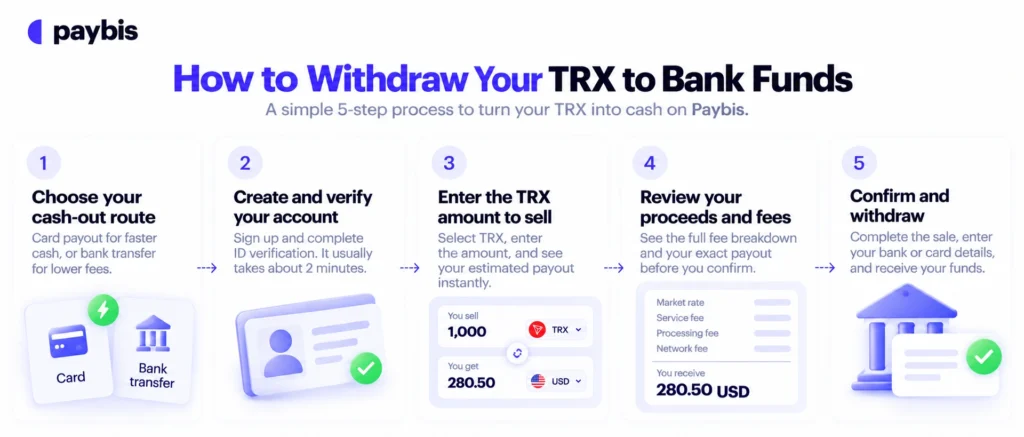
How to Withdraw Your TRX to Bank Funds
The steps below follow Paybis’s flow as a worked example, but the same logic applies to any regulated payment gateway.
1. Pick Your Fastest Cash-Out Route
Decide between card payout (fastest, higher processing fee) and bank transfer (slower, lower fee). For amounts under $500, the card route usually makes sense because the speed is worth the extra processing cost. For larger amounts, a SEPA or ACH transfer saves meaningful money on fees.
2. Create and Verify Your Account
Sign up and complete identity verification with a government-issued ID and a selfie. Paybis uses passwordless sign-in. The Paybis verification process takes roughly 2 minutes for most users, per the exchange limits guide. Larger transactions may require proof of address or source of funds, such as payslips or bank statements. This is a legal compliance requirement, not a platform hurdle.
3. Input the TRX Amount to Sell
Open your wallet (on mobile or desktop), select TRX, and click “Sell.” Enter the amount you want to sell, and the calculator shows your estimated payout in your local currency immediately. The price locks for 15 minutes during checkout, so you can review the fees without the rate changing. The Paybis sell walkthrough documents each screen, and the Paybis calculator video shows the tool in action. No trading charts, no order books, “You send X, you get Y.”
4. Review Your Net Proceeds and Fees
Before you confirm, the screen shows the service fee, processing fee, network fee, and your exact total payout. This is the number that hits your bank account. No surprises after the fact.
5. Finalizing Your Tron Withdrawal Steps
Confirm the sale, enter your bank or card details, and submit. The transaction is processed quickly, and the bank deposit follows according to your chosen method. You get an email confirmation when it completes. If you prefer a visual walkthrough, Paybis’s withdrawal video guide shows the exact flow.
What to Verify Before Converting TRX to Cash
Before you confirm a sale, two things are worth checking: your account limits and the identity documents you will need.
Understanding Your TRX Payout Limits
Paybis sets a $5 minimum transaction. After you complete identity verification (government ID plus selfie, roughly 2 minutes), transaction limits increase, per Paybis’s limits documentation. The highest tiers require a source of funds check (payslips, bank statements, or similar documents). Limits vary by payment method and region, so check yours before a large sale.
Paybis operates in 180+ countries with 50+ payment methods and 90+ cryptocurrencies. Those include local rails other platforms skip, such as PIX in Brazil, Webpay in Chile, and FPS (the UK Faster Payment System).
ID Verification Requirements
You need a government-issued ID (passport, driver’s license, or residence permit) and a selfie for the liveness check. Verification takes roughly 2 minutes.
Security callout: Only sell through licensed, regulated platforms. Paybis is registered with FinCEN in the US and FINTRAC in Canada and holds PCI DSS Level 1 certification. Paybis has operated since 2014 without a security breach, as detailed in Paybis’s security overview.
Unregulated peer-to-peer platforms offer none of these protections. If a counterparty disappears with your funds, you have no recourse.
Sell TRX and Get Paid Today
Paybis is a regulated crypto payment gateway operating in 180+ countries since 2014. It converts TRX to your local currency and pays out to your card or bank account, with every fee shown on screen before you confirm.
Paybis makes buying crypto almost as easy as online shopping – quick, straightforward, and with peace of mind. I’d recommend it to anyone who wants a no-stress way to get started. – Christine K. on G2
Paybis holds 32,800+ Trustpilot reviews with a rating of 4.1 or “Great” as of September 2026. Users most often praise transaction speed and support responsiveness. If anything goes wrong, 24/7 live chat is available in 9+ languages. Rejected transactions are never charged: the full payment returns automatically to the original source, per the rejection policy.
Ready to cash out? Create a Paybis account, complete identity verification, and confirm your exact payout before you sell.
Key Terminology
- TRX: The native cryptocurrency of the Tron blockchain.
- Network fee: The cost the blockchain charges to process a transaction. Set by the blockchain, not the platform.
- Service fee: The platform’s commission for facilitating the sale. On Paybis, this starts at 1.49%.
- Processing fee: The cost charged by the payment provider (card network or bank). On Paybis, 4.5% to 8.5% for card transactions over $50.
- Net proceeds: The final amount you receive after all fees are deducted.
- Settlement: The moment the transaction is confirmed on the blockchain and funds become available.
- KYC (Know Your Customer): The identity verification process required by law before you can sell crypto. On Paybis, this means submitting a government-issued ID and a selfie. It typically takes about 2 minutes.
- AML (Anti-Money Laundering): The legal framework that requires platforms to monitor transactions for suspicious activity. Paybis complies with AML regulations as a FinCEN-registered money services business in the US and a FINTRAC-registered business in Canada. This is why larger transactions may require proof of funds such as payslips or bank statements.
FAQ
Can I Sell TRX Directly to My Bank Account?
Yes. Payment gateways like Paybis can convert TRX to your local currency and send it to your bank account or card in one flow. Card payouts are near-instant, and bank transfers take 1 to 2 business days for SEPA or 1 to 3 business days for ACH, depending on the network.
How Much Does It Cost to Cash Out Tron?
Total fees combine three charges. The network fee is set by the Tron blockchain and is generally low, though the exact amount varies by platform and network conditions. The service fee is 1.49% on Paybis (waived on your first card transaction). The processing fee is 4.5% to 8.5% for card transactions over $50. The exact total is shown before you confirm your transaction.
What's the Fastest Way to Convert TRX to Cash?
A card payout is fastest, often completing near-instantly on Paybis. PIX in Brazil settles in under 10 seconds, and SEPA Instant settles within 10 seconds, per the European Central Bank.
Do I Need to Pay Taxes When I Sell TRX?
Selling crypto for cash is a taxable event in most countries. In the US, the IRS treats digital assets, including Tron, as property, so capital gains tax applies when you sell. Keep records of your sale price, original purchase price, and transaction dates.
What If My Withdrawal Is Rejected?
You are not charged, and the full payment returns automatically to your original payment source. Contact 24/7 live chat if the status is unclear.
How Long Does Tron Withdrawal Take End to End?
Card payouts complete near-instantly after the under-1-minute processing time. Bank transfers add 1 to 2 business days for SEPA or 1 to 3 business days for ACH, depending on your payment network.
Disclaimer: Don’t invest unless you’re prepared to lose all the money you invest. This is a high‑risk investment and you should not expect to be protected if something goes wrong. Take 2 mins to learn more at: https://go.payb.is/FCA-Info